After a content page launches, the next question is always the same: what do I change now? The honest answer starts with checking, not adding. Check whether the content page delivers its result. Compare content pages that solve different tasks in different shapes. Then iterate — one diagnosed problem at a time.
Five cases run that loop: a builder growing a topic tree, a long content travel page, a single-page name generator, a design platform’s content reference pages, and an AI tool site losing traffic. Each answers one question differently: how much page does this task need? No universal length formula — only the task, the evidence, and the next fix.
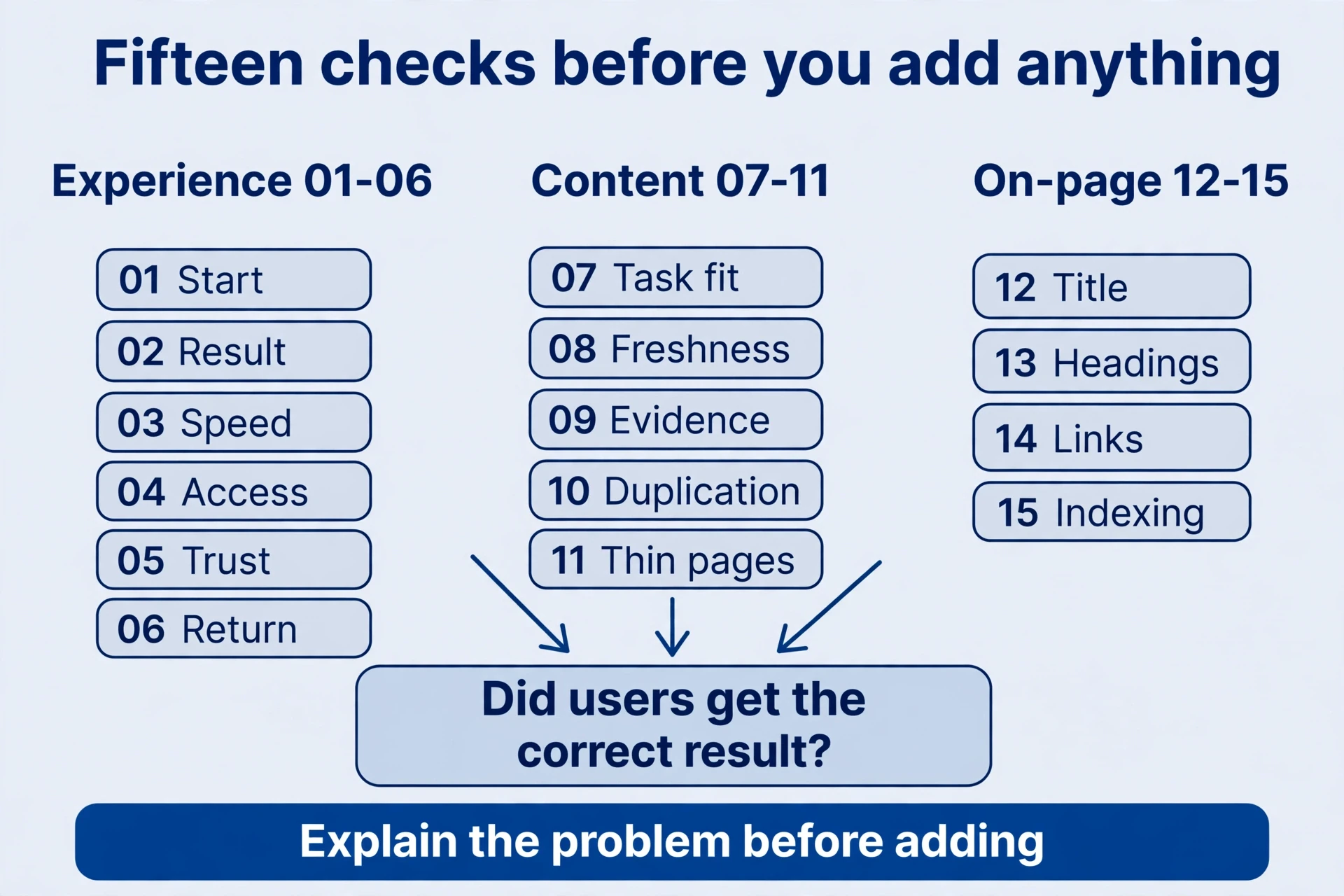
Fifteen content checks, one question
A checklist turns vague “quality” into inspectable things: fifteen characteristics across experience, engagement, content, and on-page work. Every one comes back to the same test — did users get the correct result, and where did they hit obstacles? Time on content page, bounce, and authority give clues, not a fixed ranking formula.
| # | Requirement | Check it, then fix it |
|---|---|---|
| 01 | Fast loading | Open it on a phone over a typical connection. First usable screen, images, response. Compress the heavy stuff, remove waits that block use. Speed can affect crawling too. |
| 02 | Mobile-friendly | Content Test text, input, buttons, tables, results, downloads. Fitting the viewport doesn’t prove the task works. |
| 03 | Good internal links | Clear navigation, breadcrumbs, hierarchy, relevant links. New content needs discovery paths. A homepage link doesn’t guarantee fast indexing. |
| 04 | Longer duration | Read it next to completion and errors. Tutorials need reading time; conversions can be quick. Add no useless steps. |
| 05 | Lower bounce | Check the analytics definitions and events first. Leaving after a one-page answer can be success. |
| 06 | More content pages per visit | Check whether the next content pages were useful. Don’t split a simple action just to inflate views. |
| 07 | Original content | Your own demonstrations, calculations, experience, verification, distinct outputs. Copying or rephrasing adds nothing by itself. |
| 08 | Authoritative content | Accurate, with verifiable evidence; facts kept apart from inferences. Length, content page count, or a famous byline proves nothing alone. |
| 09 | Practical content | Users can act, compare, or decide from real steps, content examples, and limits. Cut vague repetition, fill missing answers. |
| 10 | Relevant content | Pages connected around users and tasks. Expansion needs a distinct purpose; more content pages don’t prove depth. |
| 11 | Regular updates | Update when rules, features, data, or questions change, and record why. New dates or mechanical publishing add nothing. |
| 12 | Text on content tool pages | Purpose, input and output, steps, limits, questions. An unexplained field isn’t enough. |
| 13 | Appropriate title and description | Title and description distinguish the real task and delivery — not the same copy site-wide. |
| 14 | Appropriate headings | H1 for the main topic, H2 for questions, H3 for subtopics. Content structure follows relationships, not font size. |
| 15 | Image explanations | Informational images get descriptive content alt text and captions where needed, with units, periods, and definitions. Decorative images can carry empty alt. |
Use the table the right way round: explain the problem before deciding to add content or change functionality. Official helpful-content guidance stresses value for people, original contributions, and trustworthiness — no preferred word count. Don’t bolt on modules nobody needs just to tick every box.
Grow from narrow tasks, not from the top
One builder’s story shows the sequence: joined a course community November 15, 2023, studied about ten days, a content discussion of about 34 minutes on November 25, version milestones December 7 and 22. One person’s timeline — learning, consultation, first version, content improvements — not a standard schedule.
He started by checking demand — searching online communities to confirm people wanted this kind of tool — then began building. The first keyword was competitive, and a new site with few links had little strength. Buying a domain didn’t solve the ranking problem. The content case never disclosed domain or keyword, so nothing here checks against live data. Take the content method, not the mystery.
The content method starts with information gain: find the real question, try the tool yourself, and pin down which step existing answers skip. Fill the gap with real steps, examples, comparisons, and limits. Then follow the new content page — do users still need to go elsewhere for one crucial answer? Adding explanation and delivery counts; rewriting the same content paragraph three times adds length without information.
Then grow the topic as a tree. Picture one: Animals at the top; Pets, Farm Animals, and Sea Life below; then Dogs, Cats, Cows, Llamas, Dolphins, Sharks. Dogs splits further into Bulldogs and Shepherds. The tree explains containment — broad topics holding narrower ones. It doesn’t mean this builder ran an animal site.
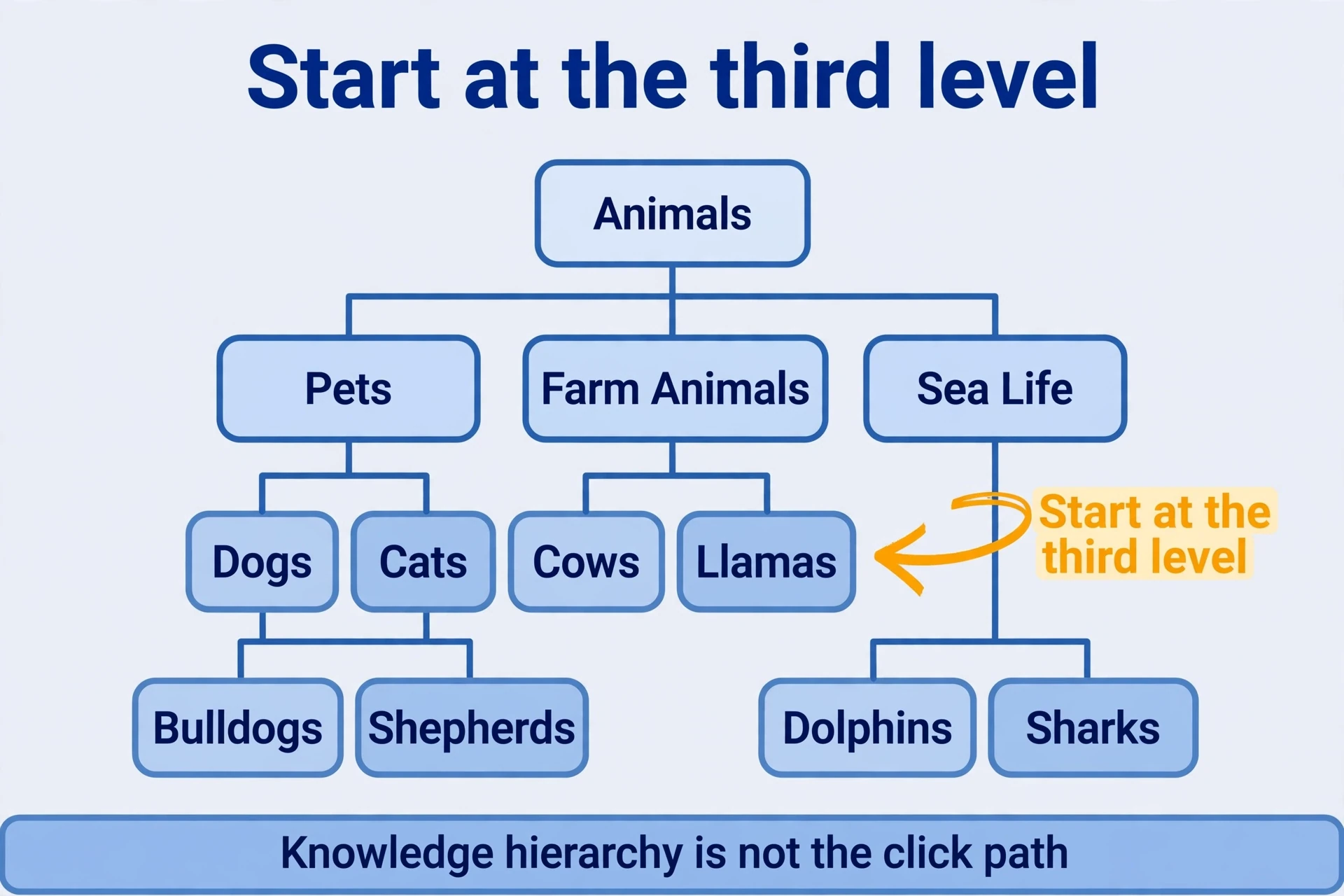
Order matters. Start at the third level: a few narrow tasks you can satisfy completely, with real functionality and entry points. Launch, then watch which terms gather impressions — a basis for digging into queries, not a sign the content page is finished. Once neighbouring tasks work, build second-level collections that help people choose and link down. Collections serve selection and navigation, not mechanical copies of lower-level text. When functionality and content support the broader main term, let the homepage explain the overall purpose while keeping entry points to the narrow tasks. Later, split into fourth-level topics or open another channel — Plants, say — with its own system, not just a new category name.
Keep two ideas apart while you build: the knowledge hierarchy and the click path. A subject can run four or five levels deep without forcing four or five clicks every time. Homepage, categories, and recommendations can shorten the path. Real coverage is usable content pages at each level, plus the links between them.

Promotion ran as a steady rhythm: prepare content and a list of usable link sources, then about half an hour a day — relevant content discussions, material that solves real problems, directory listings with real users, citations people give voluntarily. Learn each platform’s context before showing up. The author said revenue doubled in successive early months, with no verifiable amounts or complete analytics behind it — keep that as story, not as a projection for your income. The reviewable sequence is the point: validate demand, start narrow, watch query impressions, improve content, promote where relevant, broaden gradually.
When a long content page earns its length
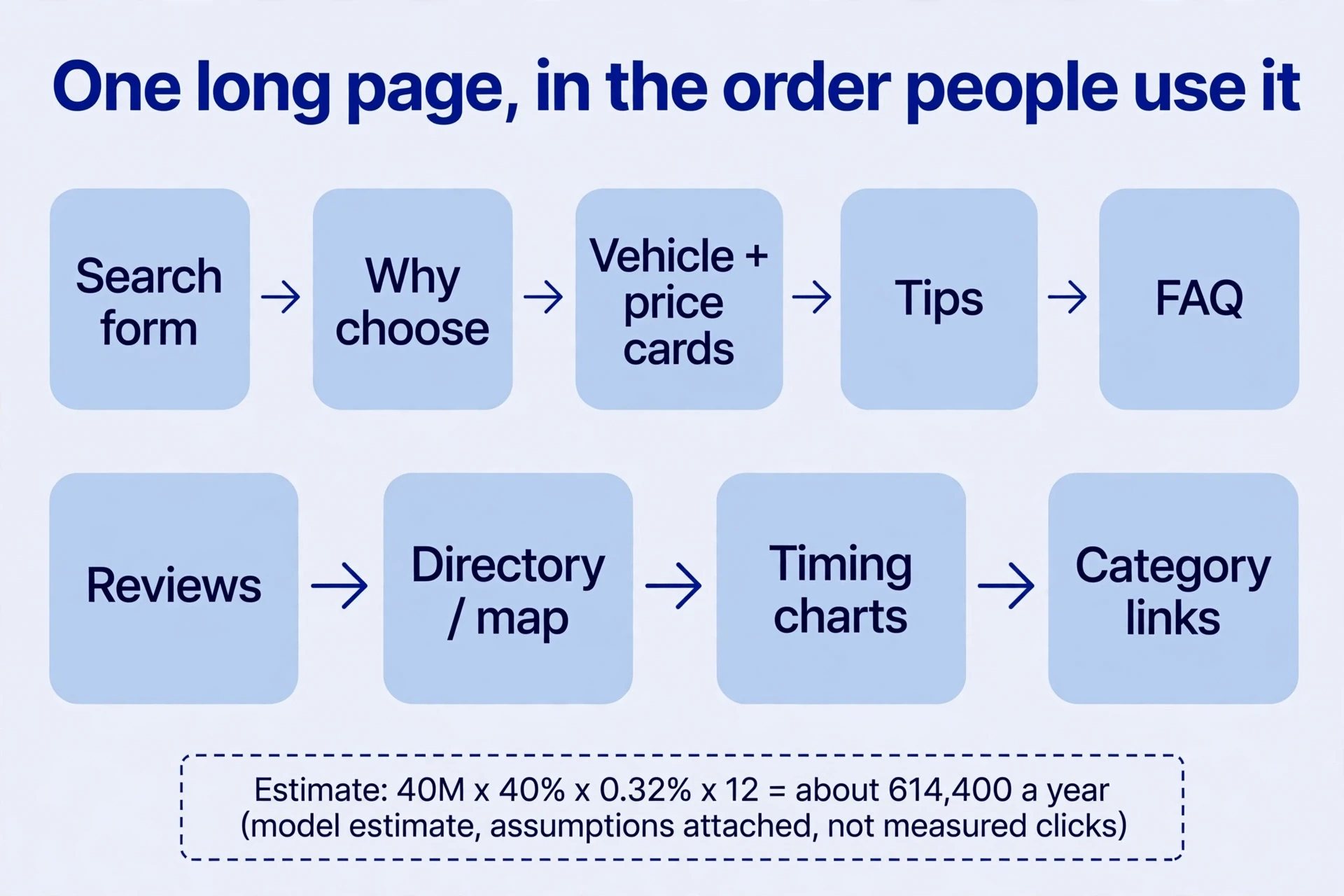
Back to a single page: how much content is enough? A travel search site’s New Content York car-rental page is long because one rental decision drags in many questions — an available car first, then times, prices, vehicle types, locations, conditions, content reviews. Each module serves one step. Check what evidence your version would need before copying the shape.
| Module | Step it solves | Content evidence your page needs |
|---|---|---|
| Location, dates, pickup and drop-off form | Start finding available cars at once | A real query function, or a verifiable service path |
| Why choose the platform | Judge usefulness and trust | Real capability, not invented scale or guarantees |
| Vehicle and price cards | Compare economy, compact, SUV, and more | Dated, conditional quotations — or clearly illustrative prices, never asserted current rates |
| Rental tips and practical experience | Dodge local driving, selection, and booking problems | Accurate, actionable, maintainable information |
| FAQ | Fees, requirements, common choices | Relevance to the local task, not generic filler |
| Reviews and user experience | See how the service actually performs | Genuine sources with context, never fabricated content reviews |
| Company directory, locations, map | Find pickup points, compare distances | Valid addresses and service information |
| Booking timing and price charts | See how timing and conditions move price | Explainable historical data, units, applicability |
| Airport, transit, neighbourhood, brand links | Move from city-wide needs to specific places and suppliers | An independently useful destination behind every link |
| Truck, van, SUV, pickup categories | Choose by passengers, luggage, purpose | Real use differences, not duplicated category titles |
| Tutorials and summary tables | Compare key prices and locations fast, before the detail | Summary and detail consistent, conditions clear |
Now check how the case estimated the content page’s scale, because the arithmetic is the content lesson. Whole-site monthly visits were estimated at about 40 million, organic search about 40%, paid search about 16%. The New Content York page took about 0.32% of organic traffic. Multiply under the same definitions: 40 million × 40% × 0.32% × 12 ≈ 614,400 — roughly 610,000 to 620,000 a year. That’s a model built on a whole-site estimate, a channel share, a single-page share, and twelve assumed-stable months. Not a click count from analytics. Keep the assumptions attached to the number, and don’t rewrite it as measured data or assume any long content page must reach that scale.
A small site starts narrow: pickup instructions for one airport, or one content vehicle-type comparison. Get the information right first. Extra content text helps only when the page can fulfil the query with distinctive, reliable decision information. Without the data and service capability, narrow the task — copying module names leaves empty content sections.

One content page can be the whole answer
A different task needs a different shape. A random-name generator gives visitors a thousand English names at once, and a fresh set on refresh. The whole site was estimated at about 123,150 monthly visits. Users get the result on the same content page. A substantial single page completes this simple task. A long content travel page doesn’t mean every tool needs dozens of extra articles.
Read the content evidence carefully. The source saw two results in a site query and concluded the canonical setup was wrong. Two results prompt an investigation; they prove no error. List the possible variants first — www and bare domain, path, protocol — then use URL inspection to compare the declared canonical with the address chosen. Align links, redirects, and canonicals once the main URL is confirmed. A site query finds clues, not complete indexing statistics.
Timelines need the same care. Registered August 14, 2021, earliest archive around August 18, small traffic for sixteen months, then growth. Waiting doesn’t produce traffic — features, links, demand, and crawling could all have shifted. Keep examining content evidence over time before saying what happened.
So do the numbers in the screenshots. One figure was described as 195 referring domains; the screenshot’s current column actually showed 195 links and 137 referring domains, with other figures covering all time. The early values of 7 and 9 came from different months and can’t be merged into one snapshot. These records support studying how a small, low-authority site meets demand. They set no authority threshold to reach first.
Then the content question. Expressions like “random names,” “random names list,” and “1000 random names” ranked well in some regions. Yet a keyword tool showed the target phrase only twice in about 2,145 words — roughly 0.09% density. No contradiction. The thousand names are the requested result. To judge the content page, examine the valid names first, not the phrase count. And 0.09% is not a new ideal density. It describes one content page.
Building something similar starts with use, not wording: how many names, which language, duplicates allowed, copy or download, filtering, what changes on refresh. Implement those clearly, then explain uses and limits. If visitors want distinctive brand or baby names, a thousand ordinary names may fail the task — check whether the intent differs before building another content page. Categories help only when they help people choose. Don’t force them when filtering adds nothing. Random outputs must actually change, and the list must hold valid names. The word “random” in the title supplies neither.
Screen promotion the same way: does each content method help relevant people find the tool and create real citations or entry points? Buying links that pass ranking credit, or mass-producing irrelevant links, doesn’t become standard content practice by repetition. Neither “200 directories” nor “20 crawl requests” is an indexing threshold — check link relationships against the official link-spam policy instead.
The contrast is the takeaway: the name task is delivered by the names themselves; choosing a rental car needs conditions and evidence on top. Content text volume follows which information completes the task. Simple tasks still need working buttons, results, and explanations. Complex decisions need more content explaining their parts.
Reference pages: values first, then the way to use them
Some content pages deliver accurate reference data and help people apply it. A design platform’s content size pages show the pattern. The Content YouTube page first listed dimensions for different objects in a clear table, with unit switching between pixels and centimetres, then explained device cropping, display areas, content formats, and safe zones. People got specific values first, then learned why a correctly sized file might still display differently depending on conditions.
The archived table listed thumbnails at 1280×720, channel banners at 2560×1440, 4K images at 3840×2160, and avatars at 800×800. Those were the values on the content page at that time, for those objects, under those conditions. Before publishing your own dimensions tool, verify current platform specifications — the exact object and the cropping conditions, one by one. Never strip the dates and scope and present historical values as today’s dimensions on every device.
After one dimensions question, follow the user’s next task. Breadcrumbs to the sizes collection revealed social platforms — Facebook, Instagram, X, LinkedIn, Pinterest, Twitch, SoundCloud, Tumblr, Etsy — plus posters, flyers, brochures, books, and paper sizes such as A4. Adjacent tasks for design-tool users, so useful links run between content reference pages, templates, and the editor.

For a small team, the collection exposes narrow tasks that stand alone. One paper-size reference site was estimated at about 293,000 monthly visits — whole-site, not one content A4 page. The design platform’s roughly 820 million monthly visits come from its whole business, not its content size pages. Settle the reference page’s role before estimating the small part you plan to build.
Production can be systematised without flattening each content page. Collect real dimensions queries — object, platform, units, source. Clean synonyms apart; keep distinct tasks distinct — banners, avatars, and thumbnails on one platform can’t replace each other. Group them, then configure each content page’s URL, main term, dimension fields, conditions, content examples, related templates, and entry points into a reviewable list. Verify specs and actual display; fill in cropping, aspect ratios, content formats, and limits before the information enters a shared template. The template can be reused; tables, explanations, content examples, and related tools must match each task. Before launch, check links, mobile tables, and numerical consistency, and publish a small batch first. Content update affected pages when specs change. A consistent content structure cuts repeated organising work; answers still need individual research. Change only the platform name while keeping wrong dimensions, and users leave without a correct result.
When traffic falls, separate the layers
Content pages and products need ongoing content checks after accumulating traffic. An AI tool site shows how. Whole-site monthly visits were estimated at over 16 million in May 2025, falling to over 8 million in April 2026, with a March 2025 peak near 18.75 million. Fix the content comparison months before describing the drop: peak-to-April and May-to-April are different comparisons.
The site-wide trend needs breaking down. Three content pages moved differently:
| Page | March 2025 estimated search clicks | April 2026 estimate | Approximate change |
|---|---|---|---|
/machine-learning-model/text2img | 2.3 million | 735,600 | About −68% |
/chat | 1.1 million | 600,400 | About −45% |
/chat/gpt-chat | 545,200 | About 2.2 million | About +304% |
These are third-party estimates of organic-search clicks, a different definition from all-channel site visits and from measured analytics. Two content pages fell while one rose. That demands content investigation page by page, query by query. A site-wide halving doesn’t mean every product and keyword fell together.
Next, separate market demand from your own position. Related queries — “ai image generator,” “ai photo generator,” “ai picture generator” — moved both ways in a monthly content comparison: near +2.5% for one phrase, +7.3% for another. A different period from the annual content page comparison. Separate clues. One month’s wobble explains no year-long decline.
The author’s main explanation was insufficient content product iteration while competitors served specific scenarios better. Treat that as a hypothesis to test. The charts show estimated changes and the existence of competition. They don’t separately rule out seasonality, algorithm changes, measurement shifts, channel mix, or page-level technical issues. In a real content review, inspect your own data and content pages first, locate the decline, then test the product-capability hypothesis.
Before debating content iteration, confirm what the product already does. The image-generation screenshot already showed model and mode choices, speed and content quality settings, styles, and shapes, with introduction and pricing below — not one bare input box with no parameters. The sharper question: do those general options help people get usable avatars, logos, ecommerce images, posters, or social visuals? Content check capability per scenario:
| Specific task | What users prioritise | Add to page and product |
|---|---|---|
| Avatar | Identity consistency, background, style, crop | Reference image, understandable presets, real examples, avatar ratios, downloads |
| Logo | Name, graphic, clarity, reusable output | Content text capability and limits explained, content formats, genuinely deliverable editing or download |
| Ecommerce product image | Accurate subject, background, platform specs | Upload and subject preservation, scene presets, comparisons, output conditions |
| Marketing poster | Text, layout, brand information, dimensions | Templates, content text editing, layout, purpose-specific sizes — not random images alone |
| Social visual | Content, platform ratio, series consistency | Ratio presets, examples, reusable configurations, downloads |
Apply the same sequence to the rising content chat page. Brand-related queries carry navigation and mixed intents — not every one is a need any chat tool can satisfy. Check which content page people enter, what they expect, and what they complete. The cause of the growth still needs query and usage data.
Four actions turn the case into work: distinguish scenarios; build dedicated content pages only for confirmed independent tasks; add templates, content examples, defaults, styles, dimensions, downloads, FAQs; improve after launch from indexing, queries, clicks, and usage. The first step decides whether separate publication is justified. Different expressions of the same task combine. Renaming scenarios alone never justifies mass-producing indistinguishable content tool pages.
Diagnose first, then choose the change
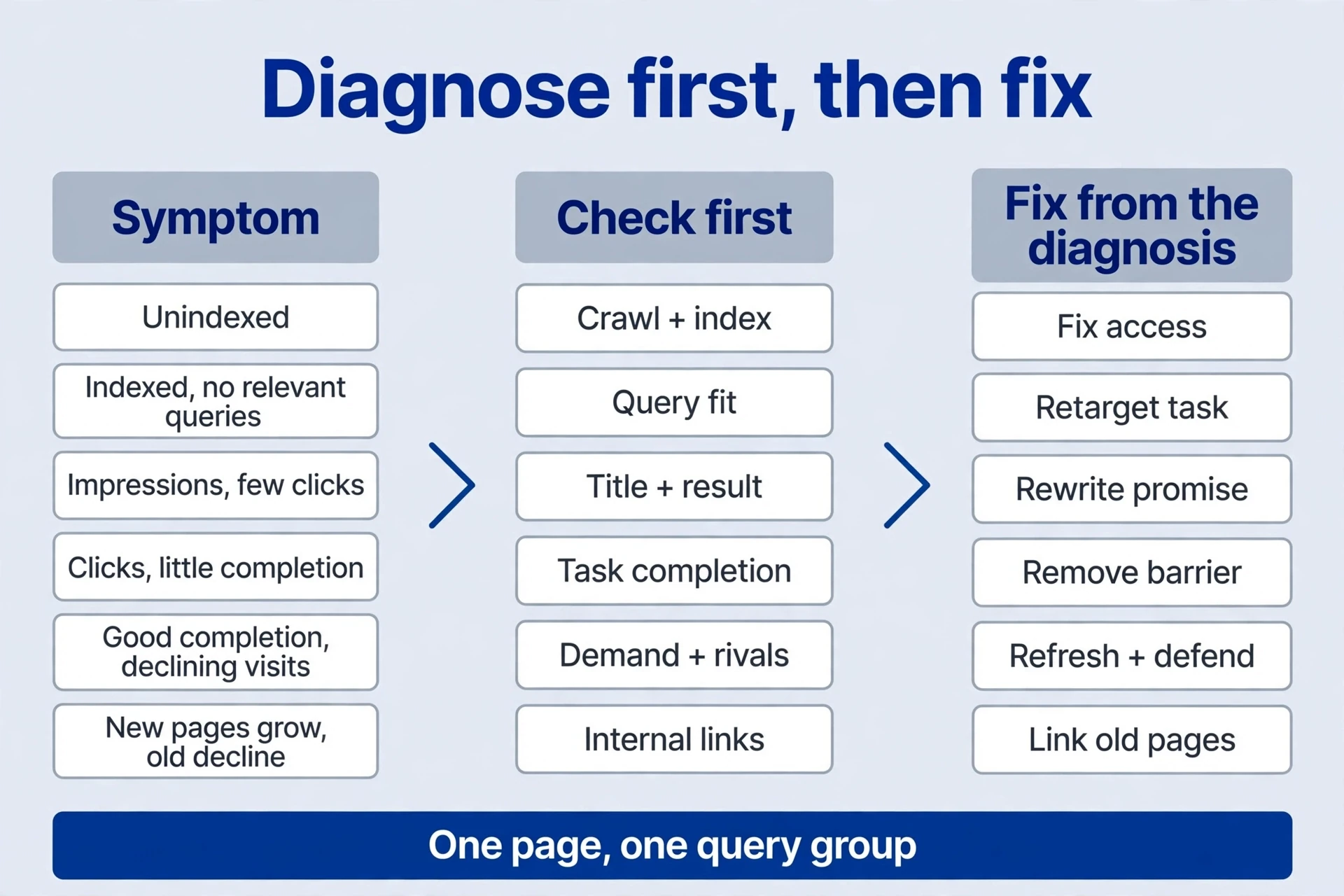
The fifteen content checks set the rule: the next change follows the break you identify. Compact version: impressions without clicks, look at titles and descriptions; clicks without retention, look at content page and product; no query impressions, investigate demand and content. Direction only — real work starts by checking crawling, position, demand, and data setup.
| Symptom | Check first | Change that matches |
|---|---|---|
| Unindexed | Discovery paths, fetching, noindex, canonical, duplication, rendering | Repair delivery or value, then check processing |
| Indexed, no relevant queries | Task, body, features, competition, sample period — reports don’t show every query | Add real answers and clear explanation; reconsider the task if needed |
| Impressions, few clicks | Position, country, device, direct answers, intent | If wording is unclear or misleading, use the small title adjustment from the last content lesson; low rank also needs value and relevant links |
| Clicks, little completion | Inputs, waiting, failure, registration or payment, content output quality, mobile use | Fix the product flow and results, not the clock |
| Good completion, declining visits | Market demand, positions, competitors, channels, definitions | If demand is waning, assess neighbouring tasks; if share is falling, improve competitive delivery |
| New content pages grow, old ones decline | Changed homepage tasks, duplicate intent, unbalanced links | Protect the core, merge duplicates, separate distinct tasks, link appropriately |
Before implementing, narrow the investigation to one content page and one query group. State the observed content evidence apart from hypotheses still awaiting validation. Then choose a change that can answer the question. Functionality repairs, content improvements, and title experiments can run in sequence, each keeping its reason, its reviewable outcome, and a recovery plan where needed. Rewriting the whole site at once and watching only total visits makes it hard to tell which judgment was right, or what to change next.
One content iteration, worked end to end
Assume the console shows marketing-poster impressions, and users say generated images still need content text and suitable export sizes. A teaching content example — use your own figures and feedback. Nine steps:
- Confirm the task. Inspect relevant content result pages and talk to users: finished posters, assets, or prompts? Build only deliverable objectives.
- Inspect the original content page. Record core queries, features, and usage. Keep the general page’s task if it’s still valuable.
- Choose a dedicated page. For layout, content text editing, and special sizes, use
/marketing-poster-generator/— not a renamed heading on the old page. - Add real functionality. Purpose and copy inputs, real templates, ratios, editable content text, previews, errors, usable downloads. Drop unsupported promises.
- Add explanations and examples. Reproducible inputs, outputs, editing, contexts, content formats, limits, including manual steps. Never promise perfectly rendered content text every time.
- Organise entry links. Link from the general generator and tutorials to posters, and onward to related tasks, without hiding the core tool.
- Accept before publishing. Generate, edit, and download on mobile. Check empty, processing, success, failure, and limit states, then titles, descriptions, headings, alt content text, numbers, links, and indexing.
- Observe and compare. Record indexing, target queries, impressions, clicks, and completion. Clicks without usable posters mean product repair. A good product with few impressions means intent, competition, and discovery content checks.
- Choose the next action. Add content pages only for real independent tasks. Merge synonyms and simple ratio variations first. Keep the fifteen content checks, and update with reasons and substance.
Record the content iteration so someone else can follow it:
| Record | What it must contain |
|---|---|
| Content evidence | Queries with date definitions, actual content page issues, tasks, tests. Sample: target-URL console exports with country, device, and dates; original finished-poster feedback; mobile generation, editing, and download records; supported and unsupported functions. Real interviews and tests are observations. “Text editing may improve completion” is an inference. Volume, completion, and post-change earnings stay unverified until measured. |
| Change and hypothesis | What changes, and why it should remove the current obstacle. Sample: add the content poster page with purpose and copy inputs, templates, ratios, editable content text, preview, and download; keep the general content page’s task and add a related entry. The hypothesis: completing content text and sizing together reduces switching to another tool. Test the smallest complete flow — no synonym-generated batches, no simultaneous site rewrite. Remove unavailable capabilities from promises. |
| Acceptance | Usable outputs, real examples, mobile flow, fifteen content checks. Sample: owned or licensed assets and real copy. Generate, edit, check layout, download, and open the file on mobile, recording dimensions, content format, and legibility. Test every state, then mark pass, problem, or untested against the fifteen checks. Titles, alt content text, links, indexing, and data handling must match capability. Fix key obstacles before publishing. |
| Observations | Old and new groups and content pages tracked separately, with completion, errors, and use. Sample: track the general and poster content pages apart — indexing, groups, impressions, clicks, valid completion, errors. Tell preview generation apart from file export, and sample-check usability. A download click is not a qualified finished output. Same country and device, complete periods, and check for damage to the old task too. |
| Conclusion | What the content evidence supports, what stays unexplained, the next repair. Sample, conditional: successful mobile editing and export establishes a completable flow, not search growth. Continued download failure means output repair. Reliable completion with few relevant impressions means discovery, intent, competition, and content sample-period checks. Report changes only from real before-and-after data, keeping outside-factor and small-sample limits. Without data: “Plan and acceptance definitions established; effectiveness unverified.” The next content page needs a real task, not a publishing-frequency target. |
Check content quality item by item — no fixed recipes for length, single content pages, or behaviour metrics. Every expansion earns its place with a distinct task and real delivery. Historical figures get separated by month, content page versus site, links versus domains, estimate versus measurement. Decline gets diagnosed before anything changes. Iterate that way, and traffic you keep is traffic you understand.
Comments
Join the conversation. Comments are reviewed before appearing.
Loading comments…