A title makes a promise. The page keeps it, or it doesn’t. Everything in this lesson follows that order: state the promise clearly, deliver it on the page, and only then test one title change — with evidence, and a way back.
Titles get more attention than they deserve and less care than they need. People stuff them with keywords, copy them across pages, or title promise features the page doesn’t have. Then they wonder why clicks don’t turn into completed tasks. The fix isn’t clever wording. It’s alignment: the title, the description, the headings, and the working page all saying the same thing.

Title, description, and headings do different jobs
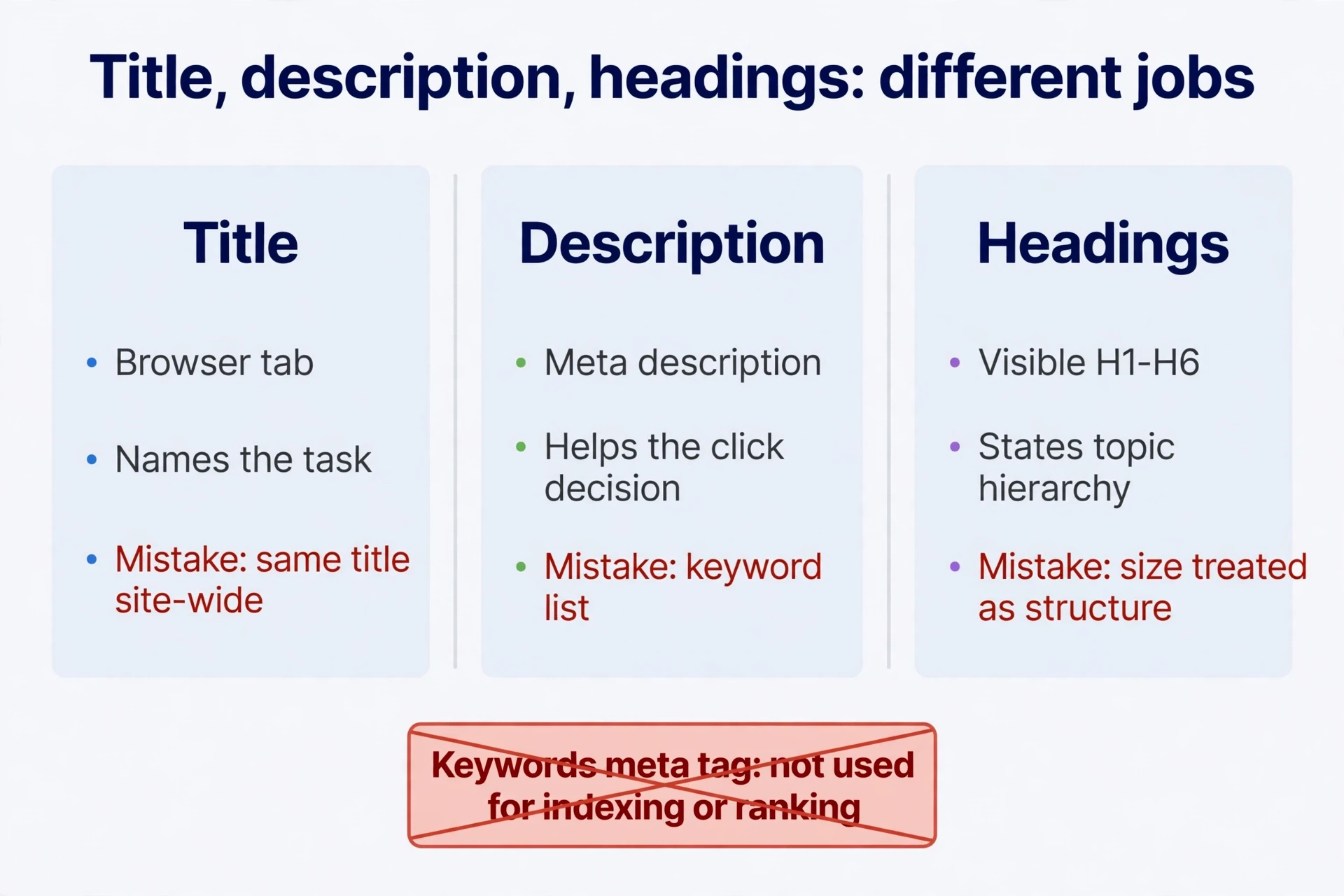
Start by separating three elements people constantly mix up. Call them TDH: Title, Description, Headings. An older title checklist used TDK, with Keywords in the third slot. Forget the Keywords slot. The search engine doesn’t use the keywords meta tag for indexing or ranking. Time spent filling it is time wasted.
| Element | Where it lives | What it does | Common mistake |
|---|---|---|---|
| Title | The HTML <title>, shown in the browser tab | Names the page’s task and features in brief; one source for search titles | Same title site-wide, stuffing, features the page lacks |
| Description | meta name="description" | Summarises content and purpose, to help the click decision | A keyword list, or one generic slogan on every page |
| Headings | Visible H1–H6 | State the topic and its hierarchy, for browsing and understanding | Font size treated as structure; several top headings, no main thread |
| Keywords | meta name="keywords" | Not used for indexing or ranking | Spending title optimisation time filling keyword lists |
Title and H1 can sound similar. They’re different elements doing different jobs. The title can carry a real feature description or a brand name. The H1 helps someone who just arrived confirm they’re in the right place. H2 organises the main questions. H3 breaks down subdivisions inside one question. Go to H4–H6 only when the content genuinely runs deeper. Don’t split content just to use all six levels.
One more thing before writing: title search results may not show your wording verbatim. The search engine can combine the title element, a prominent main heading, and other signals into the displayed title. Snippets mostly come from body content, and may use the description. Clear writing helps. It guarantees nothing about character counts or exact wording on every device. Check the official title and snippet documentation, and keep your HTML separate in your mind from the system’s final presentation.

Headings are information first. Big title text doesn’t need to be an H1. Buttons, navigation, and prices don’t need to be headings. Outline the content, then style the hierarchy. Check for one clear main heading and sections that genuinely explain it.
In practice, the title and the H1 often differ a little, and that’s fine. The title might add a feature phrase or a brand name for the browser tab and the title results page. The H1 stays plain, confirming the topic for someone who just arrived. Different shapes, same task. Trouble starts when they drift apart — the title promises playback, the H1 names something else, and the visitor has to guess which one the page means. Keep both pointed at the same job.
Write the set from what the page does
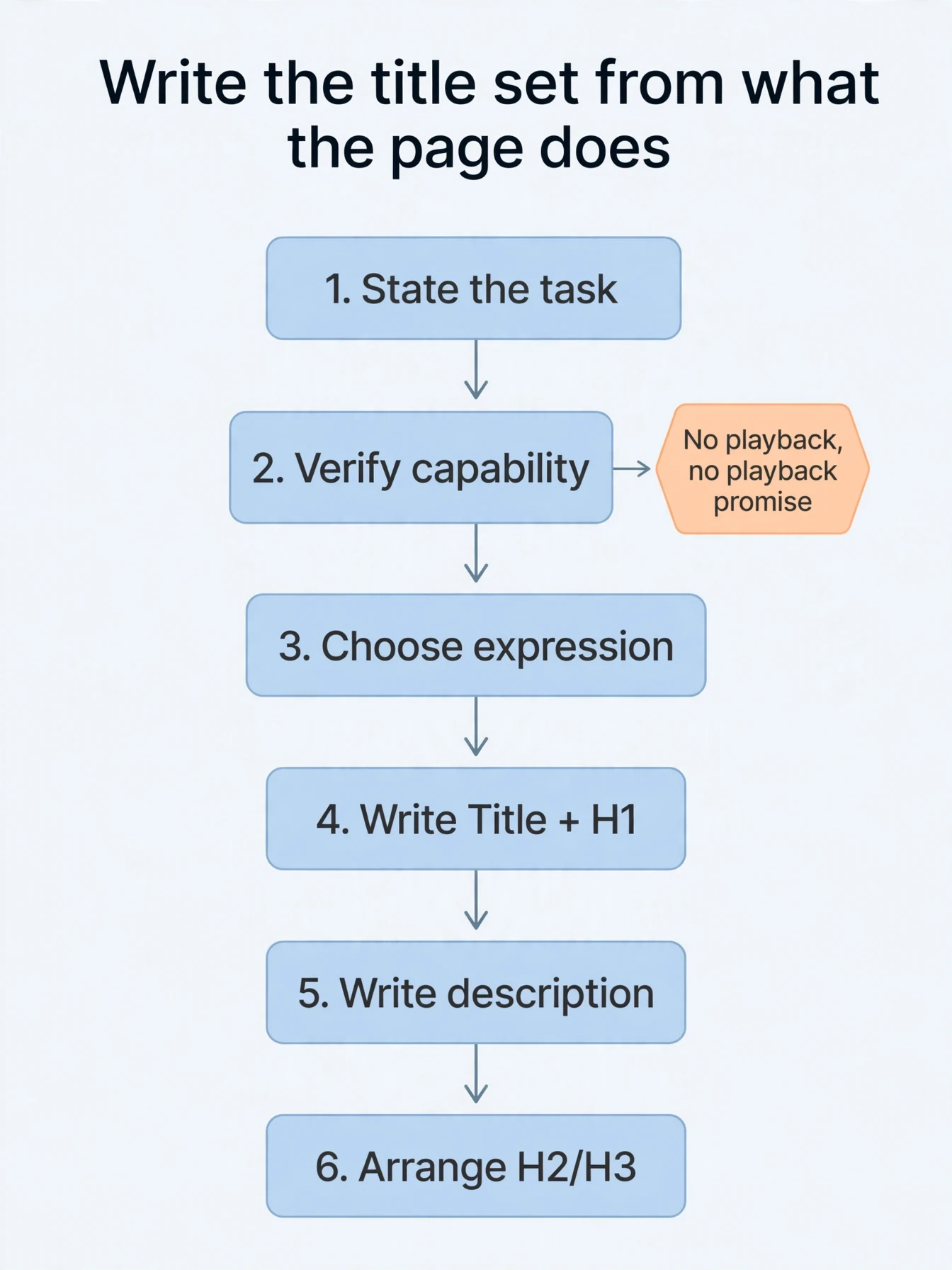
Here’s a walkthrough, continuing the text-to-Morse page from the last lesson. It’s a title teaching example — a way to practise the title method, not a case already built somewhere. Begin with what the visitor does and what the page delivers. Check the real features. Then write. The title wording earns its keep from the page’s capabilities.
- State the task. Visitors title type text, get Morse code, and want playback and copying.
- Verify capability. Confirm conversion, playback, and copying actually work. No playback, no title playback promise. Free and no-login claims have to be real too.
- Choose the main expression. The task is text-to-code. Decoding can be separate, or an explicit mode. Inspect phrases and result pages instead of cramming in every synonym.
- Write Title and H1. The title identifies the task. The H1 confirms the topic on the page.
- Write the description. One or two natural sentences covering input, output, features, and limits — not the whole keyword table.
- Arrange H2 and H3. Follow the order of use and the real questions, checking each heading has an answer behind it.
<title>Text to Morse Code: Online Conversion and Playback | Example Tool</title>
<meta name="description"
      content="Enter text, view Morse code, play dot-and-dash audio, and copy the code. Includes character examples, separator rules, and unsupported-character guidance.">
<h1>Text to Morse Code</h1>
<h2>Enter and Convert Text</h2>
<h2>How to Use the Result</h2>
  <h3>Character and Word Separators</h3>
  <h3>Playback and Copying</h3>
<h2>Character Table and Examples</h2>
<h2>Supported Inputs and Common Questions</h2>
Read the code as an outline first. “Example Tool” is a placeholder brand — swap in your own. Put the actual tool area where it belongs. Matching the example doesn’t mean adding seven repetitive blocks of title text. Combine short questions. Use H3 for the complex ones. And above all, test the tool: confirm “Online Conversion and Playback” in the title actually works. Wording can’t supply a feature that isn’t built.
Check the whole set four ways:
| Inspection | It should answer |
|---|---|
| Read the title alone | What the tool is, and whether it fits the task at hand |
| Read the H1 and first screen | Where you’ve landed, and how to start |
| Read H2 and H3 alone | The order of the content — not a synonym list |
| Check the description line by line | Every promised feature, free condition, and output exists |
If several pages differ only by swapping photo, image, and picture in the title while doing the same thing, go back and regroup the tasks. Flip it around: if old-photo restoration and photo upscaling deliver different results but both sit under “AI Photo Tool,” their titles should say which task each page does. Settle what each page completes before writing its TDH. Polishing titles can’t fix pages that were split wrong.
Keep the title promise on the page
A title brings people in. What happens next decides whether they stay. Often it comes down to how easy it is to start. Making people register, log in, or pay before they see a single result sends many of them away before they’ve acted. A trial should let them judge whether the result suits them — first.
For an image tool, that means a real example, a file upload, and a usable preview. If downloading the high-resolution result costs money, say so before the action, not after. If free generation has a quota, state the allowance and whether failed attempts eat into it. People should know how far the trial goes before they start. A title shouting “free” while payment is demanded immediately, or a “no login required” button that opens a registration form, splits the title promise from the process.
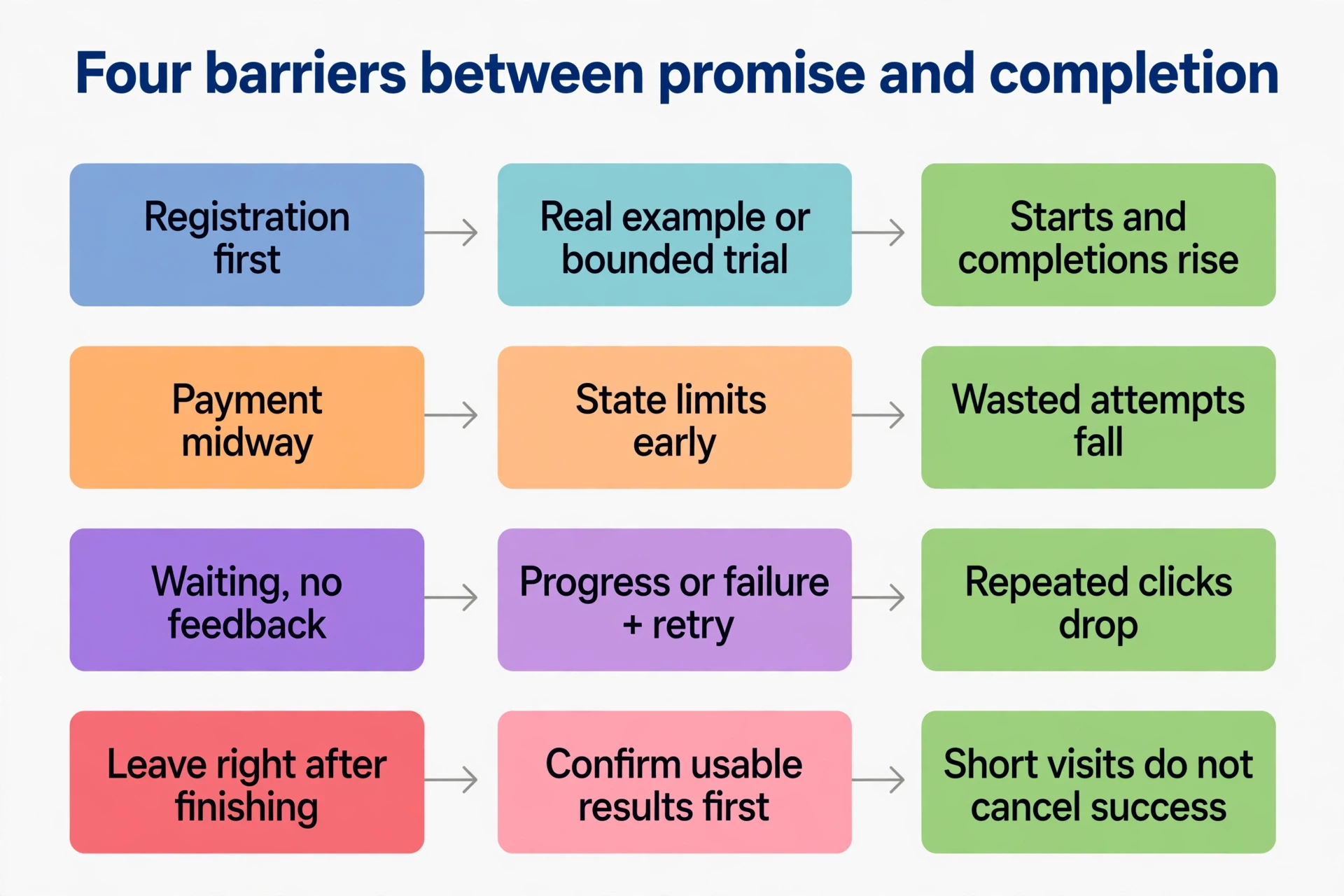
| Barrier | Possible title change | How to tell it worked |
|---|---|---|
| Registration before seeing output | A real title example or bounded trial, then explain accounts | Starts and actual completions rise |
| Payment or output limits found midway | State previews, downloads, allowances, and specs early | Wasted attempts, complaints, and abandonment fall |
| Waiting with no feedback | Progress, title results, or failure — with a retry people understand | Repeated clicks and unresolved waiting drop |
| People leave right after finishing | Confirm usable title results before offering a next step | Short visits don’t cancel out successful completions |
Read time-on-page with care. The source material linked longer stays and fewer returns to the title results with ranking gains across several sites. That came from the author’s experience. No controlled title experiment, no before-and-after numbers behind it. Don’t turn it into a formula where one extra minute buys rankings. Satisfied visitors don’t necessarily close their browsers. Dissatisfied ones don’t necessarily go back to search. Someone who gets a correct calculation in thirty seconds finished the task. Someone stuck on an error for ten minutes had a bad experience.
So read duration next to completion, errors, and repeat use — together, or not at all. Never add useless steps or forced waits to stretch the clock. That obstructs the very completion you’re measuring.
For background reading, start with official search documentation, then independent SEO publications. They do different jobs. Official docs describe how the system works. Independent publications test, interpret, and sometimes overclaim. A tactic that worked on one site is not a rule. Guidance also ages — a post from three years ago can describe a system that no longer behaves that way. For each claim, ask what title evidence sits behind it and whether it fits your page. That’s the filter for everything you read next.
Forty Play buttons and a CSS trick
Here’s a detail that can send good work sideways. A page had forty audio title examples, each with a Play button. Someone worried the repeated word “Play” would dilute keyword density, and suggested pushing the label into CSS instead of HTML:
.play-button:after {
  content: "Play";
  margin-left: .5rem;
}
The trick works like this: a pseudo-element generates the visible title text, so the repeated word leaves the HTML body. The same approach came up for other repetitive title interface text, illustrated with an emoji directory page. It shows the difference between the display layer and the document layer. It doesn’t prove search engines can’t read generated title text. And repeated action labels on buttons aren’t keyword stuffing on their own. Chasing an ideal keyword density is the wrong objective for this title change.
The same source suggested loading separate stylesheets per language — one for Chinese, one for English, one for Japanese — to swap the “Play” label. The code even called the Japanese file by the wrong name, since corrected to ja.css:
/* cn.css — Chinese: Play */
.play-button:after { content: "\64ad\653e"; margin-left: .5rem; }
/* en.css — English: Play */
.play-button:after { content: "Play"; margin-left: .5rem; }
/* ja.css — Japanese: Play */
.play-button:after { content: "\518d\751f"; margin-left: .5rem; }
The title example changes only the displayed word. A real multilingual page still needs its own body content, separate URLs, and language entry points. Swapping CSS wording doesn’t build any of that.
But the bigger issue is access. Developer documentation notes that CSS-generated content sits outside the DOM, and some combinations of assistive technology and browsers don’t announce it. A key button whose label lives only in a pseudo-element can lose its instruction entirely when CSS is off or a screen reader is running. Primary actions need real HTML text or an explicit accessible name. CSS content suits decoration. Use actual title text for “Play,” so everyone knows what the button does:
<button type="button" class="play-button">
  <span aria-hidden="true">▶</span>
  <span>Play</span>
</button>
With a list of audio items, accessible names can tell “Play example 1” from “Play example 2” and carry playing or stopped states, so people know which item they’re controlling. A name can even carry the state itself — “Play example 1, playing” versus “paused” — instead of leaving it to an icon. Translated labels should match the page’s actual language. A page written in Chinese with English-only button labels fails the same title test in the other direction. Judge the whole technique one way: can every button be understood and operated correctly? If not, the technique fails, however tidy the HTML looks.
Read the queries before changing anything
Editing a new page and editing a page with existing traffic are different situations. Once the search console shows impressions for a page under certain queries, the system has associated the page with those queries. You can inspect your title wording against real queries. That alone proves no top-ten position and no satisfied need. If the page isn’t indexed at all, fix crawling, indexing, and content direction first. Small title wording changes come later.
A worked title example shows the discipline. Picture a page built around expression parts A, B, C, and D:
- It first targeted the easier combination A B D, while also covering the long-tail A B D C. Title and H1 read
xxx A B D C yyy. - After some time, the console showed impressions and clicks for both. Those existing queries became the title baseline to protect.
- The author spotted demand for A B C and B C — B C relatively less competitive — both closely fitting the page’s answer.
- One title change only: remove D, giving
xxx A B C yyy. Main task intact, description aligned. - The author reported B C appearing in 24-hour data, and overall impressions rising days later, with clicks not yet following. Keep watching old and new queries.
The letters stand for parts of an expression. The title method is the point: look at existing queries first, find new combinations that fit the original task, make one justified title adjustment. The source explained the effect as deletion making the target combination easier to understand. That’s one person’s experience-based explanation of one title adjustment. Semantic matching systems exist too, so no rule follows that every new site must jam words together, or that deleting a word guarantees impressions.
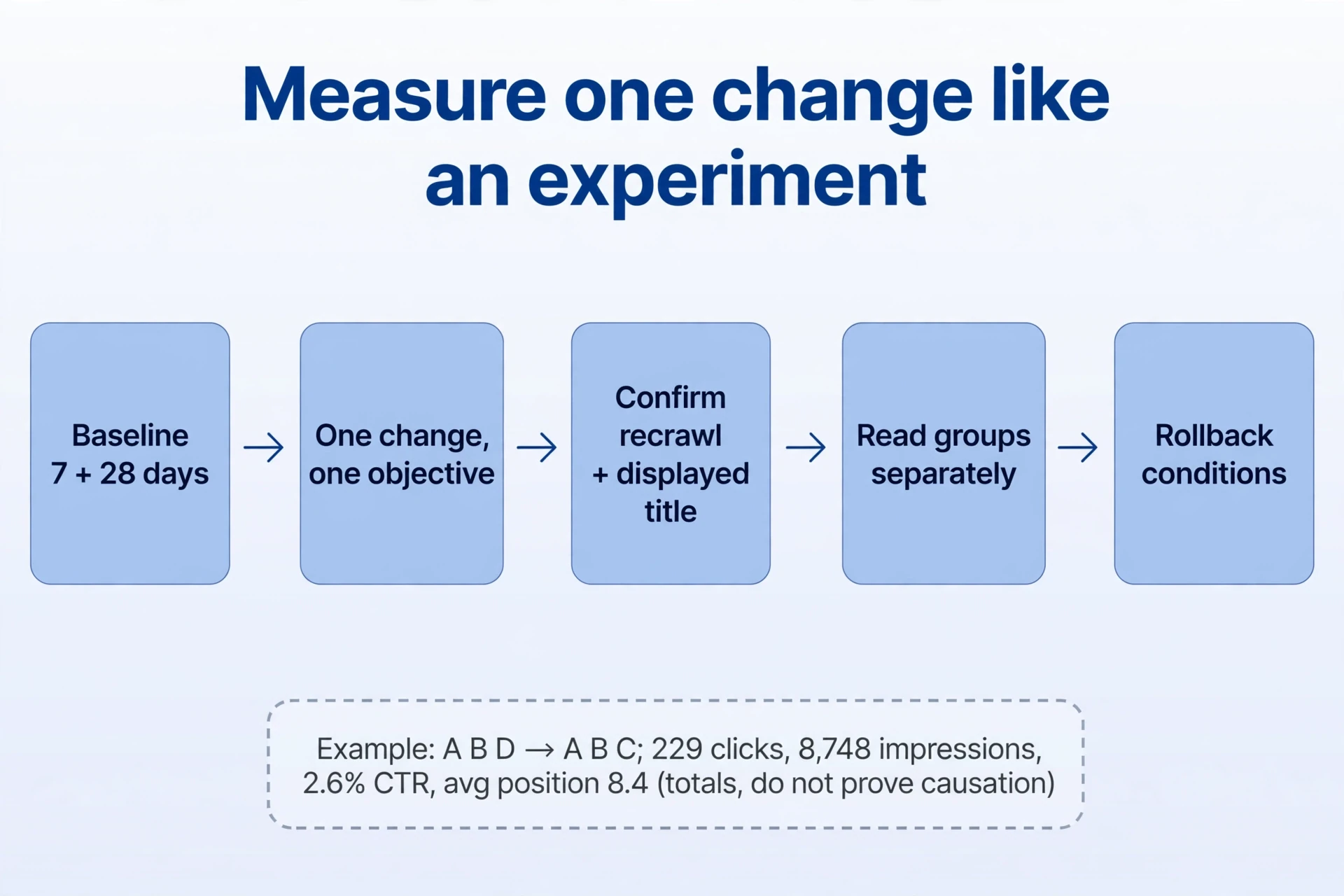
The screenshot behind the report showed aggregate numbers: 229 clicks, 8,748 impressions, 2.6% click-through rate, average position 8.4. No rows for the B C query, no full title baseline. Aggregate numbers without the underlying rows don’t show causation. That’s the one plain caveat this section needs.
| Consider a small change | Wait, or fix something else first |
|---|---|
| Enough title query evidence to identify real users | The console data isn’t understood, or it’s extremely sparse |
| The new expression closely fits the task and the answer | A cosmetic title wording preference, or an unrelated trend pasted in |
| Protected phrases and deletion effects known; backup and rollback ready | Rewriting title, body, FAQ, calls to action, and structure all at once, effects unexplained |
| One clear objective, aimed at title and H1 | Unindexed content, broken function, or the wrong task — bigger than title tuning |
Apply the same title test to an established page with steady traffic. It has tasks and queries worth protecting. Changing many things at once makes it hard to say which title change did what. Broad unexplained title changes raise the risk and muddy the review. Major errors still get fixed — with the scope, the reason, and the validation written down. Keep the title change small, the objective single, and the record complete.
Measure like a title experiment
Before changing anything, filter the performance report to the target URL and record the date range, search type, country, and device. You’re studying one page. Then pull the past 7 and 28 days and export queries, impressions, clicks, click-through rate, and average position as the title baseline. Small samples or strongly seasonal demand need longer title observation. And never pin a title whole-site change on one page.
Split the title baseline into three groups: existing core terms, existing long-tail terms, and new terms you want to strengthen. Check they belong to the same task. State what’s unclear in the current title and what the new title wording aims to fix. Save the old version, the new version, and the time of publication. Now you can say both what you want to strengthen and which existing queries need protection.
Implement one title change aimed at one objective. Title and H1 can move together — same objective. Keep the URL, the body, and other major conditions as steady as possible, and don’t make another title change the next day. Afterwards, confirm recrawling and the actual displayed title first. Then check whether new terms gain impressions, old terms hold, and click-through rate and clicks move. More total impressions can just mean more low-position queries showed up. Judge each group separately to see whether the change is heading the intended way.
Match the observation window to how data arrives. Early signals can appear after 24 hours, but the latest data may still be collecting. Title updates need recrawling and processing, which takes days to weeks. The day you edit is not necessarily the day search finishes processing it, and not every title change lands within 24 hours. Check the console’s data definitions and the official title-update guidance, and wait for complete enough data before reading click title changes.
| What you see | What it can mean | Next step |
|---|---|---|
| New-query impressions, old queries and use stable | Coverage may be widening; clicks depend on position and demand | Keep observing on a steady schedule, no immediate further title edits |
| More total impressions, lower click-through rate | Many low-position queries appeared, or attraction and intent worsened | Split by query, position, country, and device — not total rate alone |
| No title new-query change, clear old-query decline | Meaning may have been lost, or seasonality, competition, and other title changes coincide | Confirm recrawling and outside factors, check the task, restore if needed |
| Similar impressions, fewer clicks | Title check position, result features, displayed title, demand fit | Compare groups and result pages before choosing a title change |
| Only small daily wiggles | Not enough evidence | Wait for complete data, keep the records |
Finally, don’t treat aggregate metrics as overly precise. Average position is the mean position of the measured title results. It shifts when the query mix shifts — it’s not the page’s fixed rank for every term. Reports can also omit some queries, so adding up query rows won’t always reproduce the aggregate total. Write these limits into the title experiment log. Then compare the same page, the same query groups, and the same title measurement definitions, so the conclusion can be checked later.
Write down the title experiment before you run it
Six fields, filled in before the change. The sample answers continue the text-to-Morse title teaching example, with playback as the feature under test:
| Field | What to record |
|---|---|
| Page and task | URL, real input and output, current title, H1, description. Sample: /text-to-morse/ converts, copies, and plays; test the SOS encoding and audio. Save the actual HTML, a first-screen screenshot, and title feature tests. Implement playback before promising it. |
| Baseline | 7- and 28-day periods, filters, core groups, impressions, clicks, position. Sample: fix URL, web search, target country and device, export both periods. Label text-conversion, audio, and unrelated groups. Invent no growth. Note missing or untested tracking. |
| Objective | Target expression, demand and title competition evidence, continued task fit. Sample: audio-related impressions already exist, but the title wording omits playback. Check the region’s result pages to confirm people want encoding playback, not courses or music downloads, before adding a phrase. |
| Change | Exact old and new title wording, deletion effects, backup, date. Sample: title goes from “Text to Morse Code |
| Observations | Recrawling, new and old groups, click-through rate, clicks, real completion. Sample: confirm processing and the displayed search title first, then audio and text groups. Treat 24 hours as an early view; review complete 7- or 28-day periods. If impressions rise and click-through rate falls, inspect new low-position queries first. Sparse or unprocessed data means keep watching, not claimed growth. |
| Rollback conditions | Lost task, misleading title promises, or persistent core-query decline after processing with no plausible outside explanation. State the observation window. Sample: repair or restore at once if playback promises fail or the task turns misleading. With processed title changes, adequate samples, persistent core-query decline, and no useful audio gain, check seasonality, position, competition, and other title changes before restoring. A full 28 days after processing can serve as a first title review here; low traffic may need longer. No universal deadline. Never roll back automatically after one bad day, and never swap title core-query checks for a blended average position. |
A title sample decision, to show the reasoning: text-conversion queries exist, playback works, but audio phrasing isn’t well covered. Check result pages for encoding playback rather than music or courses. If they align, clarify the title while keeping text-to-Morse, and monitor both groups. And if users actually want title practice, a real training feature beats inserting training words.
Accept the work only when all four hold:
- Title, description, headings, and the keywords meta tag are told apart, and each does its own job.
- The full title set matches real capabilities, with accessible button names.
- Trials connect to real completion — not duration or density chased mechanically.
- Every title edit to a page with existing queries carries evidence, a backup, clear definitions, and rollback criteria.
Keep the title experiment log where the next person can find it. Six months later, nobody remembers why a title changed — the log does. It turns one page’s lesson into the site’s working knowledge.
State the promise. Deliver it. Test one title change at a time, and write down what happened. That’s how a title earns its clicks — and how the page behind it keeps them.
Comments
Join the conversation. Comments are reviewed before appearing.
Loading comments…