Kaggle Qwen Image testing succeeded with Qwen-Image-2.1 Standard INT8, ComfyUI, and a Tesla T4. At 1024 × 1024 and 25 steps, the first three workflows took 184–193 seconds each. Sampled peak VRAM was about 14.34 GiB on the active GPU.
Our Kaggle Qwen Image setup generated a red teapot beside a white cup, then completed two more prompts. We also restarted Kaggle Qwen Image in a fresh session using saved model files, without downloading the weights again.
These Kaggle Qwen Image field notes record the working configuration, measurements, and interruptions. Two T4 GPUs were available, but inference used GPU 0; GPU 1 remained idle.
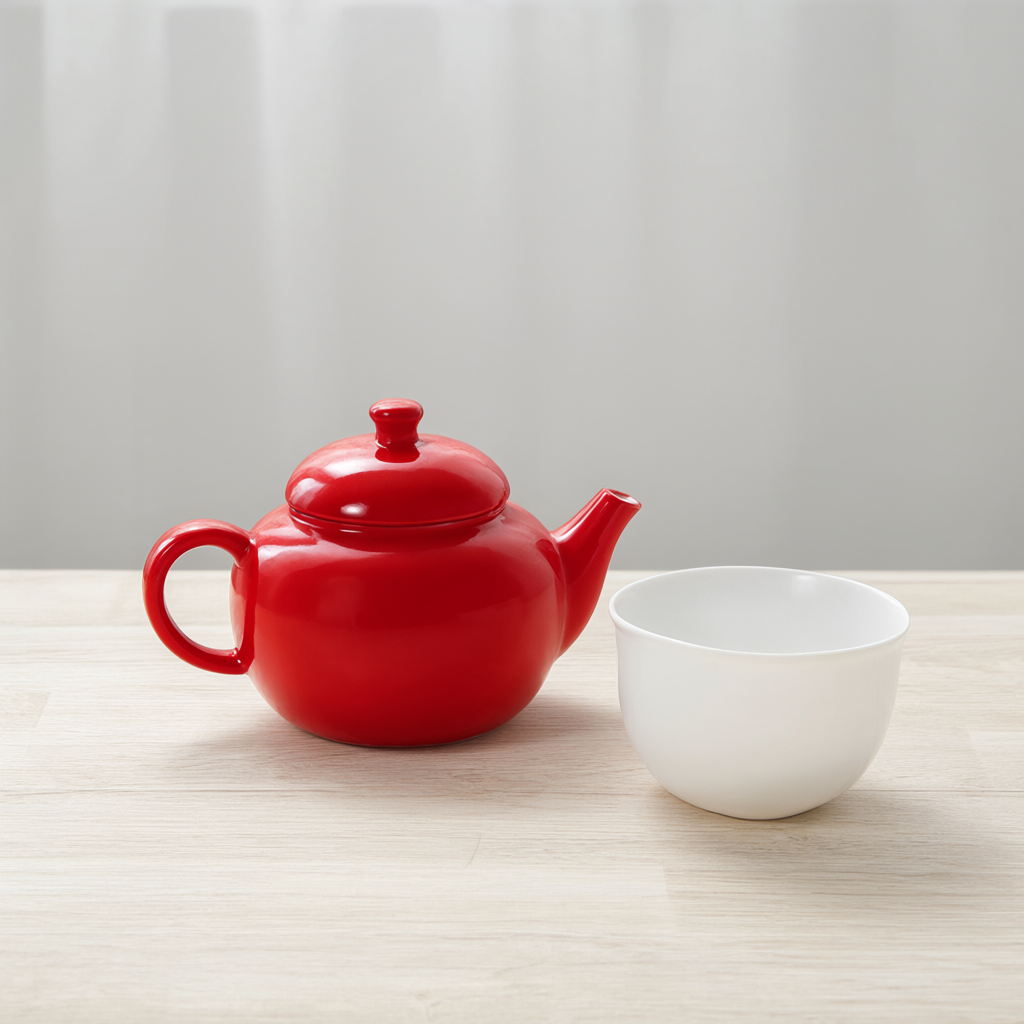
Kaggle Qwen Image output: the first teapot-and-cup image, generated at 1024 × 1024 with 25 steps.
Earlier Kaggle Qwen Image attempts: GGUF, offloading, and Turbo
Before this Kaggle Qwen Image test, the earlier attempts with Muse reportedly tried three configurations:
- V4 used a GGUF DiT and an 8-bit text encoder, then hit a cross-device tensor error after loading.
- V6 used one GPU with CPU offloading, but ran out of GPU memory during generation.
- A Turbo setup downloaded three files through ComfyUI but never started successfully, after about an hour and a half.
Those Kaggle Qwen Image failures come from the earlier account; we did not recheck its logs. We confirmed that an old session was still active and stopped it.
For the new Kaggle Qwen Image attempt, we chose standard INT8 and the official ComfyUI workflow. Keeping quantization, GPU placement, and sampling settings consistent let us test one configuration from model loading to saved output.
Downloading Kaggle Qwen Image: the session-switch problem
The first Kaggle Qwen Image download plan used a CPU session to save GPU time. The files totaled about 17 GB. After downloading them, we enabled Files only and switched to GPU. The old session’s file upload showed no clear progress after roughly twelve minutes.
We downloaded Kaggle Qwen Image again, directly in a GPU session. A temporary directory had more free space than the working directory, whose capacity was about 20 GB. The previous CPU-session files remained intact.
Before starting Kaggle Qwen Image inference, we checked the downloaded files’ hashes. A separate interruption came from our twenty-minute overall time limit. We stopped near that deadline, removed the limit, and restarted from the files already on disk. This Kaggle Qwen Image interruption was a manual stop, rather than an out-of-memory failure.
Kaggle Qwen Image INT8 model files and ComfyUI settings
The working Kaggle Qwen Image configuration used three files from Comfy-Org/Qwen-Image-2.1, the ComfyUI packaging of Qwen’s original model:
qwen_image_2.1_int8_convrot.safetensorsqwen3vl_8b_int8_convrot.safetensorsqwen_image_2.1_vae_bf16.safetensors
The first two Kaggle Qwen Image files are the diffusion model and text encoder. The third is the VAE, which remains BF16 even though we call the configuration standard INT8.
To run the Kaggle Qwen Image setup on T4 hardware, we started ComfyUI with --lowvram and --force-fp16. The logs confirmed low-VRAM mode and dynamic VRAM management.
Across the three initial Kaggle Qwen Image runs, only the prompt changed:
| Parameter | Value |
|---|---|
| Resolution | 1024 × 1024 |
| Steps | 25 |
| Batch size | 1 |
| CFG | 1 |
| Sampler / Scheduler | euler / simple |
| Denoise | 1 |
| Seed | 593103825222985 |
The Kaggle Qwen Image workflow loaded the models, encoded the prompt, sampled, decoded through the VAE, and saved a PNG. We checked that the required nodes were available before submission. After each Kaggle Qwen Image run, we verified execution status, complete PNG readability, and output dimensions.
Kaggle Qwen Image generation time and VRAM results
The first Kaggle Qwen Image prompt described a small red ceramic teapot on a table beside a white cup. It tested the complete path from prompt to saved image. Two figure-art prompts then completed with the same settings and no out-of-memory errors; their outputs were checked but are not shown here.
These are the three initial Kaggle Qwen Image measurements:
| Run | ComfyUI workflow time | Script-recorded total | GPU 0 sampled peak VRAM |
|---|---|---|---|
| First image | 192.57 s | 207.41 s | 14683 MiB |
| Second image | 188.57 s | 211.39 s | 14681 MiB |
| Third image | 184.42 s | 200.37 s | 14681 MiB |
Each Kaggle Qwen Image workflow took about three minutes. Service startup, waiting, and output checks brought the recorded total to roughly three minutes twenty seconds to three and a half minutes. Model downloads and dependency installation are excluded. The Kaggle Qwen Image workflow time includes the complete workflow, rather than sampling alone.
While running Kaggle Qwen Image, we sampled GPU memory approximately every two seconds: 101, 103, and 98 samples respectively. The highest observed usage was about 14.34 GiB; a short spike between samples could be missed.
The Kaggle Qwen Image GPU split was clear: GPU 0 reached 100% sampled utilization, while GPU 1 stayed near 3 MiB and 0% utilization. Running Kaggle Qwen Image with two available T4s did not make this configuration a dual-GPU inference setup.
For system RAM, the Kaggle Qwen Image logs showed a limit of about 30 GiB. Peak process memory was not recorded for these three runs.
Save Kaggle Qwen Image models in a private Dataset
After successful Kaggle Qwen Image generation, we saved the three model files and a manifest in a private Kaggle Dataset. Version 1 contained four files totaling about 17.28 GB, with no generated images.
Mounting the Kaggle Qwen Image Dataset initially failed. After upload and server-side processing, the SDK returned Failed to get session. Add Input in the Notebook also returned An error occurred updating the session at one point.
Once the Kaggle Qwen Image Dataset mounted, we read the files and calculated their SHA256 hashes. All three matched the originals, the manifest matched, and the input directory was read-only.
Those checks established that the saved Kaggle Qwen Image files were accessible in the original session. A fresh session was the next test of whether the Dataset could support a new generation.
Restart Kaggle Qwen Image in a fresh GPU session
Before restarting Kaggle Qwen Image, we confirmed that the previous ComfyUI directory was absent. We mounted the private Dataset, verified all three hashes again, and symlinked the files into the locations ComfyUI expected.
This fresh Kaggle Qwen Image session required runtime preparation but no external model-weight downloads. Using the original teapot prompt and sampling settings, it generated another image:
| Fresh-session measurement | Time |
|---|---|
| Environment and model setup | 140.48 s |
| ComfyUI workflow execution | 168.44 s |
| Service startup through output checks | 199.37 s |
| Full measured run, from setup through checks | 341.78 s |
The fresh Kaggle Qwen Image run took about five minutes forty-two seconds from setup through checks, excluding queue and session-allocation wait. Workflow execution is included in startup-through-checks time, so the four rows are not additive.
For this Kaggle Qwen Image reuse test, GPU 0 reached a sampled peak of 14753 MiB. GPU 1 remained near 3 MiB, again indicating effectively single-GPU inference.
We compared the fresh Kaggle Qwen Image teapot output with the original pixel by pixel: the pixels matched exactly. PNG hashes differed because embedded metadata, including output names, differed. The comparison applies to those two outputs in the recorded setup.
At that point, restarting Kaggle Qwen Image from the private Dataset had worked end to end: mount, verify, generate, and check the output. We stopped the fresh GPU session afterward.
Kaggle Qwen Image test versions and revisions
These versions identify the successful Kaggle Qwen Image environment:
- Python: 3.13.16
- PyTorch: 2.11.0+cu130
- ComfyUI: 0.37.0
- comfy-kitchen: 0.2.35
- comfy-aimdo: 0.5.5
- Attention: PyTorch attention
- ComfyUI commit:
93810483a4739a1588236919a3128d3070244146 - Model revision:
aacf31a6d48e707f352ecba714cee0680da3479b - Official workflow revision:
a7acaf8cee9ccccdaf4b26ce04a9fced4c4d13de
The Kaggle Qwen Image measurements come from the initial three generation reports and the fresh-session reuse test. Logs, workflow, environment versions, and the installed-package list were retained; not every dependency was pinned, so a changed environment needs checking again.
What this Kaggle Qwen Image setup is ready for
The tested Kaggle Qwen Image configuration is 1024 × 1024, 25 steps, and one image per run. Direct GPU-session downloads, hash checks, and consistent settings got generation working. The private Dataset then made restarting Kaggle Qwen Image possible without repeating the weight downloads.
Higher resolutions, larger batches, and second-GPU inference remain untested. This Kaggle Qwen Image baseline gives us a working setup to compare against when trying them.
When publishing outputs from Qwen Image on Kaggle, the image-preview-to-useful-visit guide covers descriptive context and the action a visitor can complete after opening an image.
Comments
Join the conversation. Comments are reviewed before appearing.
Loading comments…