A tool page has one job: let the visitor finish something. Everything else — the tool explanation, the examples, the related links — supports that job. Get the order wrong and people land, read, and leave with nothing done.
That sounds obvious. Plenty of tool sites still get it backwards. They open with a sales pitch, park the actual tool behind a button, and send the result to a third page. Each hop is a chance to lose someone. The fix starts before any writing: decide what the visitor came to do, and deliver that first.
Let the task decide the tool page
Two visitors can search the same subject and want different things. One wants a Morse code translator to convert text right now. The other wants to know what Morse code is. Same topic. Different tool pages — or at least different first screens.
Start there. Ask what the visitor’s hands want to do in the first ten seconds. Then build the tool page around that answer.
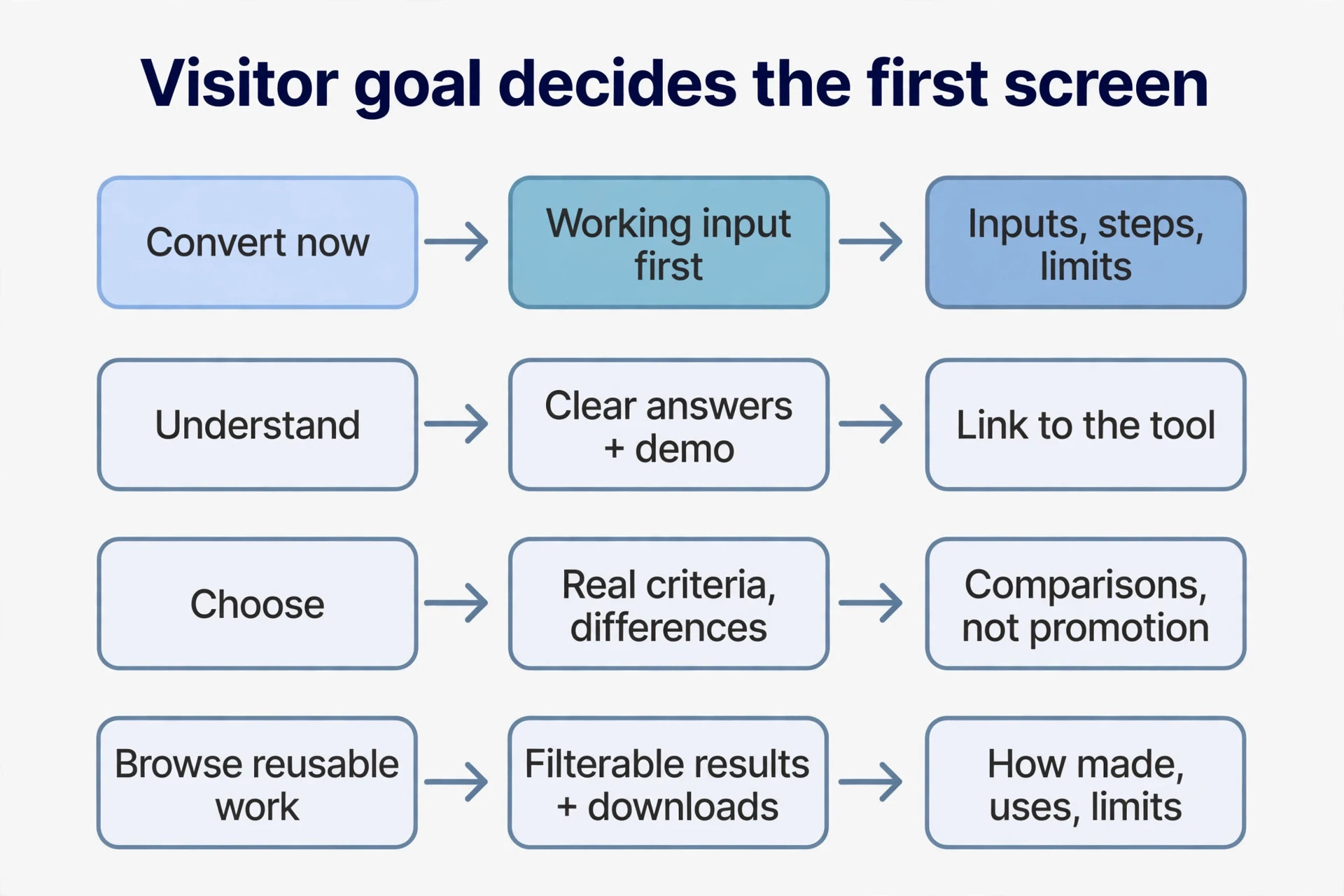
| Visitor goal | Deliver first | Support with |
|---|---|---|
| Convert, calculate, or generate now | A working input, a clear action, understandable tool output | Inputs, steps, limits, what the result is good for |
| Understand a principle or method | Clear answers, examples, a demonstration | A link to the tool, so readers can test the method |
| Choose a tool or approach | Real criteria, differences, use contexts | Comparisons, not just promotion buttons |
| Browse reusable work | Filterable results, context, downloads, regeneration | How the work was made, what it can be used for, limits |
A simple tool can often fit the action, the necessary explanation, and a few chosen examples on one tool page. People learn as they work. Complex workspaces, private projects behind a login, and long multi-step processes can still justify separate pages. Judge by two outcomes: can visitors complete the task without friction, and is the tool page useful on its own when someone lands on it straight from search? Arrange what belongs together around those two tests.
Watch for the fragmented pattern: a promotional tool landing page, then a button to the tool, then a separate results page after acting. Sometimes that split is just history — marketing built one page, developers another, results got stored elsewhere. For a simple task it makes people work out where to go next, while the explanation, the tool, and the output sit on three different addresses. Follow the actual journey instead. Cut every transition that isn’t earning its keep.
Why a tool company publishes articles
If the tool should do the job immediately, why do some tool companies publish piles of articles? Take a workflow-automation company — software that connects apps and automates repetitive work. Most people don’t wake up knowing they need automation. They wake up with a work problem. Tutorials, tool selection guides, and answers to related questions meet them at the problem, then walk them toward trying the product.
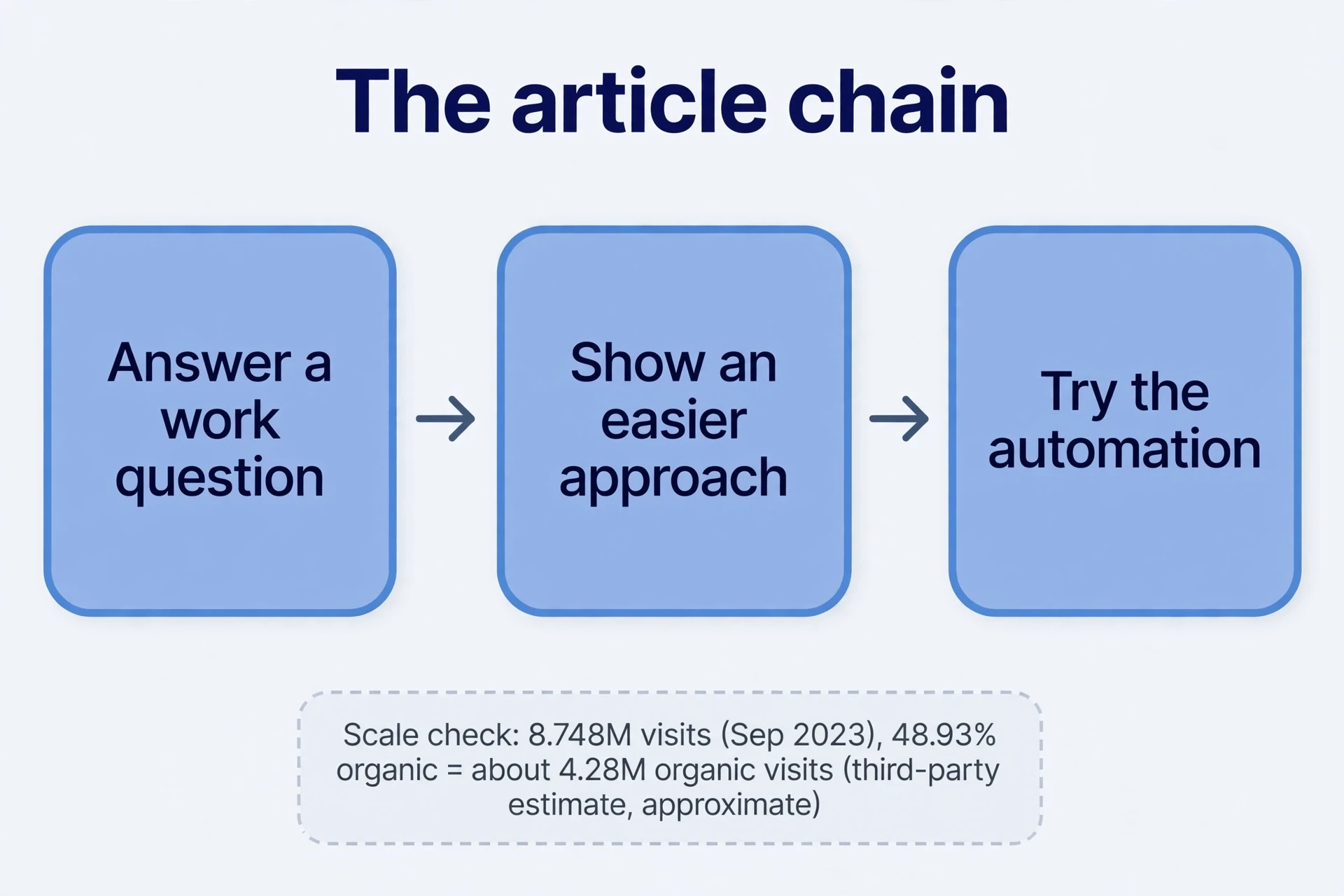
First, get the scale straight. In September 2023 the site drew an estimated 8.748 million visits, about 7.2 tool pages per visit, average visit about 4 minutes 22 seconds. April had about 8.26 million visits, August about 9.73 million — traffic had already eased off by September. Organic search brought about 48.93%, direct traffic about 38.47%, paid search about 7.1%. Third-party estimates, rounded. Good for scale, not exact counts. Multiple entry points plus multi-page visits: this business can’t be understood as one tool landing page. And engagement figures don’t show completions. Tool pages per visit says nothing about how many people finished an automation.
Next, sanity-check the search scale. Roughly 8.75 million visits times 48.9% organic gives about 4.28 million organic-search visits — close to another measurement tool’s estimate of about 4.3 million. Two rough numbers agreeing doesn’t make either exact. Dates, countries, devices, and whether visits and clicks were counted the same way all need their own checks. Once the scale looks broadly plausible, move on to specific terms and tool pages.
That means going past the keyword table. Split brand terms from non-brand terms first. Brand searches usually land on the homepage or a product entry point. Non-brand terms often land on the blog. Then open the actual tool page behind each organic keyword and write down what it is: tutorial, concept explainer, comparison, best-tools list. That tells you what question the searcher brought and how the tool page answered it.
Do the same for paid keywords and their tool landing pages. In this case the examples included soft skills, email signatures, webhooks, and RSS feeds — ads sending people to articles, not tool product pages. Follow the path inside the article: product entry points, related tool workflows, the next step toward automation. Tracing it by hand shows whether the readers being acquired actually fit the business.
The useful pattern is a chain: answer a work question → show an easier approach → let people try the automation. A multi-purpose work platform can use tutorials and app comparisons to guide people to their next step. A simple unit converter publishing dozens of unrelated AI-tool recommendations won’t attract people who need conversions. And if you plan to promote articles with paid ads, run the conversion and cost math separately. Settle how articles serve your business before you copy the acquisition path.
Two tool pages that show the whole workflow
A Morse code translator site shows the narrow-task version. At the time it drew an estimated 1.006 million visits in November 2023. The tool page let visitors type text or code, get a conversion, play the sound, and reach languages, menus, and settings. Scroll down and the same tool page carried the code chart, the concepts, translation methods, and tool instructions. Operation and explanation served one task. That doesn’t mean the text deserves credit for all the site’s traffic.
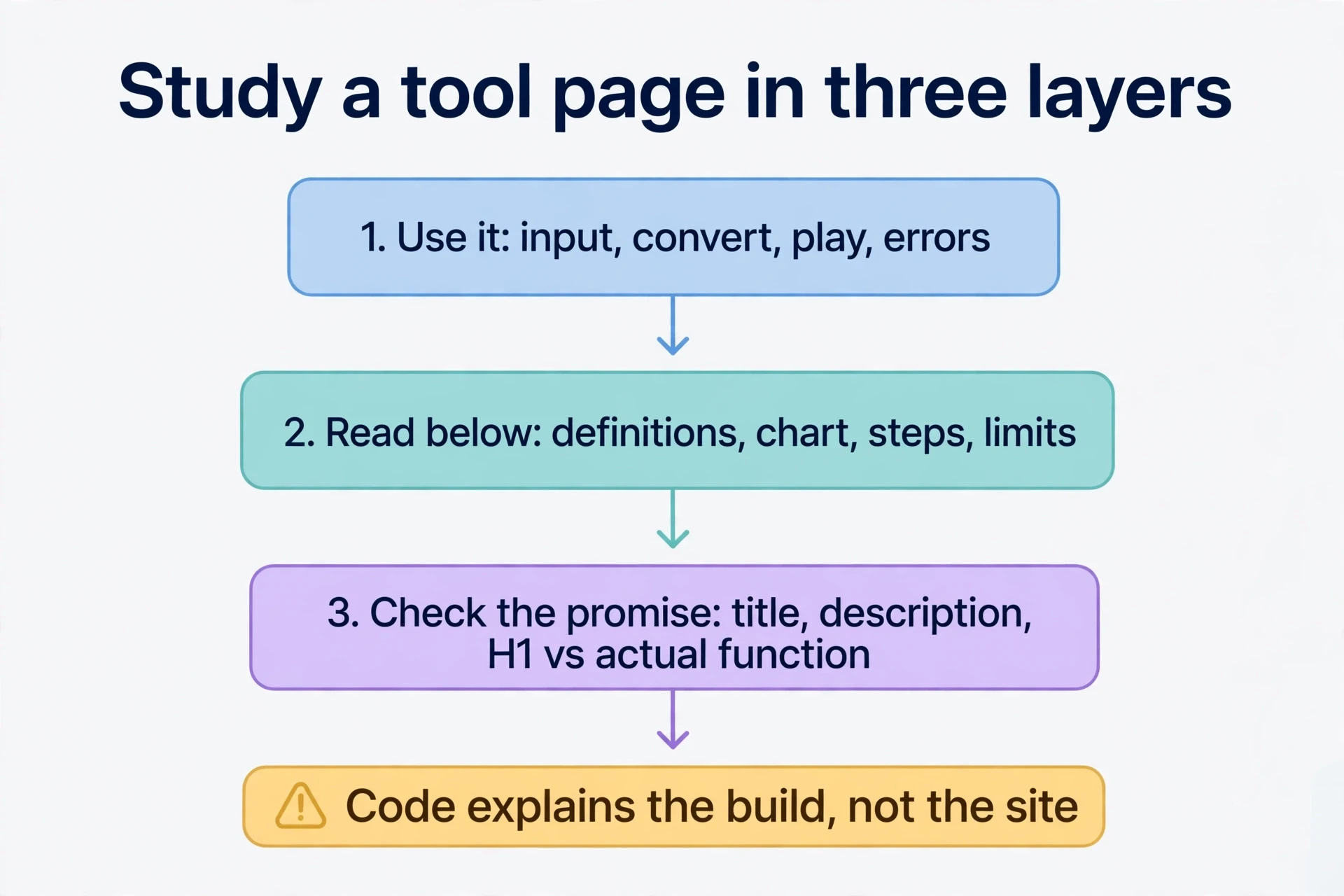
Study a tool page like this in three layers, in order. First, use it: enter input, convert, play the sound, and write down what it supports, what it rejects, and what its error messages say. Second, read what’s below: definitions, the character chart, steps, examples, limits — and note which operational questions each part answers. Third, check the public promise: title, description, H1, and headings against what the tool actually does. Three layers, in that order. You’ll learn more than the tool page’s surface ever shows.
The source code for a tool like this is usually public. Code explains how the thing was built and how the tool page is organised. It doesn’t reproduce the rest: the domain’s age, the traffic, the links, the accumulated content. Those are separate conditions, built over time. Don’t mistake copying code for copying the site.
A blog template shows the other half: the tool first-site workflow. The archived template already had posts, tags, an about page, search, light and dark switching, RSS, an introduction, featured articles, and recent articles. That’s a publishing framework. The tool you plan to deliver still has to be built on top of it.
For a first round, finish the loop. Run the template. Replace its tool placeholder content with your own real material. Build one usable feature. Deploy it and open the live URL. Try it on a phone. Submit the site. Watch the search data. Make one revision based on a real problem. Tool development to feedback, one full cycle. Changing colours or generating a batch of articles is only part of it.
The tool itself can sit on the homepage or on its own tool page inside the template, with proper navigation. Choose by the task. Judge the first round on whether the whole chain works — build, launch, feedback — not on revenue alone.
Outputs become entry points for the next user
A tool’s outputs can also teach the next visitor. A sticker-generator site let people type a description, generate stickers, and browse a library of selected public results. One person makes something reusable. Pages and search make it findable. Another person sees the result and starts using the tool. The loop runs: use the tool → reusable work exists → work gets discovered → a new user sees it → tool gets used again. The loop only works if the public work is useful to strangers on its own.

The same site connected the loop to payment: free generation, with privacy or tool high-resolution output as the paid part. People happy to share ordinary tool results build up the discoverable library. People who need private tool results or higher specs have a reason to pay. Specific plans and prices weren’t rechecked for this lesson — the point is the design, matching user choices to paid capabilities, not a price list.
The pattern transfers, but only where tool outputs stand alone:
| Reusable pattern | Input | Output | What a public tool page needs |
|---|---|---|---|
| Stickers and images | Description, reference image | Downloadable image | Quality, use, filtering, related results |
| Articles or summaries | Text, URL, source material | Explanation or organised content | Accuracy, added information, understandable sources, purpose |
| Videos and demonstrations | Text, images, video | Playable tool output | Preview, explanation, instructions, real playback |
| Webpages or small apps | Task description, configuration | A working tool page | Real usability, a distinct task, necessary explanation, limits |
Before copying the model, check whether tool outputs have independent uses. A click on Generate proves someone used the tool. It doesn’t prove every result deserves search discovery. Repetitive, wrong, context-free, or private results should stay personal. Confirm intent, quality, and purpose before anything goes public. Quantity alone brings no search traffic.
How search meets the tool page
Once the page works, learn how a search system finds it. The process has distinct stages, and each stage breaks differently. A URL nobody discovered needs different work from one that was crawled but never indexed. An indexed tool page that matches no query is a third problem. Find where the tool page stopped before deciding what to fix: entry points, delivery, or content and tasks.
It starts with discovery. The search system picks up URLs from links on known tool pages, sitemaps, and other entry points, then queues them — new pages and older pages due for a refresh. Then it requests each URL and reads the response status and HTML. Tool Server errors, restricted access, or empty pages leave nothing usable for later stages.
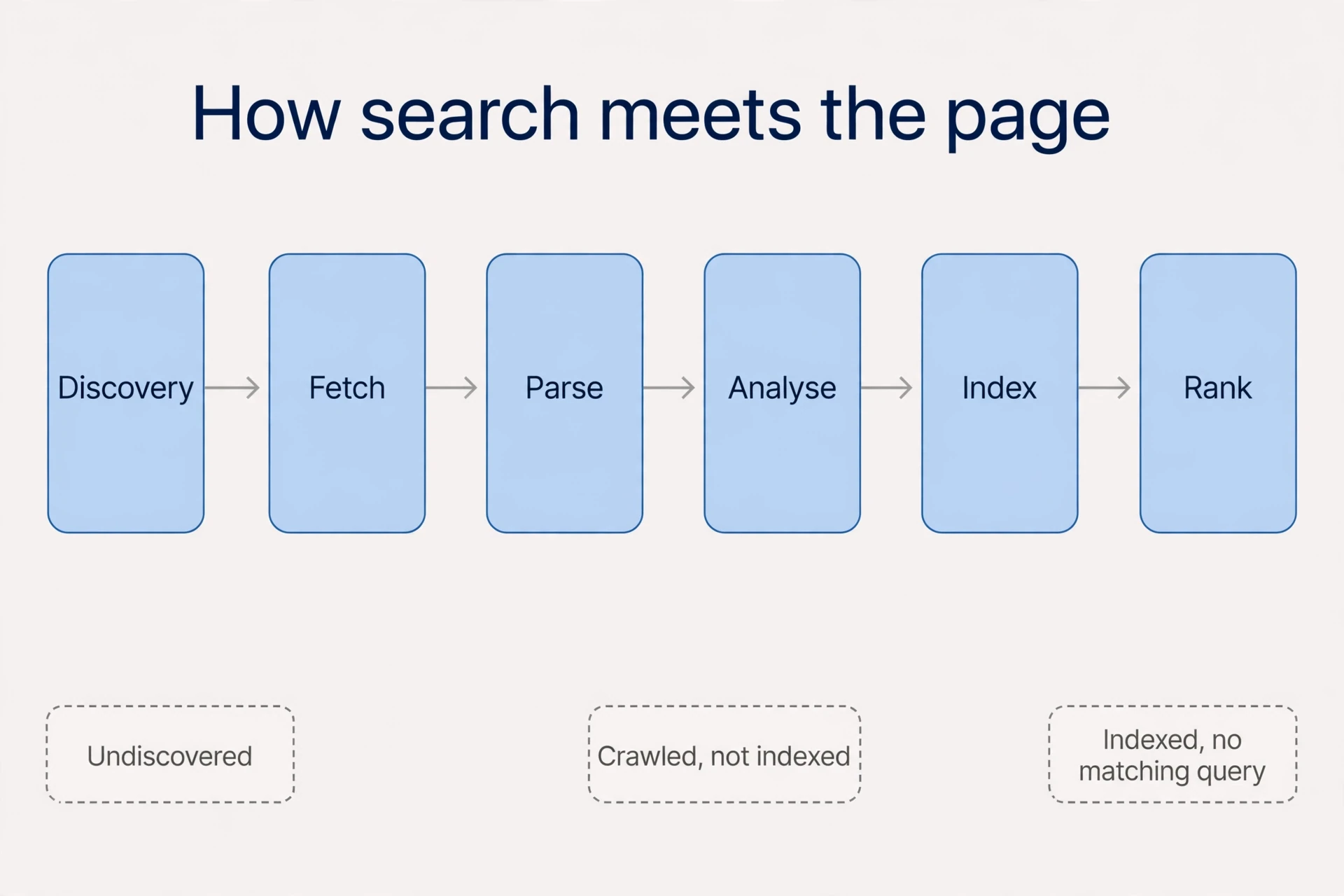
After a successful fetch comes parsing: body text, titles, metadata, links — running JavaScript where needed to see the rendered tool content. Then analysis: content and relationships, judged for indexing. Knowing an address, getting a response, and getting indexed are three separate outcomes. Check them separately.
When someone searches, the system pulls tool candidate pages from the index and interprets meaning beyond exact word matches. Then it ranks and presents results using several systems covering relevance, quality, links, and more. Indexing buys a tool page a chance to take part. Ranking for a particular term is a later contest, decided by matching and ranking on top of it.
Why doesn’t search reread the whole web for every query? An inverted index: lookup tables from terms and tool content features to documents, built in advance. “Morse” can point to a code chart, a translator, and a historical introduction before anyone searches. Candidates come out of the index first, then get assessed against the task at hand. That’s the simplified model. Real search adds semantics, freshness, and multiple ranking systems. Your tool page still has to perform the task. A list of terms can’t stand in for the tool content.
Links point in three directions, and the direction matters:
| Name | From your site’s view | Check |
|---|---|---|
| Internal link | Your homepage → your translator | Whether important tool pages get discovered, and whether anchor text explains the purpose |
| Outbound link | Your tutorial → an outside reference | Whether the target is verified and useful, and whether the link attribute fits the relationship |
| Backlink | Someone else’s tutorial → your tool | Relevance and genuine provenance, not counts alone |
The same A → B link is outbound for A and a backlink for B. Read link data from the right end. Links help discovery and inform judgments about relationships and quality, so look at origins and destinations instead of counting. When placing related links — in body text, breadcrumbs, categories, pagination — ask first whether they help someone browse. Dozens of unrelated navigation links on every tool page guarantee nothing.
One recorded case: a site with a hundred thousand tool pages indexed in under a month, no sitemap submitted at the time. It leaned on recent-page entry points, a full listing, and pagination. That’s one site’s story. It doesn’t mean every site can skip sitemaps. Sitemaps add clues; they don’t guarantee indexing. In practice, every important tool page should be reachable through a crawlable link from at least one other tool page on the site.
Click depth is about the path, not the address. The suggestion is to keep important tool pages within three clicks of the homepage where possible. A deep-looking address like /a/b/c/d/ linked straight from the homepage is one click. A short address buried behind several tool pages of pagination is hard to reach. Click through from the homepage to core tools, popular categories, and new content, and fix the entry points first. Don’t rebuild a site just to shorten slashes.

Two technical claims from the source material need correcting. First, JavaScript. The source believed the search engine ran JavaScript only for large sites and told small sites to avoid it. Current official guidance says renderable tool pages go into a rendering queue and JavaScript runs. Server rendering or prerendering can still get tool content out sooner, and it helps other crawlers that don’t run JavaScript at all. So yes, build the tool in JavaScript. At acceptance time, inspect the rendered result and confirm tool core explanations, links, and page content arrive reliably — then decide whether prerendering is needed. Assuming small sites never get rendered leads to the wrong diagnosis.
Second, outbound-link attributes. The source recommended nofollow on all of them. Official guidance distinguishes the relationship: sponsored for paid links, ugc for user-submitted tool content where it applies, nofollow when a link can’t be trusted or you’d rather not associate with it. Ordinary helpful references don’t all need nofollow. Decide why the link exists, then pick the attribute. And a percentage in a third-party ranking-factors chart — 14% for links — is not a fixed weight for links.
Multilingual versions need the same treatment. Separate URLs, tool page text in each language, entry points that click through to each other, and the right hreflang markup help each version get found and shown on its own. A JavaScript-only language switcher under one URL, or versions reachable only through cookies, browser language, and automatic redirects, can leave crawlers seeing a single version.
Tool, explanation, and examples complete each other
Back to the page itself. A tool, its explanation, and its examples do three different jobs. The tool delivers a result. The explanation cuts the effort of understanding and operating it. Examples help people judge fit before they commit. A button followed by a long block of repetitive text covers none of the three properly.
For a Morse translator, the body text should answer seven questions:
| Question the body answers | Morse tool translator example |
|---|---|
| What is it? | A text-to-dot-and-dash converter, with supported characters explained |
| What can I enter? | Supported text, dot/dash syntax, separators, plus an example ready to try |
| How do I use it? | Choose direction → enter tool input → check conversion → play or copy |
| How do I use the tool result? | Read character and word separators, practise, copy elsewhere |
| What are the limits? | Unsupported characters, audio permissions, invalid formats, privacy handling |
| How does it differ? | What instant conversion, playback, and tables solve — no invented advantages |
| Common questions | No sound, unconverted characters, entering spaces |
Placement matters as much as coverage. Tool Format examples beside the input help people start. Error messages right after a tool action guide the next step. Full explanations and FAQs below the tool serve readers who want more. Use the same task test for separate pages: compression, WebP conversion, and upscaling all process images but produce different outputs, so separate pages make sense. “Photo” and “image” inside one compression task can usually share a page. Page count follows the number of distinct tasks actually completed — nothing else.
Public outputs need their own bar. Take a yellow puppy sticker: a random generated image with no explanation earns no independent tool search page. Organise selected work onto a tool page that explains the style and use, offers downloads and creation tips, and links back to generation — now later visitors can choose and use something there. A thousand generations aren’t a thousand independent tasks, and they shouldn’t become a thousand indexed tool pages with only the title changed.
Mechanics first: private tool results and unselected work can start outside the index. If you use noindex, let crawlers read the directive — blocking crawling through robots.txt can stop them seeing noindex at all. Get access and indexing conditions right, then judge quality, duplication, and topical organisation, and decide whether individual pages or tool collection pages fit.
Purpose decides the rest. The search engine’s scaled-content policy targets large volumes of tool low-value pages built to manipulate rankings. That doesn’t mean no tool AI output can be indexed, and it doesn’t mean user-generated content is automatically good. The way something was made never replaces inspecting each group of public content.
Start small. A homepage, or two or three complete tool core pages. Submit the site, build a few real relevant links, and watch indexing, queries, impressions, and tool usage. A smaller scope makes unfinished delivery easy to find, and those problems point at the next improvement. No page-count threshold applies. Fewer tool pages don’t rank more easily on their own, and promotion doesn’t have to wait for a magic number.
One tool page, top to bottom
Put the three strands together — the tool approach, the discovery mechanics, and the complete-page method — in a single text-to-Morse page. Eight checks, in the order a visitor meets them:
- Tool page promise. URL
/text-to-morse/, H1 “Text to Morse Code.” Title describes conversion and working playback. No playback, no promise of it. - Initial input. A labelled field, a tool one-click example, a clear start button. Supported characters explained nearby — especially restrictions that would otherwise reject input after effort.
- Output. Encoding, character and word separators, copying, playback. The tool teaching example
SOS → ... --- ...confirms the direction. - Complete states. Empty input gets a prompt. Unsupported characters get located. Failure allows retry. Playback starts and stops. An error never leaves just a spinner.
- Below the tool. Dots and dashes, three steps, tool table examples, audio and format limits, common questions with real cases — not repeated keywords.
- Related paths. Links to decoding, a complete table, tool practice instructions, with return links. The tool sits on the homepage or in a relevant directory, reached by crawlable links.
- Technical delivery. Readable headings, core text, links. Check mobile input, output overflow, copy failures, JavaScript rendering. Private input history isn’t automatically public indexed content.
- Post-launch review. Verify fetching and indexing with URL inspection; check query intent against data. Record real starts, completions, and errors. Long visits alone don’t mean success.
The same structure transfers. A sticker generator swaps in image previews, specifications, downloads, and a public-sharing choice, plus selected work and reusable prompts. Waiting for generation makes progress and tool error states matter even more. And don’t keep irrelevant tool examples and FAQs while only changing the words.
Find the failing step before changing anything
When something’s wrong, locate the stage first. Changing the tool page before diagnosing wastes the fix.
| Symptom | Check first | Priority action |
|---|---|---|
| Important tool pages undiscovered | Entries from home, directories, pagination, sitemap | Add crawlable internal links, repair URLs |
| Fetching fails or content empty | Status, permissions, JavaScript errors, rendered body | Repair delivery, prerender core text if needed |
| Discovered but unindexed | noindex, canonical, duplication, content, functional completeness | Fix configuration or value, then allow reprocessing |
| Impressions but poor task fit | Query tasks versus what the first screen can do | Correct intent or build the missing function — not keyword density alone |
| Clicks without completion | Input limits, login or payment barriers, errors, downloads | Repair the key flow, measure real completion |
| More generated tool pages, uncertain results | Duplicates, private tool outputs, missing themes, selected value | Limit indexing, organise genuinely useful tool output pages |
Five checks before publishing. Run them on your own tool page first, then extend the examples:
- One task, one phrase group. Converting supported text to Morse, with audio only when playback works. Candidate phrases include
text to morse codeandmorse code translator— the second can include decoding, so inspect the tool results. URL, title, H1, input, and tool output should describe one task. Don’t promise two-way conversion without decoding. - Start immediately. Labelled input, a tool SOS example, a start button, character support stated. On mobile, enter SOS, confirm
... --- ..., test copying and real playback. Record empty, unsupported, processing, success, and failure states, naming the character or cause. Playback can stop; copy failures allow manual selection. Keep pass/fail notes and screenshots. Don’t tick untested items. - Body explains the work. Tool input → conversion → copy or play, with dots and dashes, separators, audio settings. Use SOS and one short spaced phrase to show real input and tool output, not keyword lists. State the character set, case handling, punctuation, and tool input limit. If only Latin characters work, say so rather than promising all text. Put real copying, audio, and formatting questions in the FAQ.
- Quality examples and results. Keep a few hand-checked short examples and a character table, explaining encoding and use. Recheck mappings so tool output matches the instructions. Show conversion on the current tool page without automatically publishing private text or history. Future public examples need an explicit sharing choice, independent purpose, and quality checks. Quantity establishes no value.
- Working links. Link from home or the tool directory to
/text-to-morse/, onward to tables, decoding, or practice, with return links. Click from home and inspect addresses, responses, canonicals, and rendering. No empty links to unbuilt decoding tool pages. Sitemaps supplement internal links; after launch, check crawling and indexing, since a link alone guarantees neither.
Deliver three things: a complete tool page, a full mobile run-through, and a fault log. Find the failing step before expanding. Keeping old screenshots proves nothing about whether the tool works, the explanation holds, or the outputs deliver. The page earns its place by completing the task — for the visitor, and for search.
Comments
Join the conversation. Comments are reviewed before appearing.
Loading comments…