My TUN setup: Windows 11 + Clash Verge Rev 2.5.8 (core: verge-mihomo v1.19.32)
Here’s the short version of a very annoying week. I turned on TUN mode in Clash Verge, and instead of everything going through the proxy, basically nothing did. Then I tried the obvious fix — auto-route — and that took down my entire network, proxy nodes included. And on top of that, NetEase UU Remote kept telling me I had no network whenever TUN was on.
It took a lot of digging, but it turned out to be three separate problems stacked on top of each other, not one. This is the full story: what I checked, what I ruled out, and the TUN setup that finally works.
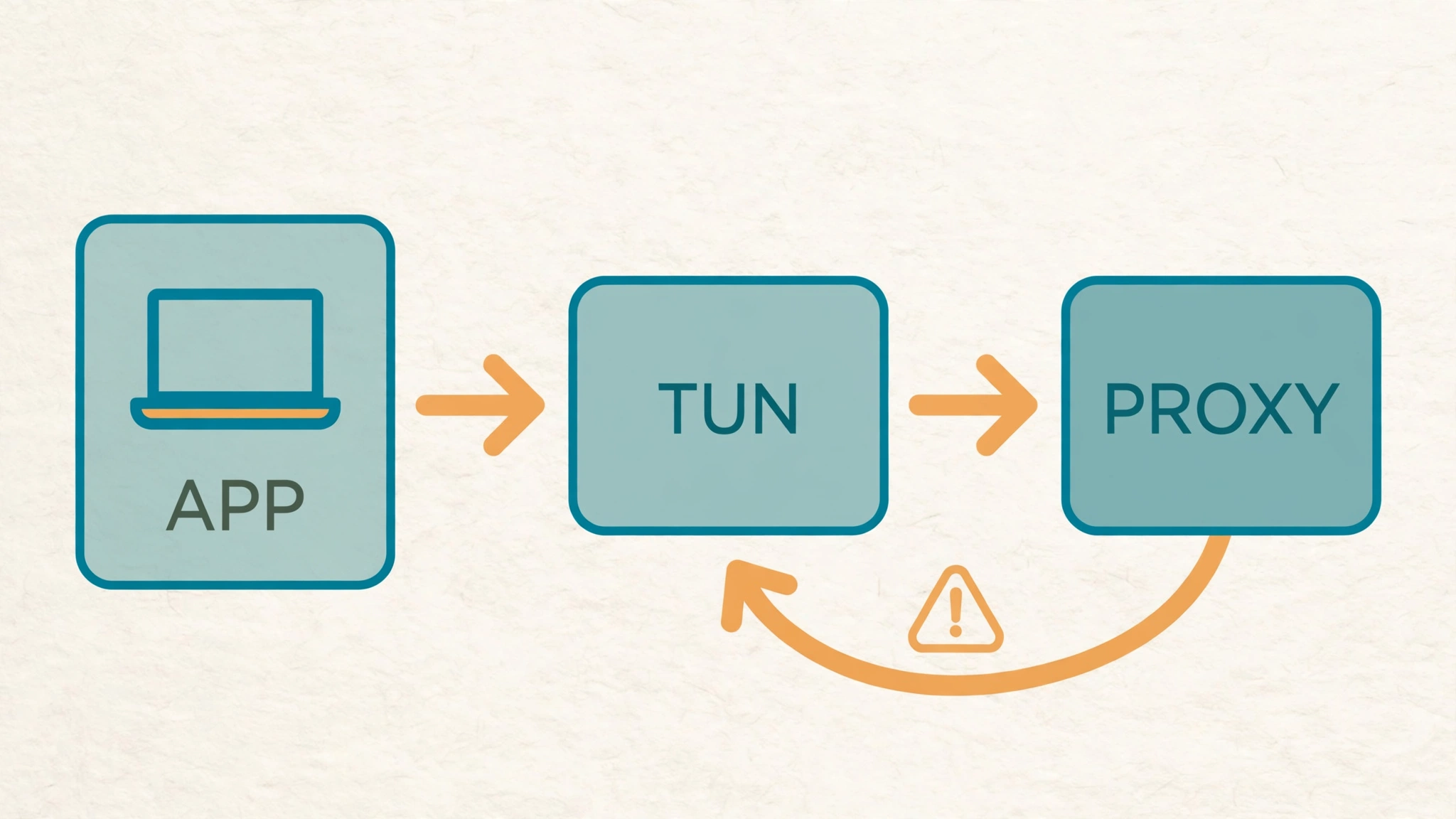
The TL;DR: auto-route itself was never the problem. The core was guessing the wrong outbound network card and sending proxy traffic back into TUN itself — a loop. On top of that, Verge kept undoing my hand-edited config, and TUN’s fake IPv6 was quietly breaking apps that prefer IPv6. The fix is a small watchdog script that pins the outbound card and hot-patches TUN at runtime.
1. What was actually going wrong
Four symptoms, and they all showed up together, which made it feel like one big mess:
- With TUN on, only the system proxy worked. Anything that was supposed to go through TUN just wasn’t proxied at all.
- Turning on Auto Route (
auto-route) killed everything — I couldn’t even reach the proxy nodes. - So I left auto-route off, which made TUN completely useless.
- After I installed NetEase UU Remote, it said “no network” whenever TUN was on. Turn TUN off, and it was fine again.
2. First suspect: UU’s virtual network card (it wasn’t that)
My first guess was that UU Remote had installed some virtual network card that was fighting with TUN. Easy enough to check:
Get-NetAdapter -IncludeHidden | Sort-Object ifIndex |
  Format-Table ifIndex, Name, InterfaceDescription, Status, MacAddress

Get-PnpDevice | Where-Object {
  $_.FriendlyName -match 'uu|netease|tunnel|tap|wintun|vpn' -or $_.InstanceId -match 'uu|netease'
} | Select-Object Status, Class, FriendlyName, InstanceId
Here’s what was actually there:
| Device | What it is |
|---|---|
Gateway NC Adapter (ROOT\NET\0002, oem52.inf / gwvnic) | Virtual NIC from NetEase UU Accelerator; installed ages before this, currently Code 22 (disabled) |
GameViewerIddDriver | Virtual display (IDD) |
nevaudio.sys | Virtual audio device |
uuycinput.sys | Virtual HID input |
ViGEmBus.sys | Virtual gamepad bus |
So no — UU Remote (GameViewer) doesn’t install a network driver at all. The only virtual NIC on the box belongs to UU Accelerator, it’s disabled, and it was there long before any of this started. I double-checked its driver source and TUN state just to be sure:
# Confirm driver source and state
Get-PnpDeviceProperty -InstanceId 'ROOT\NET\0002' `
  -KeyName 'DEVPKEY_Device_InstallDate','DEVPKEY_Device_DriverInfPath'
Dead end, but a useful one. The UU virtual NIC is not the cause. Moving on.
3. TUN was up, but it wasn’t routing anything
Next I looked at what TUN was actually doing:
Get-NetRoute -AddressFamily IPv4 -DestinationPrefix '0.0.0.0/0'
Get-NetIPAddress -InterfaceAlias Mihomo1 -AddressFamily IPv4
Get-DnsClientServerAddress -InterfaceAlias Mihomo1 -AddressFamily IPv4
What I found:
Mihomo1existed and wasUp, address198.18.0.1/30. So far so good.- But the TUN route table had no
0.0.0.0/1or128.0.0.0/1— and no0.0.0.0/0pointing at TUN either. - The default route still went to the physical gateway, and
Mihomo1had no DNS servers at all.
Meanwhile, my TUN Verge config (%APPDATA%\io.github.clash-verge-rev.clash-verge-rev\clash-verge.yaml) looked like this:
tun:
  auto-route: false
  strict-route: true
  dns-hijack:
    - any:53
And the measurements backed it up:
Resolve-DnsName www.google.com -Type A -QuickTimeout   # real IP, not 198.18.x
curl.exe -s -m 10 -o NUL -w "%{http_code}" https://www.google.com                           # 000 timeout
curl.exe -s -m 10 -x http://127.0.0.1:7897 -o NUL -w "%{http_code}" https://www.google.com  # 302
Direct requests timed out (000), the same request through the system proxy on port 7897 came back 302, and DNS was returning real IPs instead of fake ones. TUN was basically a door to nowhere.
Root cause #1: with
auto-route: false, mihomo only creates the TUN adapter. It injects no default route and doesn’t touch interface DNS, so TUN captures no traffic at all.
4. Proving auto-route itself works (via the named pipe API)
Here’s a quirk worth knowing: Verge’s mihomo doesn’t listen on 127.0.0.1:9097. The control channel is a named pipe — HTTP over NamedPipe. First, find the pipe name:
# Find the pipe name
Get-ChildItem '\\.\pipe\' | Where-Object { $_.Name -like 'verge-mihomo*' }
# e.g. verge-mihomo-production-<HASH>
Then this helper does the talking (I reuse it in the TUN watchdog script later, too):
$pipeName = '<PIPE_NAME>'
$secret   = '<SECRET>'   # from the `secret` field in config.yaml

function Invoke-CoreApi([string]$method, [string]$apiPath, [string]$body) {
    $pipe = New-Object System.IO.Pipes.NamedPipeClientStream('.', $pipeName,
        [System.IO.Pipes.PipeDirection]::InOut)
    $pipe.Connect(3000)
    $sw = New-Object System.IO.StreamWriter($pipe, [System.Text.UTF8Encoding]::new($false))
    $sr = New-Object System.IO.StreamReader($pipe)
    $bytes = if ($body) { [Text.Encoding]::UTF8.GetBytes($body) } else { [byte[]]@() }
    $head = "$method $apiPath HTTP/1.1`r`nHost: localhost`r`nAuthorization: Bearer $secret`r`n" +
            "Content-Type: application/json`r`nContent-Length: $($bytes.Length)`r`nConnection: close`r`n`r`n"
    $b = [Text.Encoding]::ASCII.GetBytes($head)
    $pipe.Write($b, 0, $b.Length)
    if ($bytes.Length -gt 0) { $pipe.Write($bytes, 0, $bytes.Length) }
    $pipe.Flush()
    $ms = New-Object System.IO.MemoryStream
    $buf = New-Object byte[] 8192
    while (($n = $pipe.Read($buf, 0, $buf.Length)) -gt 0) { $ms.Write($buf, 0, $n) }
    $pipe.Dispose()
    return [Text.Encoding]::UTF8.GetString($ms.ToArray())
}

# Read the current runtime config
Invoke-CoreApi 'GET' '/configs' ''

# Enable auto-route at runtime
$tun = @{
    enable = $true; device = 'Mihomo1'; stack = 'System'
    'dns-hijack' = @('any:53'); 'auto-route' = $true; 'auto-detect-interface' = $true
    mtu = 1500; 'strict-route' = $true
    'inet4-address' = @('198.18.0.1/30'); 'inet6-address' = @()
} | ConvertTo-Json -Compress -Depth 6
Invoke-CoreApi 'PATCH' '/configs' "{`"tun`":$tun}"
And it worked. After the patch:
- TUN route
0.0.0.0/0 → 198.18.0.2 (Mihomo1)showed up Mihomo1DNS became198.18.0.2Resolve-DnsNamestarted returning fake IPs (198.18.x.x)- Direct Google 302, GitHub 200, Baidu 200
So auto-route itself is fine. It can be switched on at TUN runtime, and it works. Which raised the obvious question: why did turning it on the normal way nuke my whole network?
5. Why auto-route took down everything: a TUN traffic loop
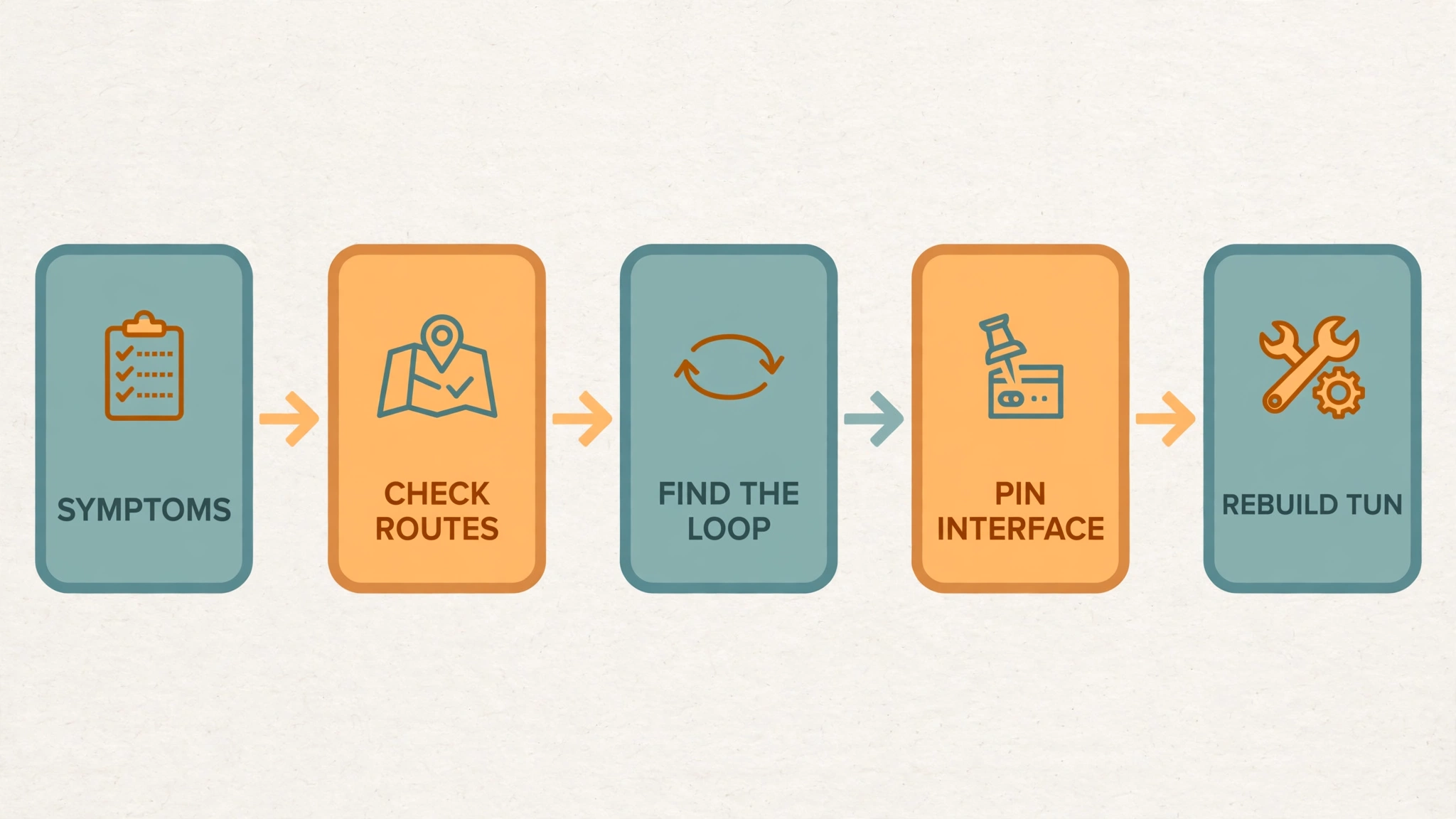
I ran a controlled A/B test — same set of “dedicated line AnyTLS” nodes, and the delay tests are started by the core itself, not by the browser, so this is a clean comparison:
| State | Hong Kong node | Japan node | US node |
|---|---|---|---|
| TUN off | 39ms ✅ | 87ms ✅ | 229ms ✅ |
| TUN on (auto-route) | FAIL ❌ | FAIL ❌ | FAIL ❌ |
After pinning interface-name | 35ms ✅ | 91ms ✅ | 230ms ✅ |
That last row is the giveaway. Here’s what was happening:
Once auto-route kicks in,
auto-detect-interface: trueguesses the outbound interface wrong — it picks TUN itself (Mihomo1). The core tries to dial the proxy servers, that traffic gets routed straight back into TUN, and round it goes. A loop. Every node fails, and it looks like “everything is down.”
It also explains something that had been confusing me: enabling auto-route at TUN runtime sometimes worked and sometimes didn’t. It just depends on when the TUN outbound interface gets bound. Race condition, basically.
The fix is all about order:
PATCH {"interface-name": "<physical NIC>"}— pin the egress first- Rebuild TUN with
auto-route - Re-confirm
interface-nameafter the rebuild, because the rebuild can shake it loose
Get the order wrong and you’re back in the loop.
6. Verge kept undoing my TUN config edits
My next idea was the straightforward one: just edit the config file and set auto-route: true there. I edited %APPDATA%\io.github.clash-verge-rev.clash-verge-rev\config.yaml — and after Verge restarted / re-applied its TUN config, the value was back to false.
Turns out service mode keeps its own TUN runtime config, and that wins:
C:\ProgramData\clash-verge-service\users\<HASH>\runtime # access deniedLesson learned: don’t fight Verge’s TUN configuration state. Keep
auto-route=falsein Verge, and patch it at runtime after TUN starts. Bonus: you never hit the “cold start with auto-route=true” failure path either.
7. The TUN watchdog script (the thing that actually fixed it)
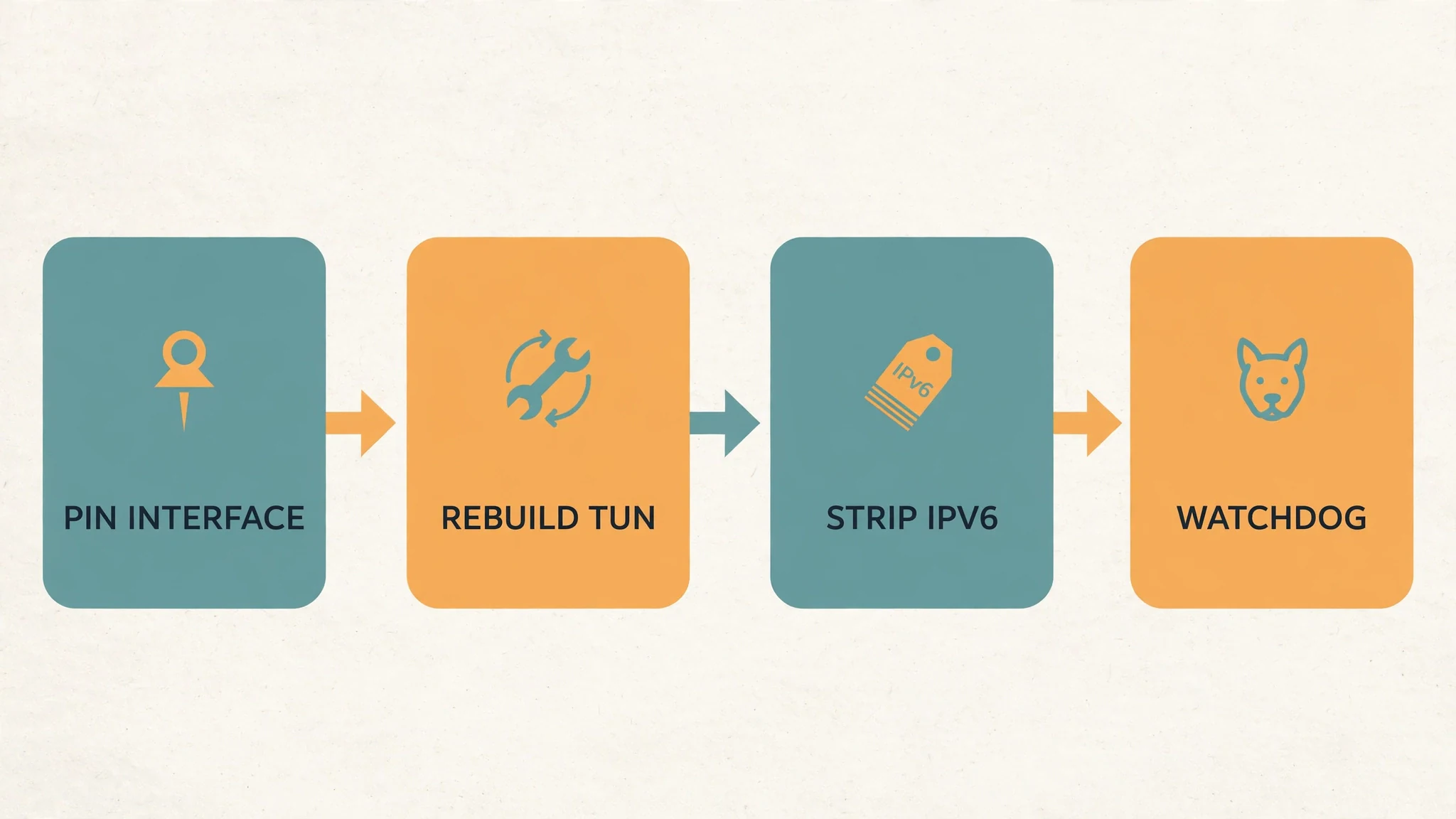
So the final design is a little TUN watchdog: a standard-privilege scheduled task → a hidden wscript launcher → a PowerShell loop that runs every 3 seconds and does four things:
- Pin the core’s outbound interface to the physical NIC (
interface-name) - If TUN is enabled but
auto-route=false: disable TUN, then rebuild it without IPv6 and withauto-route - If TUN still has IPv6 addresses: strip them
- Write a heartbeat log line every 60 seconds
7.1 Keep-TunAutoRoute.ps1
$ErrorActionPreference = 'SilentlyContinue'

$logPath = Join-Path $PSScriptRoot 'auto-route.log'
function Write-Log([string]$msg) {
    $line = '{0} {1}' -f (Get-Date).ToString('yyyy-MM-dd HH:mm:ss'), $msg
    Add-Content -LiteralPath $logPath -Value $line
}

$configPath = Join-Path $env:APPDATA 'io.github.clash-verge-rev.clash-verge-rev\config.yaml'

function Get-CoreSecret {
    $m = Select-String -LiteralPath $configPath -Pattern '^secret:\s*(\S+)' | Select-Object -First 1
    if ($m) { return $m.Matches[0].Groups[1].Value }
    return '<SECRET>'
}

function Invoke-CoreApi([string]$pipeName, [string]$method, [string]$apiPath, [string]$body, [string]$secret) {
    $pipe = New-Object System.IO.Pipes.NamedPipeClientStream('.', $pipeName, [System.IO.Pipes.PipeDirection]::InOut)
    $pipe.Connect(2000)
    $sw = New-Object System.IO.StreamWriter($pipe, [System.Text.UTF8Encoding]::new($false))
    $sr = New-Object System.IO.StreamReader($pipe)
    $bytes = [System.Text.Encoding]::UTF8.GetBytes([string]$body)
    $head = "$method $apiPath HTTP/1.1`r`nHost: localhost`r`nAuthorization: Bearer $secret`r`nContent-Type: application/json`r`nContent-Length: $($bytes.Length)`r`nConnection: close`r`n`r`n"
    $sw.Write($head)
    if ($bytes.Length -gt 0) { $sw.Write([string]$body) }
    $sw.Flush()
    $resp = $sr.ReadToEnd()
    $pipe.Dispose()
    return $resp
}

function New-TunBody($tun, [bool]$enable, [bool]$autoRoute) {
    $obj = @{
        enable                  = $enable
        device                  = $tun.device
        stack                   = $tun.stack
        'dns-hijack'            = @($tun.'dns-hijack')
        'auto-route'            = $autoRoute
        'auto-detect-interface' = $tun.'auto-detect-interface'
        mtu                     = $tun.mtu
        'strict-route'          = $tun.'strict-route'
        'inet4-address'         = @($tun.'inet4-address')
        'inet6-address'         = @()
    }
    return (@{ tun = $obj } | ConvertTo-Json -Compress -Depth 6)
}

Write-Log ("watcher started pid={0}" -f $PID)
$loop = 0

while ($true) {
    $loop++
    try {
        $secret = Get-CoreSecret

        # Physical default egress (exclude TUN itself)
        $phys = Get-NetRoute -AddressFamily IPv4 -DestinationPrefix '0.0.0.0/0' -ErrorAction SilentlyContinue |
            Where-Object { $_.InterfaceAlias -ne 'Mihomo1' } |
            Sort-Object RouteMetric |
            Select-Object -First 1
        $physAlias = $phys.InterfaceAlias

        $pipes = Get-ChildItem '\\.\pipe\' | Where-Object { $_.Name -like 'verge-mihomo*' }
        foreach ($p in $pipes) {
            $resp = $null
            try { $resp = Invoke-CoreApi -pipeName $p.Name -method 'GET' -apiPath '/configs' -body '' -secret $secret } catch { }
            if (-not $resp -or ($resp -split "`r`n")[0] -notmatch ' 200 ') { continue }

            $split = $resp.IndexOf("`r`n`r`n")
            if ($split -lt 0) { continue }
            $cfg = $null
            try { $cfg = ($resp.Substring($split + 4) | ConvertFrom-Json) } catch { continue }
            if (-not $cfg -or -not $cfg.tun) { continue }

            # 1) Pin the outbound interface first
            if ($physAlias -and $cfg.'interface-name' -ne $physAlias) {
                $body = @{ 'interface-name' = $physAlias } | ConvertTo-Json -Compress
                $r = $null
                try { $r = Invoke-CoreApi -pipeName $p.Name -method 'PATCH' -apiPath '/configs' -body $body -secret $secret } catch { }
                $first = ''
                if ($r) { $first = ($r -split "`r`n")[0] }
                Write-Log ("interface-name '{0}' -> '{1}' : {2}" -f $cfg.'interface-name', $physAlias, $first)
            }

            $restarted = $false

            # 2) TUN enabled but no auto-route: rebuild with auto-route (no IPv6)
            if ($cfg.tun.enable -eq $true -and $cfg.tun.'auto-route' -eq $false) {
                try { $null = Invoke-CoreApi -pipeName $p.Name -method 'PATCH' -apiPath '/configs' -body (New-TunBody $cfg.tun $false $false) -secret $secret } catch { }
                Start-Sleep -Milliseconds 1500
                $r = $null
                try { $r = Invoke-CoreApi -pipeName $p.Name -method 'PATCH' -apiPath '/configs' -body (New-TunBody $cfg.tun $true $true) -secret $secret } catch { }
                if ($r -and ($r -split "`r`n")[0] -match ' 204 ') {
                    $restarted = $true
                    Write-Log 'tun restarted with auto-route (no ipv6)'
                }
                else {
                    Write-Log ('tun restart failed: ' + (($r -split "`r`n")[0]))
                }
            }
            # 3) auto-route already on but IPv6 is still present: strip it
            elseif ($cfg.tun.enable -eq $true -and $cfg.tun.'inet6-address' -and @($cfg.tun.'inet6-address').Count -gt 0) {
                $r = $null
                try { $r = Invoke-CoreApi -pipeName $p.Name -method 'PATCH' -apiPath '/configs' -body (New-TunBody $cfg.tun $true $true) -secret $secret } catch { }
                if ($r -and ($r -split "`r`n")[0] -match ' 204 ') {
                    Write-Log 'stripped ipv6 from tun'
                }
            }

            if ($restarted -and $physAlias) {
                try { $null = Invoke-CoreApi -pipeName $p.Name -method 'PATCH' -apiPath '/configs' -body (@{ 'interface-name' = $physAlias } | ConvertTo-Json -Compress) -secret $secret } catch { }
            }
        }

        if ($loop % 20 -eq 0) {
            Write-Log ("heartbeat pid={0} loop={1}" -f $PID, $loop)
        }
    }
    catch {
        Write-Log ('loop error: ' + $_.Exception.Message)
    }
    Start-Sleep -Seconds 3
}
7.2 Run-Hidden.vbs (getting rid of the console window)
powershell -WindowStyle Hidden still pops up a console window — and if you close it, the TUN process dies with it (task result 0xC000013A). Launching through wscript with Run(..., 0, True) gives you no window at all, and the True makes the launcher wait for the child, so you don’t get a fresh instance spawning every minute:
Set shell = CreateObject("WScript.Shell")
shell.Run "powershell.exe -NoProfile -ExecutionPolicy Bypass -WindowStyle Hidden -File ""C:\Users\USER\AppData\Roaming\clash-tun-route\Keep-TunAutoRoute.ps1""", 0, True
7.3 Registering the scheduled task (normal privileges, no admin needed)
$script = 'C:\Users\USER\AppData\Roaming\clash-tun-route\Keep-TunAutoRoute.ps1'
$vbs    = 'C:\Users\USER\AppData\Roaming\clash-tun-route\Run-Hidden.vbs'
$user   = "$env:USERDOMAIN\$env:USERNAME"

$action    = New-ScheduledTaskAction -Execute 'C:\Windows\System32\wscript.exe' -Argument ('"{0}"' -f $vbs)
$logon     = New-ScheduledTaskTrigger -AtLogOn -User $user
$repeat    = New-ScheduledTaskTrigger -Once -At ((Get-Date).AddMinutes(1)) `
                -RepetitionInterval (New-TimeSpan -Minutes 1) `
                -RepetitionDuration (New-TimeSpan -Days 3650)
$principal = New-ScheduledTaskPrincipal -UserId $user -LogonType Interactive -RunLevel Limited
$settings  = New-ScheduledTaskSettingsSet -AllowStartIfOnBatteries -DontStopIfGoingOnBatteries `
                -ExecutionTimeLimit ([TimeSpan]::Zero) -MultipleInstances IgnoreNew `
                -RestartCount 999 -RestartInterval (New-TimeSpan -Minutes 1) -StartWhenAvailable

Register-ScheduledTask -TaskName 'ClashTunAutoRouteKeep' `
    -Action $action -Trigger @($logon, $repeat) -Principal $principal `
    -Settings $settings -Force

Start-ScheduledTask -TaskName 'ClashTunAutoRouteKeep'
7.4 The gotchas I hit along the way
| Problem | What happened | The fix |
|---|---|---|
| Chinese comments decoded as ANSI by PS 5.1 | A comment swallowed the newline, if got merged into the comment → syntax error | English comments only |
$pid is a read-only automatic variable | My sampling script errored every loop, no data at all | Use $procId instead |
@($null).Count equals 1 | An empty IPv6 array looked non-empty → PATCH every 3 seconds | Guard with $cfg.tun.'inet6-address' -and ... |
| Minute repetition spawned extra instances | Multiple watchers patching at the same time | MultipleInstances IgnoreNew + VBS True wait |
Editing config.yaml directly | Overwritten by Verge | Runtime API only |
8. IPv6: the silent killer behind UU’s “no network”
This one was sneaky. Here’s the evidence:
# System resolution returns a fake IPv6
Resolve-DnsName api.nrd.nie.163.com -Type AAAA
# 2001:2::20    <- fake-ip v6

# But the host has no usable IPv6 egress
Get-NetIPAddress -AddressFamily IPv6 | Where-Object { $_.IPAddress -notlike 'fe80*' }
# Only Mihomo1's fdfe:dcba:9876::1 and Teredo

# Yet TUN takes over IPv6
Get-NetRoute -AddressFamily IPv6 -DestinationPrefix '::/0'
# NextHop fdfe:dcba:9876::2  InterfaceAlias Mihomo1
So DNS was handing out a fake IPv6 address, the machine had no real IPv6 way out, and TUN had still grabbed the ::/0 TUN route. The symptoms were confusing until I lined them up:
ping 223.5.5.5(IPv4 through TUN) → 100% loss. Turns out mihomo TUN doesn’t forward ICMP at all.ping api.nrd.nie.163.com→ replies, because it resolves to a fake IP that TUN itself answers.Get-NetConnectionProfile→ the physical NIC showedIPv4Connectivity = LocalNetwork, and onlyMihomo1showedInternet.
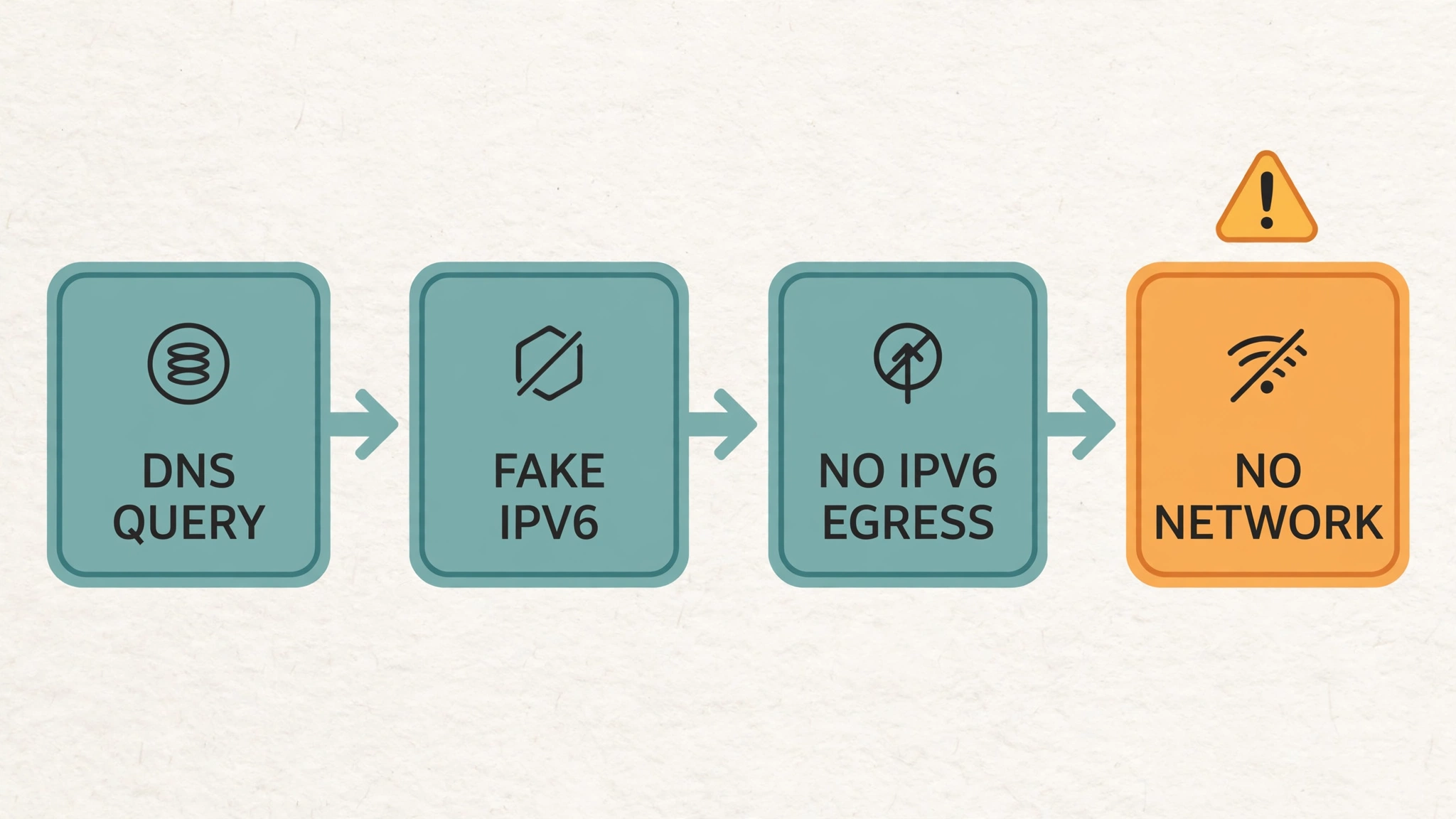
The fix has three parts:
- Disable IPv6 in Verge (
config.yaml→ipv6: false) - Let the watchdog rebuild TUN with
inet6-addressempty, and strip any IPv6 that’s already there - Result:
AAAAqueries come back empty, apps stick to IPv4, and UU works again
One more thing: the
gvisorstack is unusable on this machine — switching to it killed all connectivity. Keepstack: System.

9. UU’s “no network” had a second cause, and it’s UU’s own fault
Even with IPv6 disabled, UU Remote would still occasionally say “cannot connect to server” under TUN. Watching through the core API, the traffic itself looked fine:
GameViewer.exe        → api.nrd.nie.163.com:443   rule=DomainSuffix  chain=DIRECT  up=46KB down=24KB
GameViewerServer.exe  → api.nrd.nie.163.com:443   rule=DomainSuffix  chain=DIRECT  up=30KB down=34KB
GameViewer.exe        → nrd-file.fp.ps.netease.com:443  chain=DIRECT  down=247KB
And high-frequency netstat sampling (no admin needed) showed every TUN connection ESTABLISHED — not a single SYN_SENT:
$gv = @(Get-Process -Name GameViewer,GameViewerServer,GameViewerService,GameViewerHealthd |
        ForEach-Object { $_.Id })
& netstat.exe -ano | ForEach-Object {
    $t = ($_ -replace '\s+',' ').Trim().Split(' ')
    if ($t.Count -ge 5 -and $t[-1] -match '^\d+$' -and $gv -contains [int]$t[-1]) { $_.Trim() }
}
A pktmon capture (admin) only showed mihomo probing DNS servers over ICMP — nothing from UU at all:
pktmon filter remove
pktmon filter add NET_TCP  -t TCP
pktmon filter add NET_UDP  -t UDP
pktmon filter add NET_ICMP -t ICMP
pktmon start --capture --pkt-size 96 --file-name "$env:TEMP\uu_net.etl"
# …reproduce the issue…
pktmon stop
pktmon etl2txt "$env:TEMP\uu_net.etl" -o "$env:TEMP\uu_net.txt"
pktmon filter remove
The clincher: when I added proxy rules for nie.163.com / ps.netease.com, UU connected successfully (latency and stability were mediocre, but it connected). That proves it was getting stuck on the “direct connection to NetEase’s Cloudflare endpoint” leg.
So this last bit is UU’s own application-layer network detection (local adapter enumeration / P2P probing) misfiring under TUN. You can’t properly fix that from the Clash side.
The practical answer: turn TUN off while you’re using UU Remote. Or add proxy rules for those two domains and accept the extra latency.

10. The TUN setup that finally works
| Item | Value |
|---|---|
Verge enable_tun_mode | On |
Verge auto-route (Auto Route) | Off |
Verge ipv6 | Off |
| TUN stack | system |
interface-name | Pinned to the physical NIC by the script |
| TUN default route | Hot-patched by the script (0.0.0.0/0 → 198.18.0.2) |
| TUN IPv6 | Stripped by the script (no ::/0, no fdfe: address) |
| Watchdog task | ClashTunAutoRouteKeep — logon trigger + 1-minute self-check + restart on failure |
| UU Remote | Turn TUN off while using it |
11. The commands I keep coming back to
# TUN and routes
Get-NetAdapter -Name Mihomo1
Get-NetRoute -AddressFamily IPv4 -DestinationPrefix '0.0.0.0/0'
Get-NetRoute -AddressFamily IPv6 -DestinationPrefix '::/0'
Get-NetIPAddress -InterfaceAlias Mihomo1 -AddressFamily IPv4
Get-DnsClientServerAddress -InterfaceAlias Mihomo1 -AddressFamily IPv4

# Is fake-ip in effect?
Resolve-DnsName www.google.com -Type A -QuickTimeout

# Direct vs system proxy
curl.exe -s -m 10 -o NUL -w "%{http_code}`n" https://www.google.com
curl.exe -s -m 10 -x http://127.0.0.1:7897 -o NUL -w "%{http_code}`n" https://www.google.com

# Watchdog health
Get-Content "$env:APPDATA\clash-tun-route\auto-route.log" -Tail 5
Get-ScheduledTaskInfo -TaskName 'ClashTunAutoRouteKeep'
Get-CimInstance Win32_Process | Where-Object { $_.Name -eq 'wscript.exe' -and $_.CommandLine -like '*Run-Hidden.vbs*' }
12. Rolling it all back
Unregister-ScheduledTask -TaskName 'ClashTunAutoRouteKeep' -Confirm:$false
Remove-Item "$env:APPDATA\clash-tun-route" -Recurse -Force
And restore the rules enhancement file (profiles\<RULES_UID>.yaml) to empty:
prepend: []
append: []
delete: []
13. What I took away from all this
- “Enabling auto-route kills the network” is not auto-route’s fault. It’s
auto-detect-interfacebinding egress to TUN and creating a dial-out loop. - Order matters. Pin
interface-namefirst, then rebuild TUN. Pinning after TUN is already up often just doesn’t take. - Don’t fight Verge’s TUN config state. Direct edits to
config.yamlget overwritten; runtime API patching is the reliable way. - TUN doesn’t forward ICMP, so any app that pings to check “am I online?” can falsely report no connectivity.
- Fake IPv6 is a silent killer. With no IPv6 egress, TUN still owns
::/0, and anything that prefers IPv6 breaks quietly. - Watchdog processes have to be windowless. A console window can be closed by accident; use
wscript+Run(..., 0, True). - No Chinese comments in PowerShell 5.1 scripts. They can cause truly bizarre syntax errors thanks to ANSI decoding.
Comments
Join the conversation. Comments are reviewed before appearing.
Loading comments…