Tag context. “SEO meta tags” sounds like a form to fill in. It isn’t. Each tag does one job: identifying a page, organising its content, explaining an image, controlling indexing, unifying duplicate URLs, or presenting a shared link. Fill them in without knowing the jobs and you get a page that describes itself badly in six different places.
This lesson takes the tag signals in order — task first, versions second, presentation last — and checks each one against the real page behind it. The thread: explain the task, align the versions, check the presentation.
Ten tag signals with different jobs
Titles, headings, alt text, link relations, and structured data aren’t all technically meta elements. They belong together anyway, as a practical tag page-delivery checklist. Start with the jobs, not the tag syntax.
| Signal | Main purpose | Common tag mistake |
|---|---|---|
| Title, description | Explain the subject, help searchers decide to click | Treating tag length guidance as a hard limit; expecting an unchanged snippet |
| Headings, image alt | Express content hierarchy and image meaning | Choosing headings for font size; stuffing keywords into alt text |
| Link relations, robots | Describe link tag relationships and indexing intent | Using nofollow to block crawling; robots.txt as reliable index exclusion |
| Canonical, structured data | Identify preferred URLs; describe structured entities | Canonicalizing every page to the home page; inventing ratings |
| Social tag metadata, viewport | Sharing previews; mobile layout support | Expecting traffic, or a complete responsive design, from tag presence alone |
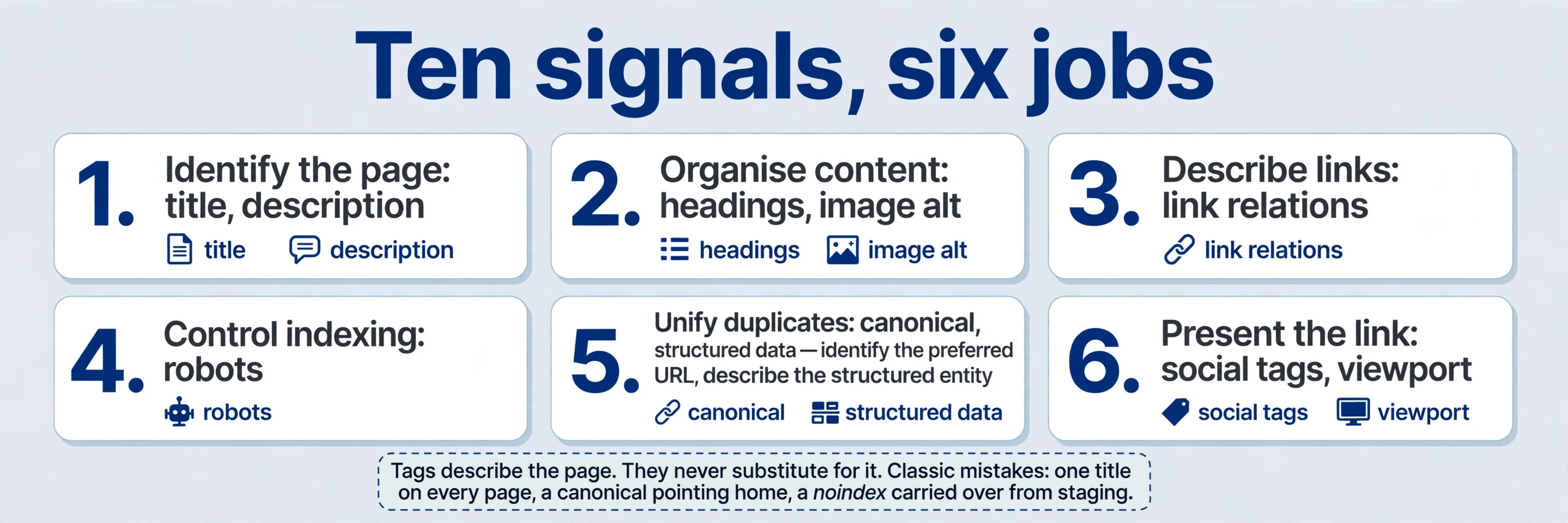
Read the table as a tag set of promises. The title promises a task. Headings promise an order. Alt text promises a tag description. The canonical promises which address counts. Structured data promises facts. Every promise gets checked against the page itself later in this lesson. Every tag describes the page. They never substitute for it.
Tag review. Run this tag checklist whenever a new template or page type ships, not once per site. Templates fail in bulk: one wrong default — the same title on every page, a canonical pointing home, a noindex carried over from staging — repeats across hundreds of URLs before anyone notices. Checking the tag signals on the template’s first real page catches the default. Checking them a year later means fixing hundreds of copies.
Tag: Tell readers what this page delivers
Tag review. Four queries, one task. “File type detector,” “file type checker,” “file extension detector,” and “file extension checker” express similar needs, and one archived page appeared for all four. The tag lesson: serve related expressions through one accurate subject. Don’t cram every variant into a title, and don’t duplicate an identical page for each phrase. People describe the same job in different words. Judge the job, not the wording.
Tag context. Separate pages earn their existence with a distinct task or deliverable. A file-type detector that identifies a tag format and a file-extension list that explains extensions are different jobs. Four wordings of the same detection job are one page with natural wording that covers the expressions as they arise. When in doubt, ask what the visitor does differently on each proposed page. If the answer is nothing, it’s one page. Judge the job, not the wording.
Give each page a distinct, natural title. Put the task early, and the brand later if it belongs there at all: “PNG to JPG Converter — Example Tools.” Title patterns follow page types:
| Page type | Title pattern | Example |
|---|---|---|
| Home | Product and its main promise | “Example Tools — Convert, Calculate, Generate in the Browser” |
| Category | Task group, plainly named | “Image Converters” |
| Tool | Task first, brand last | “PNG to JPG Converter — Example Tools” |
| Detail | Specific item, specific terms | “HEX #FF0066 to RGB — Colour Conversion Example” |
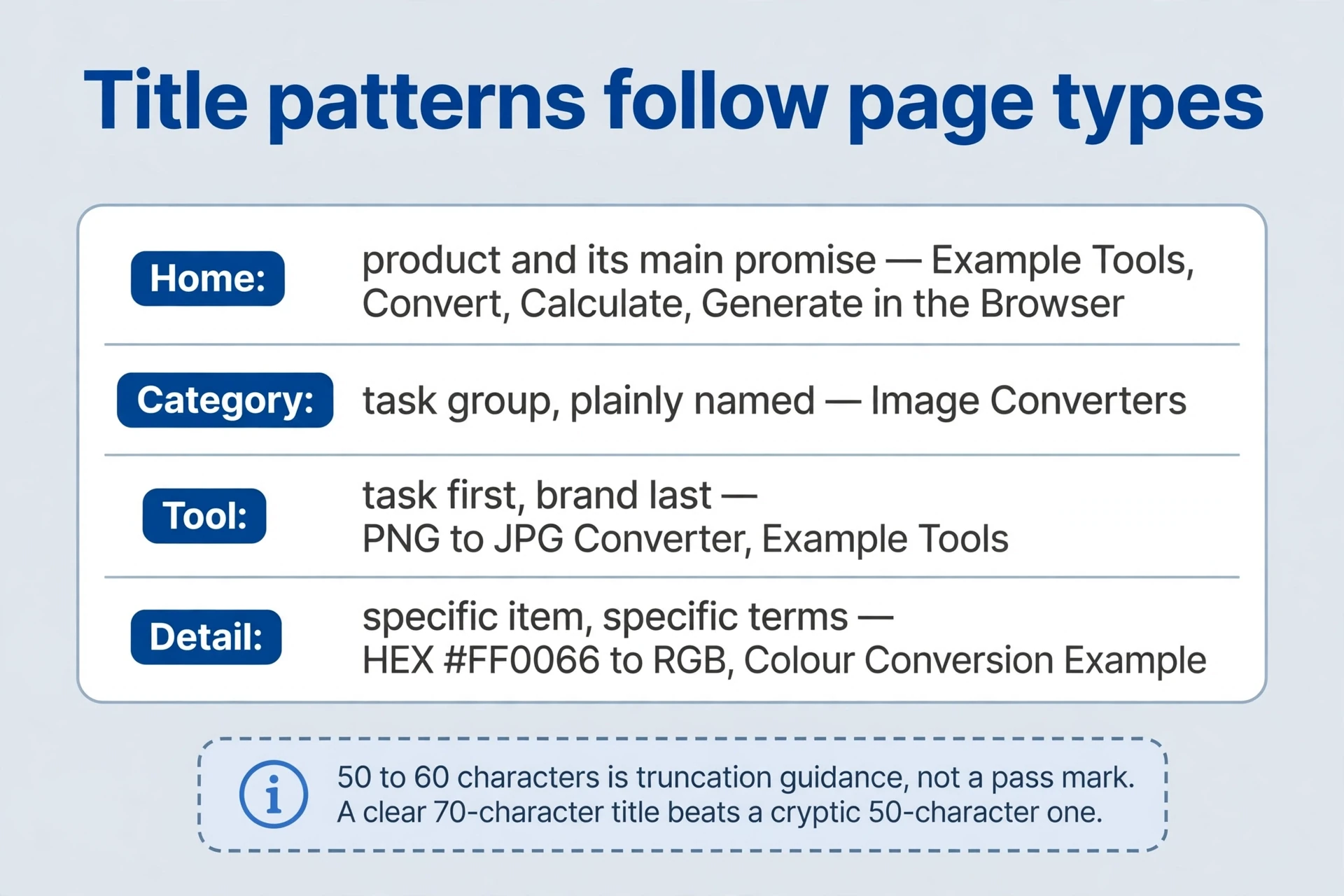
Tag evidence. The archive’s 50–60 characters is tag truncation guidance — titles get cut off around there in many displays — not a pass–fail limit. A clear 70-character title beats a cryptic 50-character one. And a third-party “15% ranking weight” for titles is an estimate from outside, not an official fixed weighting. Don’t build decisions on it.
The tag description answers why the visit is worthwhile. One or two concrete sentences about inputs, outputs, use tag cases, or differences: “Convert PNG to JPG in your browser, preview the result, and download it with your chosen background.” Compare a vague version — “Best free online converter tool, fast and easy, try now” — and the difference is obvious: the first tells you what happens, the second tells you nothing. Study competitors’ tag information structure — what they explain first, what they leave out — without copying their words. The suggested 150–160 characters is tag guidance too; snippets may pull other query-relevant text from the page instead. More tag description text means no higher ranking by itself. Relevance and accuracy do the tag work.
Write the pair together and read them as a searcher would. Title: what is this? Tag description: why click? If either one promises something the page doesn’t deliver, fix the page or fix the promise. The pair is the smallest contract on the page.
Plan the structure before choosing each heading tag
Tag context. The title identifies the document. The H1 is its visible main heading. They may match, or each may be tailored to its context — the title for tabs and result pages, the H1 for the person who just arrived. Use one clear main H1 as an editorial convention, H2 for major sections, H3 for substeps. That aids reading and maintenance. Multiple H1 elements don’t inherently trigger a penalty — but one main heading keeps the page’s subject unmistakable. Use informative headings rather than empty tag chapter numbers or a hierarchy driven by font size. If a heading only makes sense with the number in front of it, rewrite the heading.
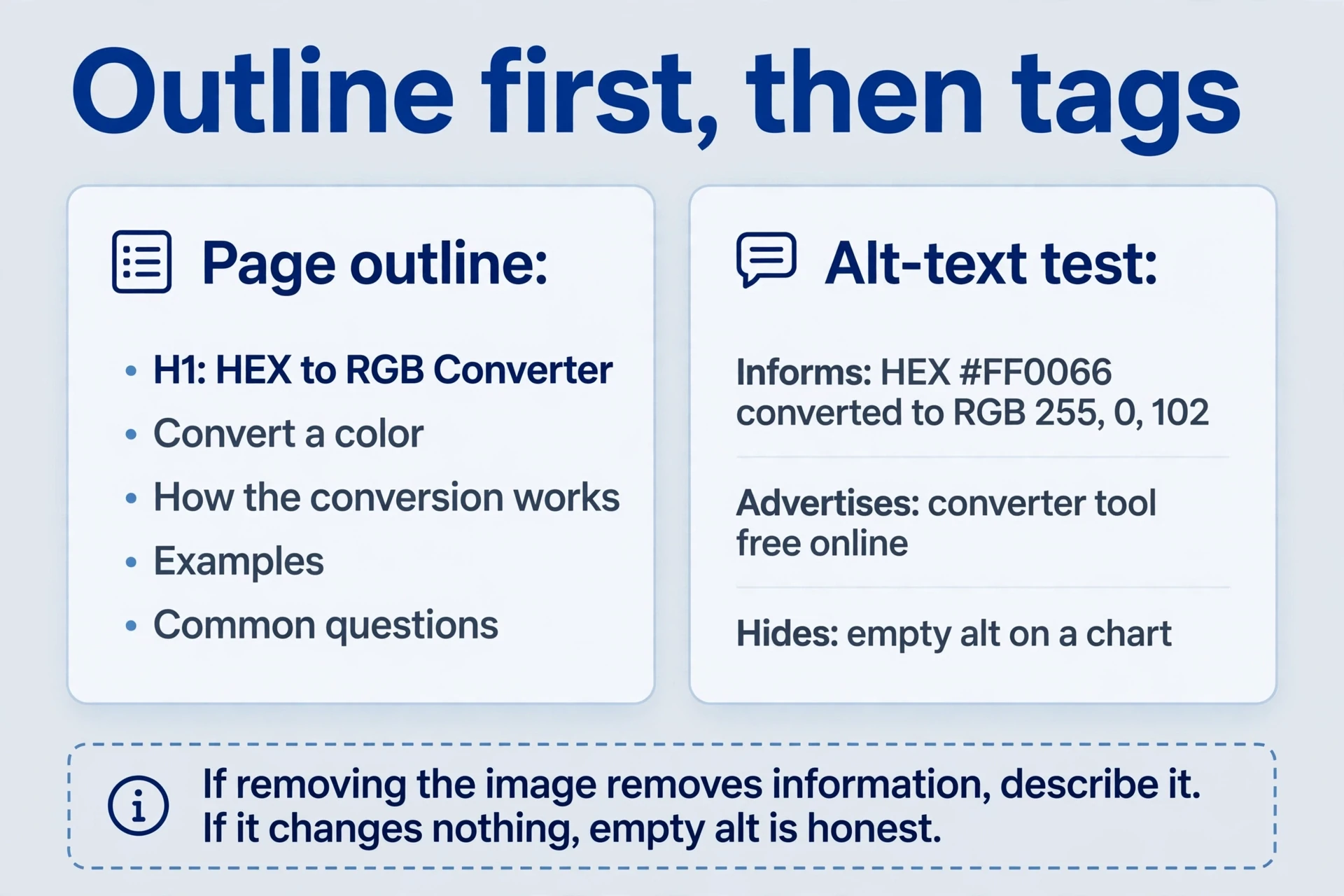
Plan the outline before tag selection. Take the colour converter: H1 “HEX to RGB Converter,” then sections — “Convert a color,” “How the conversion works,” “Examples,” “Common questions.” Each section answers its own tag question. A contents list up top helps readers tell action areas from explanations at a glance, and it doubles as the page’s own map. The outline is the structure; each tag marks it. A plugin can reveal the heading distribution of any page, but only reading the page tells you whether the tag structure makes sense. If two sections answer the same tag question, merge them. If one section answers three, split it. The outline does the thinking; each tag records it.
Tag context. Image alt text follows the same principle: explain what the image contributes, in context. It provides an alternative when images fail, serves screen-reader users, and helps describe the image to search engines. Prioritise informative product images, tag examples, and diagrams. Write what the image shows and why it matters here:
<img src="hex-rgb-example.png" alt="HEX #FF0066 converted to RGB 255, 0, 102">Tag evidence. That alt text states the tag example’s result. Compare the failure modes: stuffing keywords (“best free online hex rgb converter tool 2024”) describes nothing in the image; repeating the page title wastes the space; leaving an informative image’s alt empty hides it from people who need it. Decorative images — dividers, background flourishes, icons that repeat adjacent text — can carry empty alt text. The test is contribution: if removing the image removes information, describe it. If removing it changes nothing, empty alt is honest. Three versions of the same diagram alt make the tag rule concrete: “HEX #FF0066 converted to RGB 255, 0, 102” informs; “converter tool free online” advertises; "" on a chart hides. Write the first kind.
Separate tag link relationships from indexing instructions
Tag context. Three mechanisms get tangled constantly: tag link attributes, robots meta directives, and robots.txt. They address different problems, at different scopes. Keep them in separate boxes. The confusion usually starts with one vague wish — “keep this out of search” — applied to the wrong mechanism. Name the actual problem first: is it a link you don’t vouch for, a page you don’t want listed, or a path you don’t want fetched? Each answer picks a different box.
| Mechanism | Scope | What it does | Classic misuse |
|---|---|---|---|
Link attributes (rel) | One link | Qualifies the tag relationship between this page and its target | Nofollow on internal links, hoping to shape crawling |
| Robots meta | The current page | Requests indexing behaviour for this page (noindex, and others) | Expecting it to work when fetching is blocked |
| robots.txt | Crawling of paths | Tells crawlers which paths not to fetch | Treating it as access control or reliable index exclusion |
Tag context. Start with links. Nofollow, noopener, and noreferrer get combined often and serve different tag purposes. Nofollow qualifies a link for search processing. Noopener concerns the new window’s tag relationship to its opener — a security and performance matter. Noreferrer suppresses referrer information, which can affect attribution. Use ordinary crawlable links for internal navigation. Nofollow doesn’t organise a site; it qualifies one link’s tag relationship, and the target can still be discovered through other routes. Nofollowing your own navigation to “sculpt” crawling is an old habit with no reliable payoff: the pages still get found through sitemaps, external links, and direct submission, while the internal map you meant to guide the crawler goes unread. Spend the effort on a tag navigation structure that makes sense to people, and let crawlers walk it.
Use rel="sponsored" for paid or sponsored links, rel="ugc" for user-submitted links, and nofollow for other cases where you want to qualify a tag relationship. Combinations are allowed — the tag examples below are the normal shapes:
<a href="https://example.com/sponsor" rel="sponsored noopener" target="_blank">Example sponsor</a>
<a href="https://example.com/user-resource" rel="ugc nofollow">Community resource</a>
Tag context. Pick the tag attribute by asking why the link exists. Money changed hands? Sponsored. A user posted it? UGC. You can’t vouch for it and prefer no association? Nofollow. An ordinary helpful reference needs no qualifier at all. When a link fits two boxes — a sponsored post containing user comments, say — combine the tag attributes rather than picking one and dropping the other. The tag attributes describe relationships; a link can have more than one.
A robots meta directive applies to the current page: noindex requests exclusion from the index.
<meta name="robots" content="noindex">Tag review. Root-level robots.txt primarily controls fetching. A blocked fetch may prevent the engine from ever seeing a page’s noindex — the directive sits behind the door you just locked. Private areas need access controls, not search labels. A login gate keeps people out; noindex only asks a search engine not to list the page. Confusing the two leaves genuinely private content one leaked link away from exposure. Public previews or low-value result pages can use noindex according to their intended tag purpose: a share preview that duplicates the real page, a results page with no standalone tag value.
Tag review. Write the intended state first, in plain words: “Index the public converter; exclude the login-success page.” Then implement it, then inspect production responses and confirm each URL behaves as intended. Three steps, in that order — state, implement, inspect — because each catches a different failure: a missing decision, a wrong implementation, a leaked staging setting. Watch one leak in particular: preview noindex settings slipping into public templates. Staging configurations have a habit of following code into production. And don’t clear every exclusion just to reduce console notices. Notices describe states; the intended state decides which ones matter.

Tag: Unify multiple URLs for the same page
Tag planning. One page can easily appear at several addresses: www versus the bare domain, /guide/ versus /guide/index.php, http versus https, upper- versus lower-case paths, session identifiers, or the same page with referral parameters attached. Each variant is a separate address for the same content, and each can gather its own links and impressions. A canonical declares the preferred URL among duplicate or very similar content. It doesn’t redirect a browser — visitors stay where they landed. Use a redirect when the old address should actually send visitors elsewhere. Canonical is a suggestion about identity. A redirect is a tag instruction about movement. Choose by asking what the visitor should experience: stay here but count elsewhere (canonical), or go there (redirect).
<link rel="canonical" href="https://example.com/guide/">Tag planning. Choose a primary host and URL tag format, then consolidate deprecated variants with appropriate permanent redirects. Where referral parameters remain useful for attribution, declare the parameter-free canonical — the parameter can stay in the address people share, while the canonical names the clean version. Align internal links, the sitemap, and canonicals on the same addresses. These are tag signals, not commands: the engine can choose another version. Consistency raises the chance it chooses yours. Mixed tag signals — sitemap saying one address, internal links another, canonical a third — force the engine to guess, and guesses don’t always match your preference.
Tag context. The serious tag template mistake is canonicalizing every page to the home page. /guide/hex-to-rgb/ and /pricing/ serve different tasks; declaring the home page as their representative confuses distinct tag content signals. Give each independently useful page its own appropriate canonical. Pagination, filters, and languages shouldn’t be merged merely because they belong to one site. Each variant needs its own answer to “which address represents this content?” A paginated series points at itself page by page; a filtered view that adds nothing new points at the unfiltered version; a language version points at itself, with hreflang to its siblings.
| Visited URL | Content tag relationship | Preferred canonical |
|---|---|---|
https://example.com/tool/?ref=reddit | Only the referral parameter differs | https://example.com/tool/ |
https://example.com/tool/index.html | The same tool as /tool/ | Use /tool/ consistently; redirect the old form if retired |
https://example.com/zh/tool/ | Distinct Chinese content; English is at /tool/ | The Chinese /zh/tool/ URL, with separate language annotations |
https://example.com/pricing/ | Pricing is not a copy of the home page | /pricing/, not the home page |
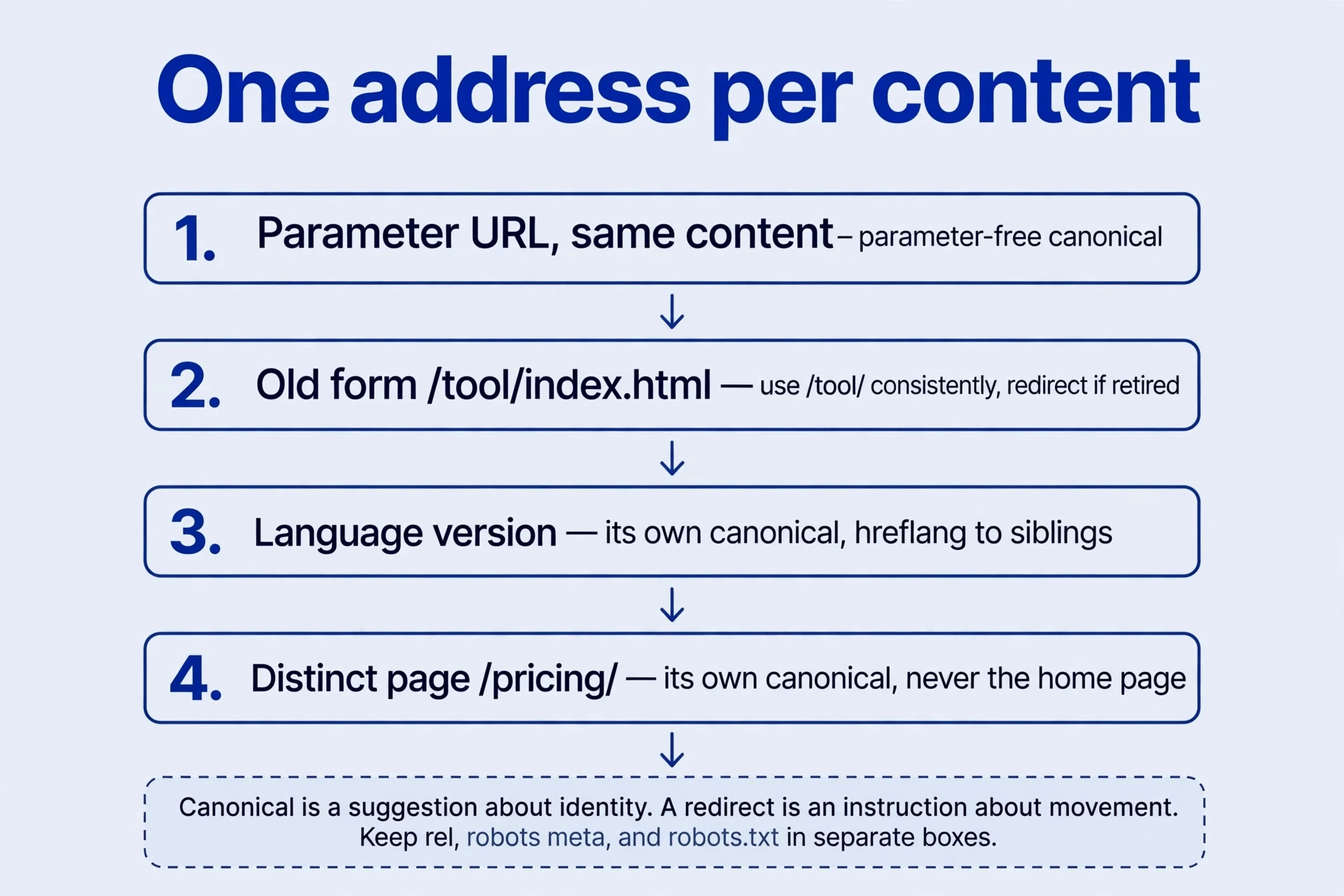
Tag context. Language versions deserve their own paragraph, because they’re the most common place this goes wrong. Chinese and English pages should not all canonicalize to English merely to “consolidate authority.” Each language version normally uses its own language’s canonical, with hreflang annotations connecting equivalents. Don’t strip language paths. Don’t copy arbitrary tracking parameters into canonicals. And compare declared canonicals against the engine’s selected canonicals in the search console — a gap between the two is a diagnostic, telling you the tag signals disagree somewhere. When the engine selects a different canonical than you declared, read it as information: the content may be closer to another version than you think, or a tag signal elsewhere contradicts your declaration.

Tag context. Correct canonicalization can consolidate tag link signals for duplicates. But a missing tag doesn’t automatically waste every backlink: engines identify duplicates themselves, using content and link tag signals. The older discussion of www versus bare domain and cookies concerns architecture — hosting, cookies, subdomains — not an SEO advantage for either form. Pick one, stay consistent, and make the destination correct. Consistency and a correct destination are the practical priorities. Everything else is commentary.
Tag: Connect structured data, sharing, and mobile display
Use the search-appearance and structured data guide to decide which features require markup and which follow page structure. For a visual landing page, continue with the image-search journey and check the preview, surrounding explanation, and action after the click together.
Tag review. Structured data expresses entities already present on a page — names, images, product information — in a machine-readable shape. A markup helper walks through the steps: enter a URL, choose a type, select content, generate JSON-LD, tag review before insertion. The helper creates tag syntax. It can’t establish type suitability, factual accuracy, or current rich-result eligibility. Those are your judgments, and the tag review step is where they happen. Check every tag field against something visible on the page. A rating nobody gave, a price nobody charges, an event that doesn’t exist — invented tag fields are the classic abuse, and they describe a page that doesn’t exist. Review in three passes: does the type fit what the page is? Does each tag field match a visible fact? Is the result type still eligible for enhanced display? A helper answers none of the three. You do.

Tag evidence. Social preview tag metadata describes shared-link previews through titles, tag descriptions, URLs, and images. Open Graph and the social card tag settings serve that one context: a link unfurled in a feed or a message. Their wording can differ from search metadata, legitimately. A search title can name the task directly, while a social title can describe a personal creation — “My sunset palette” versus “HEX to RGB Converter.” Different audiences, different promises. The archived screenshots from one writing tag tool show fields mapped to a social preview; the mapping is the tag lesson, not the tool. Validate the actual preview with the platform’s preview tool rather than assuming tag presence proves correct presentation. A broken image URL or a mismatched title shows up in the preview, not in the HTML. Preview images need absolute URLs and sensible dimensions — a relative path or a tiny icon renders as a grey box, and nobody clicks a grey box.
<meta property="og:title" content="HEX to RGB Converter">
<meta property="og:description" content="Convert, preview, and copy a color.">
<meta property="og:url" content="https://example.com/hex-to-rgb/">
<meta property="og:image" content="https://example.com/share/color-preview.png">
<meta name="twitter:card" content="summary_large_image">
<meta name="viewport" content="width=device-width, initial-scale=1">
Tag evidence. The viewport tag tells the browser how to establish a device-width viewport. The common setting — width=device-width, initial-scale=1 — still needs suitable typography, images, tools, and tables. A tag doesn’t lay pages out. Complete an operation on a narrow screen as the test: reach the button, read the result, convert a colour, without excessive horizontal movement. If the tool works but the table forces sideways scrolling, the viewport tag did its job and the layout didn’t do its. A third-party “5% mobile friendliness weight” is another outside estimate, not a calculable return on a tag. Mobile-friendliness is a property of the working page, measured by completing tasks on a phone.
Review the tag signals for one complete page
Five tag questions, worked against one page — the colour converter, or any page you own. Answer each from the live page, not from memory.
-
Do four synonymous queries need four pages? Compare intent first. If all four request file-type detection, one complete tool page can cover the expressions naturally, using the wording as it arises. Separate pages need a distinct task or deliverable. Duplicating the page four times splits the tag signals and the maintenance for no new capability. The tag intent check comes before any tag writing.
-
How should a referral variant be canonicalized? If the parameter doesn’t change the content, declare the parameter-free tool URL and align internal links and the sitemap on it. Attribution can retain the parameter in shared addresses; the canonical doesn’t redirect the browser, so nothing breaks. Check the console afterward: declared and selected canonicals should agree.
-
Should a translated page canonicalize to English? Not in this tag example. Each language has its own complete content and its own canonical, with hreflang linking equivalents. Pointing all versions to English asks for consolidation where separate language visibility is intended. The Chinese page serves Chinese readers; its canonical says so.
-
How should a public preview be excluded? Apply noindex according to the intended state, and ensure the directive can be read — don’t block fetching and expect an unseen directive to work. Use access controls for genuinely private material. A preview page that anyone can open isn’t private; it’s public content you’ve asked not to index. Keep those two ideas apart.
-
Is a complete tag set enough for acceptance? Check correspondence with the actual page: content on each URL, sharing previews, mobile task completion. Tag signals describe the page; they can’t substitute for it. A page with perfect tag coverage and a broken tool fails acceptance. A page with a working tool and sloppy tag settings fails it differently — people can’t find it, or find the wrong version. Both failures ship regularly, because tag settings get reviewed by one person and the tool by another, and nobody owns the correspondence between them. The tag checklist above is that ownership, written down.
Run the full tag check as a table before calling a page done:
| Check | Pass looks like |
|---|---|
| Title and tag description | Task named early; description states inputs, outputs, differences; both match the page |
| Headings and alt | One clear H1; sections answer their headings; informative images described, decorative images empty alt |
| Link relations and directives | Sponsored and user links qualified; internal links crawlable; noindex readable where intended, fetch unblocked |
| Canonical and language | One preferred URL per content; language versions canonicalize to themselves, hreflang connects equivalents; declared and selected canonicals agree |
| Structured data and sharing | Every tag field matches a visible fact; social preview validated; no invented ratings or prices |
| Mobile operation | Full task completable on a narrow screen; button reachable, result readable, no sideways scrolling |
Each tag is a promise. Keep every one of them, and the page behind them stops being a collection of tag signals and starts being one thing, described accurately, at one address, in each language it serves. That’s the whole job.
Comments
Join the conversation. Comments are reviewed before appearing.
Loading comments…