Your page opens fine. You see the heading, the explanation, the tool, the links. That proves the browser can display it. It proves nothing about what arrived first — and what arrives first is what crawlers, feeds, and plenty of other readers meet.
This lesson follows one request from the moment you enter a URL to the finished page, compares the ways content can arrive, and ends with rendering delivery requirements you can hand to a developer and test yourself. The thread is simple: inspect the response, compare the rendering, define the delivery.

Rendering: One request, step by step
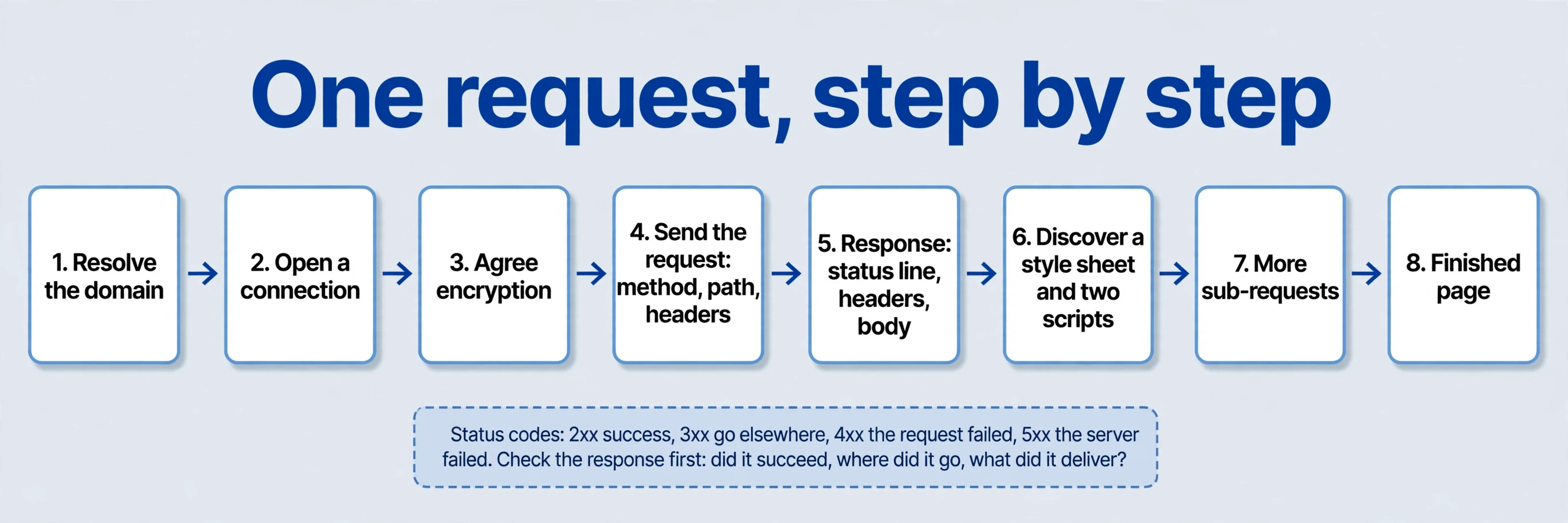
Enter a URL and the browser requests a resource from its server. The server answers with three things: a status, headers, and content. The browser interprets that content, then retrieves the other resources the page needs — styles, scripts, images — and displays the rendering result. A server can also request data from another server’s API in the middle of all this. Client and server describe roles in one exchange, not fixed kinds of hardware. The same machine can play either role at different moments. Your laptop is a client when it loads a page and a server when it shares a local preview with a colleague.
Before the request even starts, the browser resolves the address: turning the domain name into a network address, opening a connection, and — on an encrypted connection — agreeing the encryption first. Only then does the request go out, carrying the rendering method, the path, and headers describing what the browser accepts. The response comes back the same way: a status line, headers describing the content type, caching rules, and redirects, then the body itself. The browser reads the body, discovers it needs a stylesheet and two scripts, and sends more requests. That waterfall — first response, then sub-requests, then the finished page — is where rendering delivery problems hide. A page can stall at any step: slow address resolution, a redirect chain, a blocked script, a data request that never answers.
Two kinds of connection get confused here, so keep them apart. Cables, fibre, and wireless networks let devices communicate. Hyperlinks connect content hosted across different sites. The first moves data. The second organises meaning. A search engine receives no complete directory of the web. It discovers URLs, requests content, and maintains its own databases — which is why everything in the last lesson about entry points mattered. A server, in the end, is simply a computer providing a service.
GET is the common rendering method for retrieval; POST for submitting data — though each interface defines its own rendering methods, and the names alone settle nothing. A tool’s conversion endpoint might accept a POST with the input text and return the rendering result; the page describing the tool is fetched with a GET. Same exchange pattern, different jobs.
One simplification in the older material needs correcting: HTTP doesn’t mean all data travels as plain text. HTML is commonly text, but a response body can carry binary images directly, with no mandatory conversion step. HTTP/2 uses binary framing throughout. HTTPS wraps the whole exchange in encryption. The protocol carries what the page needs. The question that matters for search is narrower: what the first response contains?
Status codes tell you how that first exchange went. The 2xx family means success. 3xx means go elsewhere — a redirect. 4xx means the request itself failed, like a missing page. 5xx means the server failed. You don’t need to memorise the catalogue. You need the habit: before debating content, check whether the response succeeded, where it redirected, and what it actually delivered. A page returning errors has no content problem — it has a delivery problem, and no amount of wording fixes it.
Content can arrive at different rendering stages
Picture a photo-to-sticker page: an explanation, an upload form, and related creations. Two builds can end up looking identical in the browser while delivering content at completely different moments. Server rendering or static generation puts headings, explanations, and links into the initial HTML. Client rendering first returns a container and scripts, which then fetch data and build the page in the browser. Same screen in the end. Different rendering delivery paths getting there.
| Approach | When the main content is created | Suited to |
|---|---|---|
| Static generation | HTML generated at build time, served on request | Guides, directories, relatively stable tool descriptions |
| Server rendering | The server generates HTML per request | Pages needing current data plus useful initial HTML |
| Client rendering | Browser scripts build content, sometimes after further data requests | Keeping interaction, while validating how target crawlers process public content |
| Hybrid rendering delivery | Text arrives first; scripts handle operations and updates | Tools with stable explanations and links plus interactive upload, calculation, or preview |
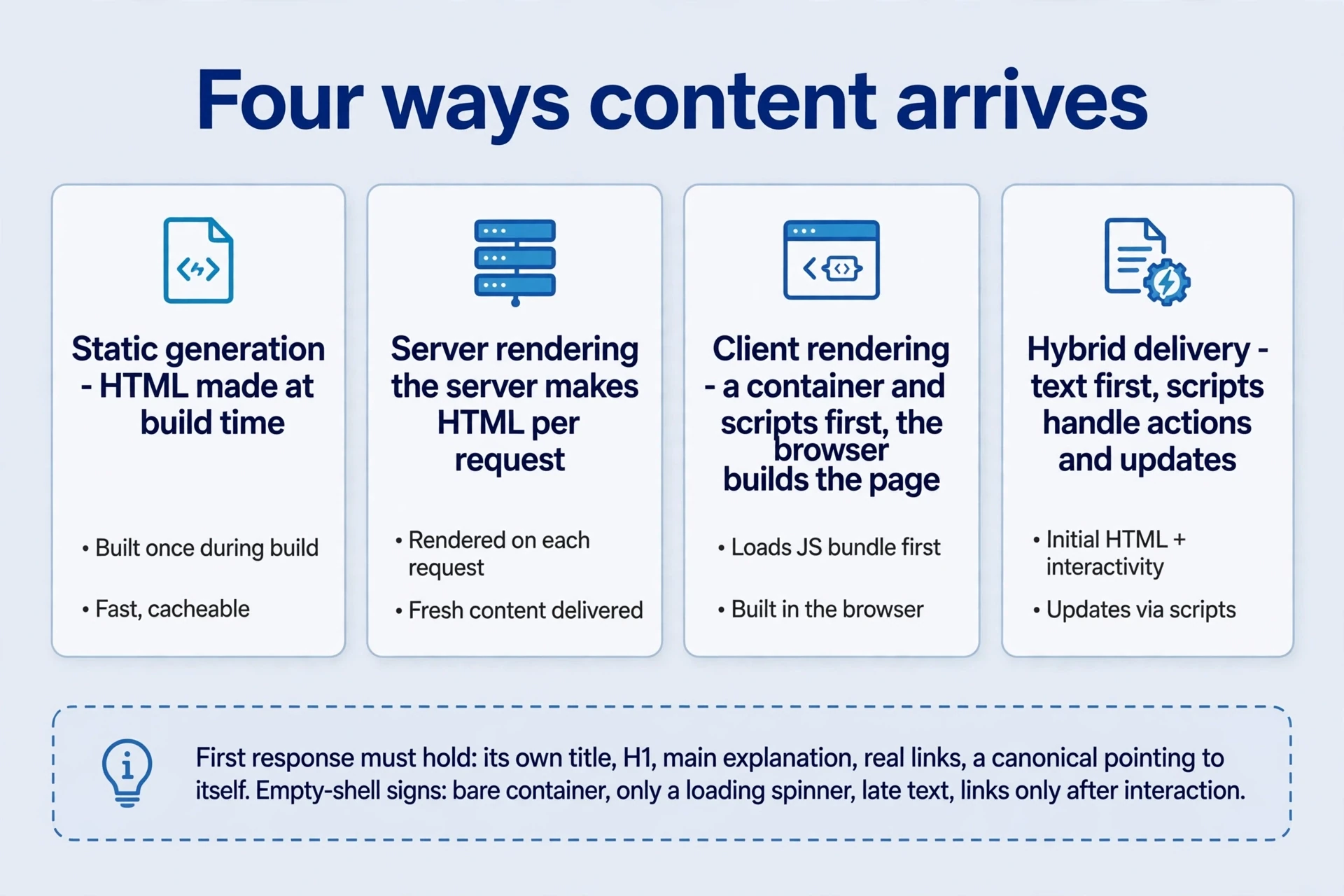
Run the sticker page through all four. Static generation bakes the explanation, the steps, and the example gallery into HTML at build time; the upload interaction still runs in the browser. Server rendering builds the same HTML fresh per request, so a counter or a fresh example can stay current. Client rendering ships a shell and lets scripts fetch the explanation and the gallery — the visitor waits, briefly, for content that could have arrived immediately. Hybrid rendering delivery sends the explanation and links first, then scripts take over the upload, the conversion, and the preview. Most real products mix these. The label matters less than the first response.
Walk the hybrid version moment by moment, because it’s the one most tool sites should aim for. First paint: the heading, the explanation, the steps, the example gallery, the links — all readable, all in the HTML. Then the scripts arrive: the upload button wakes up, the drag zone activates, the conversion runs when the visitor acts. If scripts fail, the visitor still reads the page and follows the links. If scripts succeed, the tool works on top of a complete page. That ordering — content first, interaction second — is what makes a page robust for every reader, not just the ones with perfect script execution.

Here’s the trap: judging rendering delivery by framework names. Having no dedicated backend doesn’t mean content must wait for browser JavaScript — static hosting can serve complete HTML. And an application with a large backend can still return an empty shell. Ask what the first response contains. Open it, read it, search it. Framework names tell you how the team builds. The first response tells you what the reader receives.
What should you find in that first response? The page’s own title. Its H1. The main explanation in readable text. Real links to related pages. A canonical address pointing at itself. If those five are present, the page arrives as a document. If they’re missing, it arrives as a promise that scripts may or may not keep. The empty-shell symptom list is short and recognisable: a bare container element, a loading spinner as the only content, text that appears only after a visible delay, links that exist only after interaction. Any one of those means the first response failed the page.
So which approach for which page? Public pages that explain, describe, or list — home, features, guides, directories — earn their keep from readable initial HTML. Interactive workspaces — editors, dashboards, signed-in projects — earn theirs from interaction, and can lean on scripts. The mistake is applying one default everywhere: scripting the public pages that should arrive readable, or server-rendering an editor nobody needs to crawl. Match the rendering delivery to the page’s job.
Rendering: The JavaScript warning, read accurately
One piece of older advice urged teams to specify search requirements before building, so public content depending on client scripts causes no surprises. That project-management advice still holds. Agree the rendering delivery before building, not after launch. What doesn’t hold is the categorical claim attached to it — that the search engine doesn’t execute JavaScript for small sites. The search engine executes JavaScript. Official JavaScript search documentation describes crawling, rendering, and indexing, including script execution. The correction matters because the false claim pushes teams toward the wrong fixes: either avoiding JavaScript entirely, or assuming rendering will never happen and giving up on checking.
Agreeing rendering requirements before building means writing down, per page type, what must arrive in the first response and what may run in scripts. The content inventory: which headings, explanations, and links are public and must be readable immediately. The rendering approach per page type: static for guides, hybrid for tools, script-led for workspaces. The rendering acceptance test: the three inspections from the next section, run on named URLs, with named pass conditions. And an owner: who reruns the rendering checks after each release. A paragraph in a shared document beats a meeting where everyone nods and nobody writes anything down.
In practice, check four things. Resource and API availability: do the scripts, styles, and data endpoints the page needs actually respond? The content obtained after rendering: does the finished page hold the right headings, text, and links? Consistency of links, statuses, and page signals between the initial response and the rendered result. And timing: does the rendered content arrive promptly, or after long chains of requests? Useful initial HTML is easier to inspect and serves readers that can’t execute scripts — other crawlers, feeds, link-preview cards, archiving tools, and anyone on a constrained connection. It guarantees no indexing by itself. It removes one whole class of failure before rendering even starts.
Prioritise directly readable public pages: home, feature pages, content pages. Design editors and signed-in workspaces around their actual interaction needs instead — nobody needs to index a half-finished project behind a login, and forcing those pages into a server-rendered shape buys nothing. The rule is proportionate: the more public the page, the more its content should arrive in the first response.
Rendering breaks quietly, usually after a release nobody connected to search. A new script bundle, a changed API response, a template update — any of them can empty the first response or stall the render, and the page still looks fine to the team that shipped it, because their browsers run the new code perfectly. That’s why the three rendering inspections belong in the release routine, not in a one-off audit. Run them on the named URLs after every deployment that touches templates, scripts, or data. A five-minute check catches what a quarterly audit finds months late, after the traffic already moved.
Three rendering inspections, three different answers
Use the same canonical URL for all three rendering inspections. Keep the response status, a short passage from the initial HTML, and the live-test result in one record; the Search Console measurement guide explains how to interpret the reports around that test. If rendering succeeds but the page has no useful entry route, review its internal links and discovery paths next.
Theory ends at the keyboard. Pick a representative passage from a page — a sentence from the main explanation — and run three rendering inspections. Each answers a different question, and confusing them causes most rendering arguments.
| Inspection | What it shows | What a gap means |
|---|---|---|
| View page source | The initial HTML exactly as the server sent it | Content absent here arrives later, or never |
| Rendered DOM in developer tools | The page after scripts ran, as the browser built it | What scripts produced — right, wrong, or missing |
| Search console live rendering test | What the search engine’s rendering test receives and renders | The closest view of the crawler’s experience |
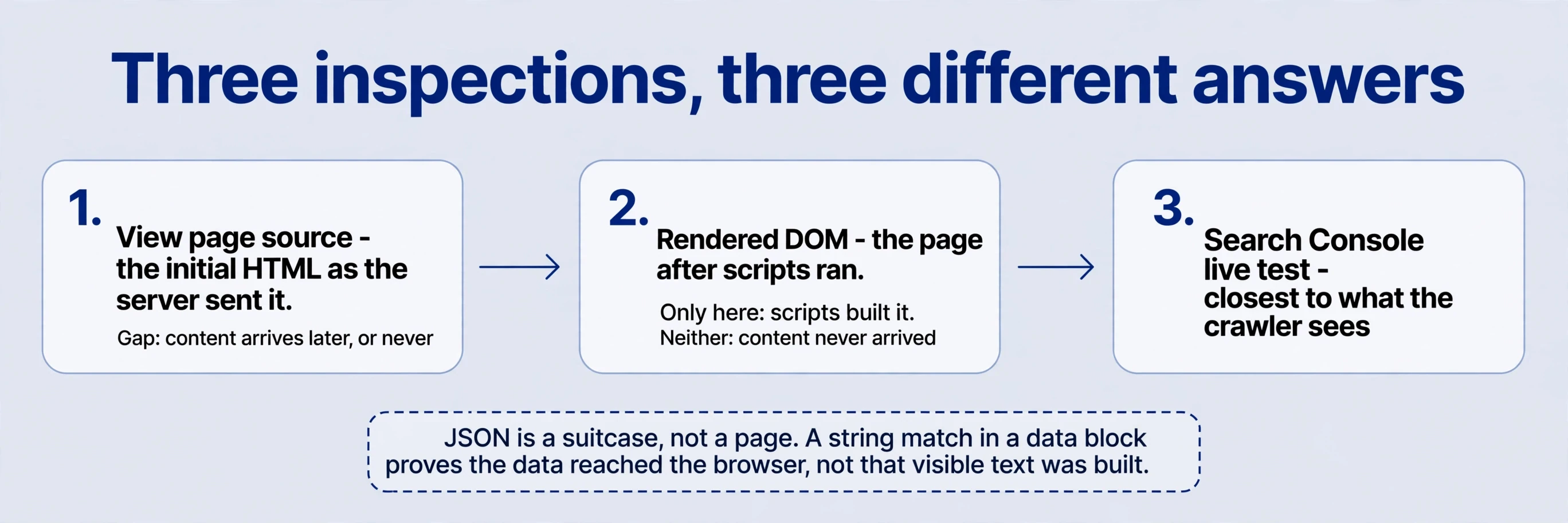
Start with view page source. Search for the passage. Ordinary content tags around it establish that it’s in the initial HTML. A match only inside a JSON block is a different finding: the data arrived, but scripts still have to turn it into visible text. No match at all establishes absence from that initial response — not here yet, nothing more. It says nothing permanent about visibility.
Next, inspect the rendered DOM in developer tools. Check the headings, the text, and the links as the browser built them. If the passage appears here but not in the source, scripts built it. If it appears in neither, the content never arrived — a failed request, a broken script, an empty data response. If it appears in the source but not in the DOM, something in the scripts removed or replaced it. Each pattern points at a different layer, which is the point of running all three instead of guessing from one.
Then, for a site you manage, compare the search console’s live rendering URL test and its rendered output. This is the closest view of what the crawler receives. Distinguish all three deliberately: initial response, browser result, search-engine test result. When they differ, investigate the actual cause — a blocked resource, a failing API, a routing quirk, a template that behaves differently per request — instead of blaming the framework. React and Vue get blamed for plenty of rendering failures that belong to a blocked script or a missing endpoint.
The JSON case deserves a closer look, because it’s the most misread. Data embedded in the page as JSON comes in two kinds. Structured data — the kind that describes the page for machines — is meant to be read as data. Application data — the content the scripts will render — is a suitcase. A string match inside the suitcase proves the data reached the browser. It proves nothing about whether the visible text got built, whether it got built correctly, or whether it got built before the crawler stopped waiting. When essential text lives only in JSON, either move it into real HTML or verify the rendering path end to end — and keep verifying it after every release, because the path breaks silently.
When the three rendering inspections disagree, diagnose by layer. Console errors and failed requests point at blocked or broken resources. Empty sections with successful requests point at the API returning nothing usable. Right content on the wrong URL points at routing. Content that changes between requests points at the template or the data source. Write down which layer failed before proposing a fix. “The framework did it” is not a rendering diagnosis. It’s a shrug.
Write the rendering requirement the way you’d test it. Concrete, checkable, tied to real URLs:
Directly visiting the home page or any of five public feature URLs returns its own title, H1, main explanation, and real links, without prior navigation, login, or form use. The tool’s calculation can still use JavaScript.
That sentence gives developers and editors a shared acceptance criterion. Anyone can open the URL, check the four items, and mark pass or fail. Vague rendering requirements — “make it SEO-friendly,” “ensure rendering works” — give nobody anything to test. The rendering requirement above separates what must arrive immediately (title, heading, explanation, links) from what may run in scripts (the calculation). That separation is the whole art: protect the public content, free the interaction.
Rendering: Why every crawler sees a different web
Crawling runs as a continuous loop: take a known URL, request it, parse the page, extract the links, decide what deserves a place in the fetch queue, and repeat. Requests cost resources — bandwidth, processing, storage — so fetching frequency varies. Clear discovery paths, valuable content, and stable responses concentrate the work on pages worth reading. A site that returns errors, duplicates, and dead ends teaches the crawler to spend less attention there.

Frequency follows value and change. Pages that update often and earn visits get revisited. Pages that never change get checked rarely. New pages join the queue behind everything already known, and their first fetch depends on the entry points discussed in the last lesson. There is no fixed crawl schedule to demand. There is a queue, and your pages compete for attention inside it with every other page the crawler knows. Stable, valuable, well-linked pages win that competition quietly, over time.
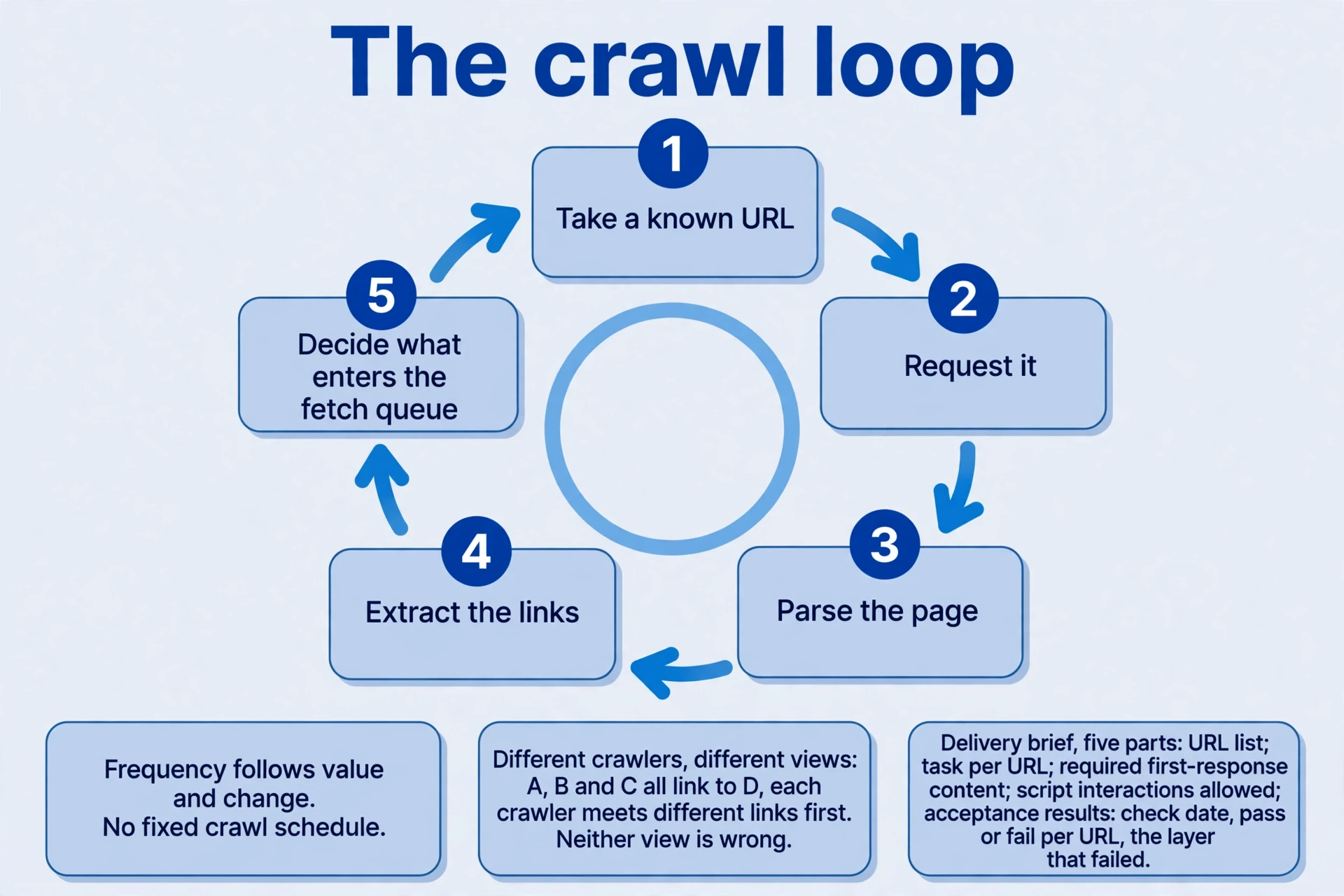
Different crawlers keep different views because they run independently. The search engine and a third-party link index maintain their own crawlers and their own databases. If pages A, B, and C all link to page D, the link index might encounter B and C first while the search engine sees A first. Neither view is wrong. They’re partial views taken at different times through different paths. The same link can appear in one report weeks before the other, or never appear in one at all, without anything being broken.
Fetching doesn’t imply immediate reporting, either. The search console’s links report is not an exhaustive real-time backlink inventory — it’s a report, processed and sampled, on its own schedule. A link appearing only in the third-party index proves neither uselessness nor total absence from the search engine’s knowledge. It proves one crawler saw it and reported it, and the other hasn’t reported it yet, or at all. Record reports with their dates and sources. Don’t rewrite good links because one report omitted them.
The archive also connects continuing low-value production with worsening crawling and indexing. Read that as feedback on production quality. Duplicate variants, planning gaps, resource constraints, and processing delays can all look similar from outside: pages fetched less often, indexed more slowly, or skipped. Examine URLs and batches, improve or retire pages without independent value, and keep diagnosing. A “penalty” story feels decisive and explains nothing. The production-quality story tells you what to change.
The cost of web-scale crawling also explains why AI search products combine existing indexes, search services, their own crawlers, and on-demand retrieval. No single rendering approach covers everything affordably: indexes answer fast for known content, on-demand retrieval fetches fresh pages when the index lacks them, and partnerships fill gaps. The company-specific arrangements described in the older material are historical descriptions, not permanent architectural facts — partnerships and rendering pipelines change. For a site owner, the useful question stays the same regardless: does the intended reader obtain the right content, through whatever path they arrive?
Write the rendering delivery brief
Four questions turn this lesson into a rendering brief you can hand over. Answer each from rendering evidence on your own pages, not from framework assumptions.
-
Why inspect the source when a page opens correctly? The browser executes scripts, so its final display establishes nothing about what arrived initially. Check the H1, the main explanation, and one internal link in both the source and the rendered DOM, and record the rendering differences. The gap between the two is the rendering risk, measured rather than guessed. A page that looks right and arrives empty has a delivery problem wearing a working interface.
-
What if the text appears only in JSON? The data arrived but may not yet be ordinary page content. Check how it becomes rendered content and what the search console’s live rendering test receives. A string match alone settles no rendering behaviour — JSON is a suitcase, not a page. If scripts fail, get blocked, or run late, the suitcase never opens. Either move the essential text into real HTML, or verify the rendering path end to end and keep verifying it after every release.
-
What is a useful minimum migration scope? List the home page, the core feature pages, and the valuable content pages. Require distinct topics and real links on direct requests, retain the tool interaction, and expand based on rendering results. Give the migration a verifiable outcome: named URLs, named rendering checks, a date to review. Migrating everything at once, unmeasured, trades one unknown for another. Migrate the public pages that earn discovery, prove the pattern, then extend it.
-
How should conflicting backlink reports be recorded? Record the source page, the target, accessibility, the actual link and its relationship attribute, the rendering inspection date, and each report’s first appearance. A missing report row is not a verdict. It doesn’t justify repeatedly changing a correct link, and changing links on report noise destroys the very history you’d need to diagnose a real rendering problem. Reports differ. The link itself is the fact; record the fact.
Then write the rendering brief itself. One page, five parts, short enough to read in one sitting and specific enough to test in one pass:
| Part | Contents |
|---|---|
| URL list | Every public page in scope, with its canonical address |
| Topic per URL | The task each page serves, in one line |
| Required first-response content | Title, H1, main explanation, real links — present on direct request |
| Interaction allowance | What may run in scripts: calculation, upload, preview, login-gated work |
| Acceptance results | Inspection dates, pass or fail per URL, the layer that failed when one did |
When the next release ships, rerun the three rendering inspections on the same URLs and compare. Rendering delivery is a habit, not a launch event. Open a page. Read what the server sent. Compare what the scripts built. Check what the crawler’s rendering test received. Where those three agree, the page is delivered. Where they differ, you now know which layer to fix — and you can write it down so the next person fixes the same layer, not the framework.
Comments
Join the conversation. Comments are reviewed before appearing.
Loading comments…