A search result can carry navigation links, images, stars, dates, or questions. Each addition looks like a feature you can install. Most aren’t. Some come from the page itself, read automatically. Some come from the site’s structure. Some come from dedicated structured data — and some of those stopped appearing years ago, while their screenshots keep circulating as if they were current.
Identify the mechanism before doing the structured data work. An old screenshot is a fine historical record and a terrible shopping list. This lesson walks ten historical appearances, separates what you control from what platforms changed, and ends with the order that works: facts on the page first, structured data second, observation third.
Structured data: Three mechanisms, not one switch
Every search feature traces back to one of three sources. Confusing them is how teams end up writing structured data for appearances that structured data never produced.
| Source | What it produces | What you control |
|---|---|---|
| Automatic extraction | Snippets, additional facts, table snippets, image selection | Clear readable content, meaningful tables, relevant images, accurate titles |
| Site structure | Sitelinks, navigation understanding, destination selection | Navigation, page names, internal links, useful destination pages |
| Dedicated structured data | Eligible rich results for supported types, while supported | Correct type, structured data fields matching visible facts, current structured data eligibility |
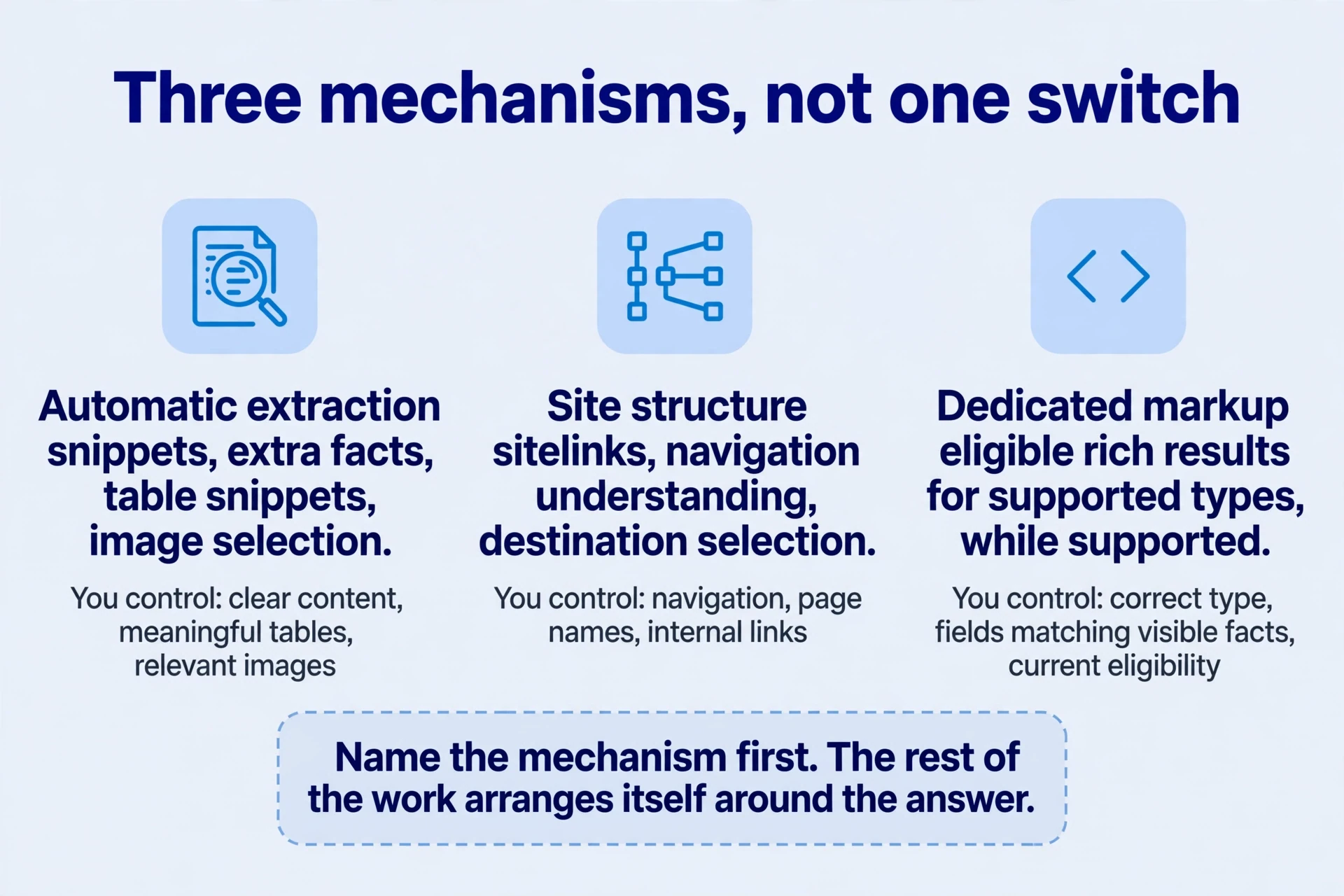
A standard result with a good title and snippet usually needs the first source only: a page that explains its task plainly. Sitelinks need the second: a site whose important destinations are obvious from its structure. Stars need the third plus real-world evidence: genuine reviews of a qualifying item, marked up accurately. And some appearances need nothing you can do now, because the platform retired them — the structured data work already happened in the past, and the feature left with it.
Take one example per mechanism so the distinction sticks. A comparison table on a tool page — rows for formats, columns for limits — can surface as a table snippet. Nobody marked it up. The engine read the structure: headers, rows, cells that mean something. A pricing link under a brand result comes from navigation: the pricing page is named plainly, linked from the main menu, and visited often. Nobody submitted the link. And a star rating under an app result comes from reviews the app actually received, described in structured data whose fields match the visible review content. Three appearances, three causes, three kinds of structured data work.
The screenshot trap deserves its own warning. Tutorials recycle screenshots for years. A 2023 panel in a 2026 tutorial looks current because the image is crisp and the caption is confident. Date every feature before building for it: check the platform’s structured data documentation changelog, check whether the current docs still describe the type, and search for a retirement notice. Five minutes of dating saves a week of implementing a display that no longer exists. When the docs are gone and the changelog records a retirement, believe the changelog.
The durable asset through all of this is useful information. Presentation features come and go on schedules you don’t set. A page that answers real questions, names its task, and delivers its result keeps its value when a display format retires. Structured data is maintenance on top of that asset, reviewed periodically — not a substitute for it.
Skipping identification has a predictable cost. A team writes FAQ structured data for a panel that no longer exists, spends a sprint on it, and ships nothing a visitor can see. Another team adds aggregate-rating structured data with no reviews behind it, earns a short-lived display, and inherits a trust problem when the fabrication surfaces. Both failures share one root: structured data work started from a screenshot instead of a mechanism. Name the mechanism first. The rest of the structured data work arranges itself around the answer.
Structured data: Ten appearances, four groups
The July 2023 observations catalogued ten formats. Read them as history with a status attached: current, automatic, or retired. Each one lists what the page must provide. None of them is a switch you flip.
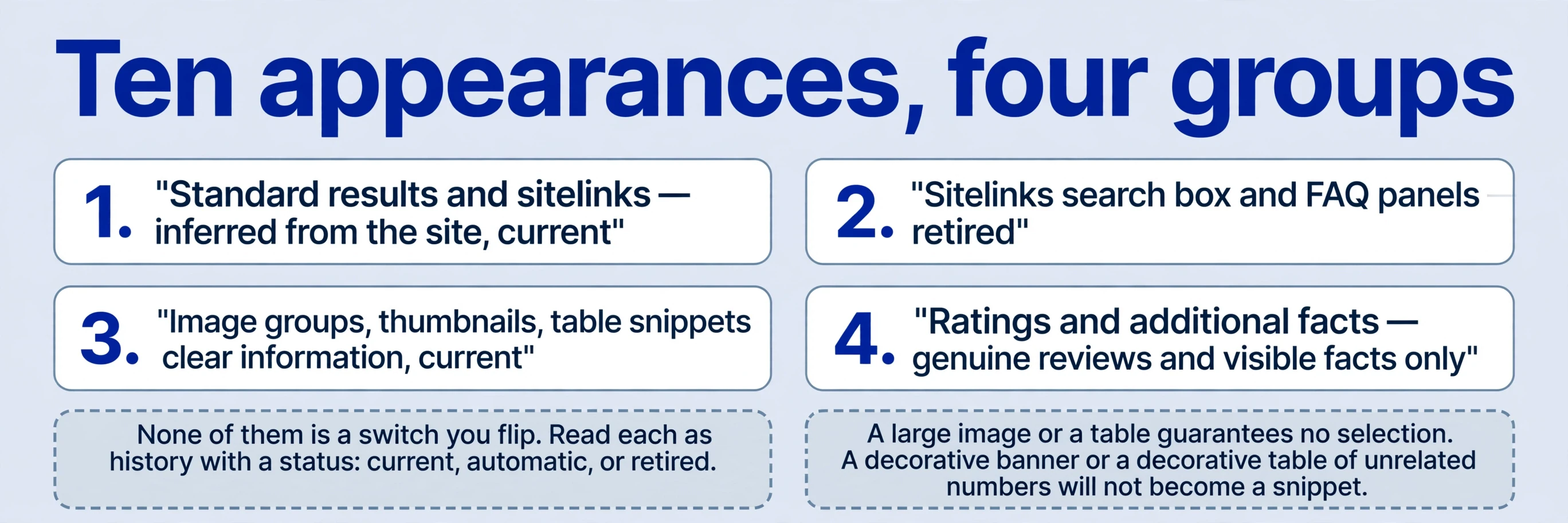
Standard results and two sitelink layouts. A standard result carries site information, a path, a title, and a snippet. Start there: explain the task and the value, make the location understandable. The path matters more than people think — a readable address tells the searcher where they’ll land before they click, while a string of parameters tells them nothing. A compact layout adds one row of links beneath. Expanded sitelinks give important destinations more space, sometimes with descriptions. All three are inferred from the site. No submitted list picks which links appear, and no tag chooses the layout. The structured data work is the page and the structure behind it, not a setting. Get the standard result right first; the richer layouts follow structure, not requests.
The snippet deserves the same thinking. The engine selects query-relevant text for the snippet — sometimes your description, sometimes a passage from the body that matches the query better. That means the body must carry the answer in plain words, not only in the description tag. A page whose explanation lives entirely in images or scripts offers the snippet selector nothing to quote. Write the answer where text lives, and the snippet takes care of itself more often than any description optimisation manages.
The sitelinks search box and FAQ panels. The archive shows a search box inside one community forum’s result, and expandable FAQ panels under others. Both are history now. The search box was retired. FAQ panels were restricted, then retired — the timeline below gives the dates. A historical observation about extractable content can’t become a present-day promise that copying the pattern reproduces the appearance. Useful on-site search still serves visitors who arrive. Real questions with real answers still serve readers. The search-result panels those things once fed are gone. Keep the useful parts. Stop chasing the display.
Image groups, thumbnails, and table snippets. Image groups let people inspect examples before clicking — a resume-template gallery previewing the deliverable, so the searcher judges the product before the visit. Individual thumbnails can accompany snippets, and can coexist with sitelinks; the engine chooses the combination. Table-like snippets expose lists or relationships — a comparison laid out in rows and columns. Their shared foundation is clear information: relevant, usable images and meaningful table structure. What makes an image “relevant and usable”? It shows the deliverable, it sits in context that explains it, its description says what it is, and the landing page behind it completes the task. A decorative banner does none of that. A diagram with no explanation does half. Adding a large image or a table guarantees no selection. A decorative table of unrelated numbers won’t become a snippet, and a stock photo won’t become an image group. Design for the task — examples people can judge, tables people can use — then observe what the search appearance does with them.

Ratings and additional facts. The archive illustrates ratings with resume sites and app stores, and extra facts with an encyclopedia entry. One suggestion in the old material — make users believe the search engine itself rated the page — should not guide anything. Stars must represent genuine reviews appropriate to a supported type. They are not the search engine’s endorsement, and they are never invented counts and scores. What makes reviews genuine? A real reviewed item, a real review source, and the review content visible on the page the structured data describes. App-store ratings refer to a reviewed item and its review source, not a score for the page. A product page with no reviews has no rating to mark up, however much a star display would help clicks. Additional facts come from automatic extraction of readable information — the encyclopedia entry’s facts were on the page, stated plainly. Valid schema syntax establishes neither factual accuracy nor structured data eligibility. Syntax is the envelope. Facts are the letter.
An image-search module sometimes sat above standard results, its relevance depending on the query’s visual intent. The image path runs preview → source page → download or use, and each step has its own job. The preview must show the deliverable clearly enough to judge. The source page must explain it and offer the download or the tool. The task must complete there. Prepare relevant images, explanations, and a landing page that completes the task. A click that lands on a page with nothing to do is a wasted impression in any format. Image work that stops at the preview — pretty pictures, dead-end pages — converts nothing.

Structured data: Sitelinks: influence without control
For the site-structure part of this work, follow the internal links worksheet: choose a useful destination, name the passage that should lead to it, and write the reason for that next step. This separates navigation improvements from structured data changes when reviewing the release.
Sitelinks come in two shapes: expanded, with room for descriptions, and mini one-line versions. They often appear with brand searches, shortening the route to pricing, structured data documentation, login, or core features. The expanded shape gives destinations space to explain themselves; the mini shape gives a bare list of routes. Both are automatic, both draw on the same structure, and neither is a format you select. Don’t optimise for one layout — a site whose navigation reads clearly produces sensible links in either shape, and a site whose navigation is tangled produces odd selections in both. You can improve the site structure behind them. You cannot require a particular link to appear. That distinction decides where the structured data work goes.
The controllable work is unglamorous: clear navigation, accurate page names, relevant internal links, useful destinations. Audit the destinations first. List the six to eight pages people most need after landing — pricing, structured data documentation, the core tools, help, login — and check each one: does the page exist, is it named plainly, is it one click from the main navigation, does it deliver what its name promises? A destination that fails any of those reads as unimportant, because to the visitor it is. Fix the failures before expecting any link to surface.
If people search for your pricing, don’t repeat pricing dozens of times on the home page hoping the home result will sprout a pricing link. Build a directly accessible pricing page that explains plans and differences, and give it a clear entry in the product navigation. The engine infers importance from structure and use. Repetition on the home page teaches nothing except that the home page mentions pricing a lot.
Brand searches add a wrinkle. The archive discusses an AI-detection tool whose brand name overlaps a general expression — people searching the generic idea land on the brand, and the brand reads as the category. Stronger brand recognition doesn’t mean a keyword is permanently owned or immune to competition. A tool’s brand classification, a regional result page, and the engine’s broader interpretation of the query are different pieces of evidence, and they move independently. Competitors can out-serve the task. Regional results can differ. The engine can reinterpret the phrase. The practical response is twofold: keep a brand page that explains the product and its name clearly, and keep task pages that serve the generic need on their own merits. When the generic pages are strong, the brand doesn’t need to own the phrase. When they’re weak, no brand signal compensates. Product and brand maintenance continue: keep the product good, the brand clear, and the pages honest about what each one does. No result is a permanent possession.
Structured data: What the FAQ timeline actually changes
| Time | Recorded change | Practical structured datan interpretation |
|---|---|---|
| 2009 statement | The search engine doesn’t use the keywords meta tag for web ranking | Don’t fill it with synonyms, competitor names, or unrelated popular terms |
| Around 2019 | FAQ rich results introduced; many pages adopted FAQ sections | Write useful answers to real questions, not content solely for extra search space |
| August 2023 | FAQ rich results restricted to well-known government and health sites | Ordinary tool sites could no longer rely on that appearance |
| November 2024 | The sitelinks search box retired | Don’t implement its structured data solely to reproduce an old screenshot |
| From May 7, 2026 | FAQ rich results stopped appearing; structured data documentation removed in June | A search appearance retired; questions and answers on websites were not prohibited |
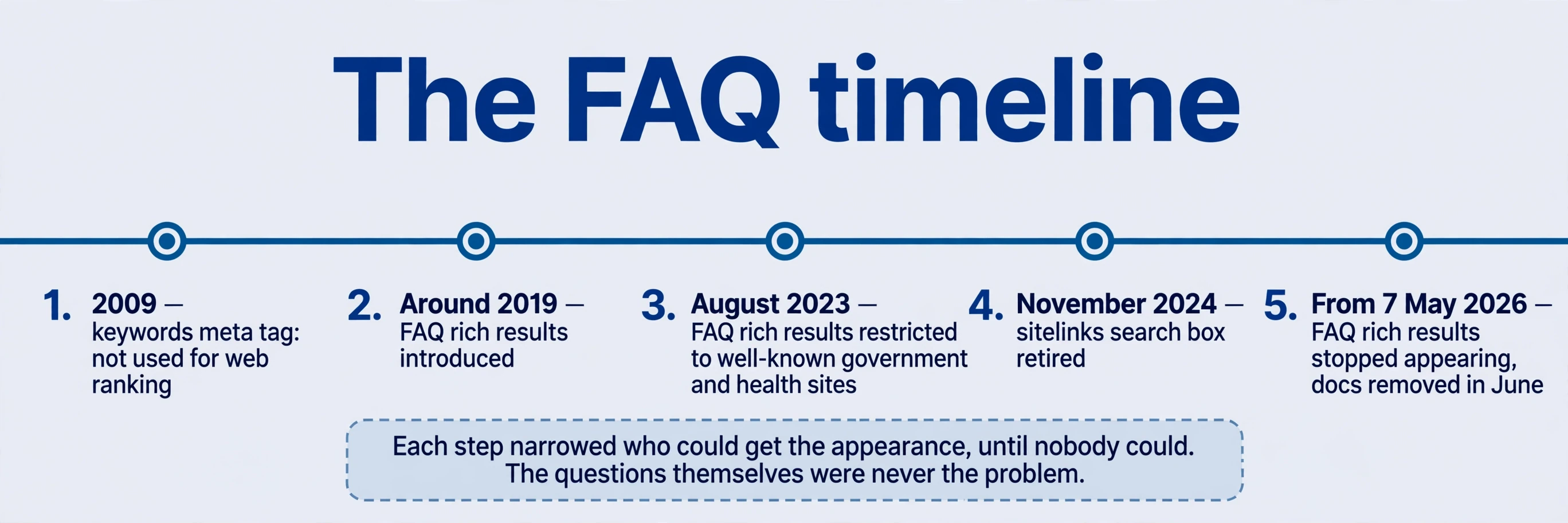

The changes are recorded in the platform’s structured data documentation changelog. Read that changelog the way you’d read release notes: what changed, when, and for whom. Make it a quarterly habit — skim the entries, note retirements and restrictions, and write them into the team’s log with dates. The FAQ story rewards that habit: the August 2023 restriction was an early warning, three years before retirement, that the appearance was narrowing. Teams that read it had time to shift effort from structured data to the questions themselves. Teams that didn’t kept maintaining structured data for a shrinking audience until it vanished. The arc is clear. Introduced around 2019, adopted everywhere, restricted in August 2023 to well-known government and health sites, then retired entirely from May 7, 2026, with the structured data documentation removed the following June. Each step narrowed who could get the appearance, until nobody could. The questions themselves were never the problem. The display was.
The 2009 row earns its place because it explains a habit that outlived its reason. For years, pages filled the keywords meta tag with synonyms, competitor names, and popular terms, on the theory that listing words attracted traffic. The statement ended the theory: the tag doesn’t affect web ranking. What remains is a structured data field that costs bytes and invites stuffing. Leave it empty, or leave it out. The words that matter belong in the title, the headings, and the body, where readers and extraction can use them.
For old structured data, the recorded advice is calm: leave existing FAQPage structured data in place and decide case by case for new pages. No emergency site-wide rewrite solely to remove a retired appearance’s structured data. But it should no longer be a required step for obtaining a search FAQ panel, because there is no panel to obtain. Maintenance decisions follow actual platform needs and cost. If another platform or system genuinely consumes the structured data, keeping it may be worth the bytes. If nothing consumes it, removing it on the next natural edit is tidy — not urgent. And if the structured data sits in a shared template, removing it from the template removes it everywhere at once; check what else the template feeds before editing.
The older article also speculates about use by other engines or AI systems, and about commercial motives behind health-site eligibility. Those are interpretations, not established benefits or retirement causes. Keep them out of decisions. The stronger reason to keep questions on a page is direct: they explain input limits, payment terms, output formats, and the concerns people actually raise before using a tool. Write them for the visitor in front of you. Maintain structured data according to real platform needs, without promising AI recommendations nobody can verify.
Structured data: Put the facts on the page before writing JSON-LD
Before testing structured data, verify the canonical URL and page signals and compare the initial HTML with the rendered page. For an application page, record the visible product name, supported inputs, price terms, and the matching structured data fields side by side. A mismatched price is a content correction to make before rerunning a structured data test.
Suppose you run an online image tool. Before any structured data, answer three questions. What does the page describe — an application, a product, an article, an organisation? Is that type currently supported, and what does structured data eligibility require? And are the facts published on the page, for users, before they’re mapped into fields? Helpers and structured data source examples assist expression. Copying someone else’s stars establishes no suitable type. The facts come first because structured data describes the page; it doesn’t create the thing described.
Identifying the type is a decision, not a guess. An application type fits a tool people use in the browser. A product type fits something with a price and an offer. An article type fits editorial content. An organisation type fits the entity behind the site. Ask what the visitor is looking at: the thing itself, something for sale, a piece of writing, or the company? A tool page marked up as an article, or a blog post marked up as a product, tells the engine the wrong story — and the mismatch shows up in eligibility structured data checks, if not immediately, then when the type’s structured data requirements get enforced. The wrong-type failure is quiet: the structured data test may even pass on structured data syntax while the type’s required structured data properties sit unmet, and nothing ever displays. Recovery is straightforward once diagnosed — remove or correct the type, retest, record the change — but diagnosis starts with admitting the type was a guess. Decide it from the page, in writing, before the first structured data field is mapped.
Publish the real name, the capabilities, and the pricing where users can see them. Then map those same facts into structured data fields:
{
  "@context": "https://schema.org",
  "@type": "SoftwareApplication",
  "name": "Example Image Tool",
  "applicationCategory": "MultimediaApplication",
  "operatingSystem": "Web",
  "url": "https://example.com/image-tool/"
}
This is a descriptive structured data syntax example, not a complete eligibility template for an application rich result. It invents neither ratings nor offers — and that’s the point. Every field here matches a visible fact: the name, the category, the platform, the address. Check the current required structured data properties for the type before adding anything else, add the structured data, and run the rich-results testing tool for supported features. Then verify the live URL against the visible content, field by field. A passing structured data test is not a display guarantee. Structured data tests check syntax and eligibility. Display is a separate decision, made per query, per page, over time.
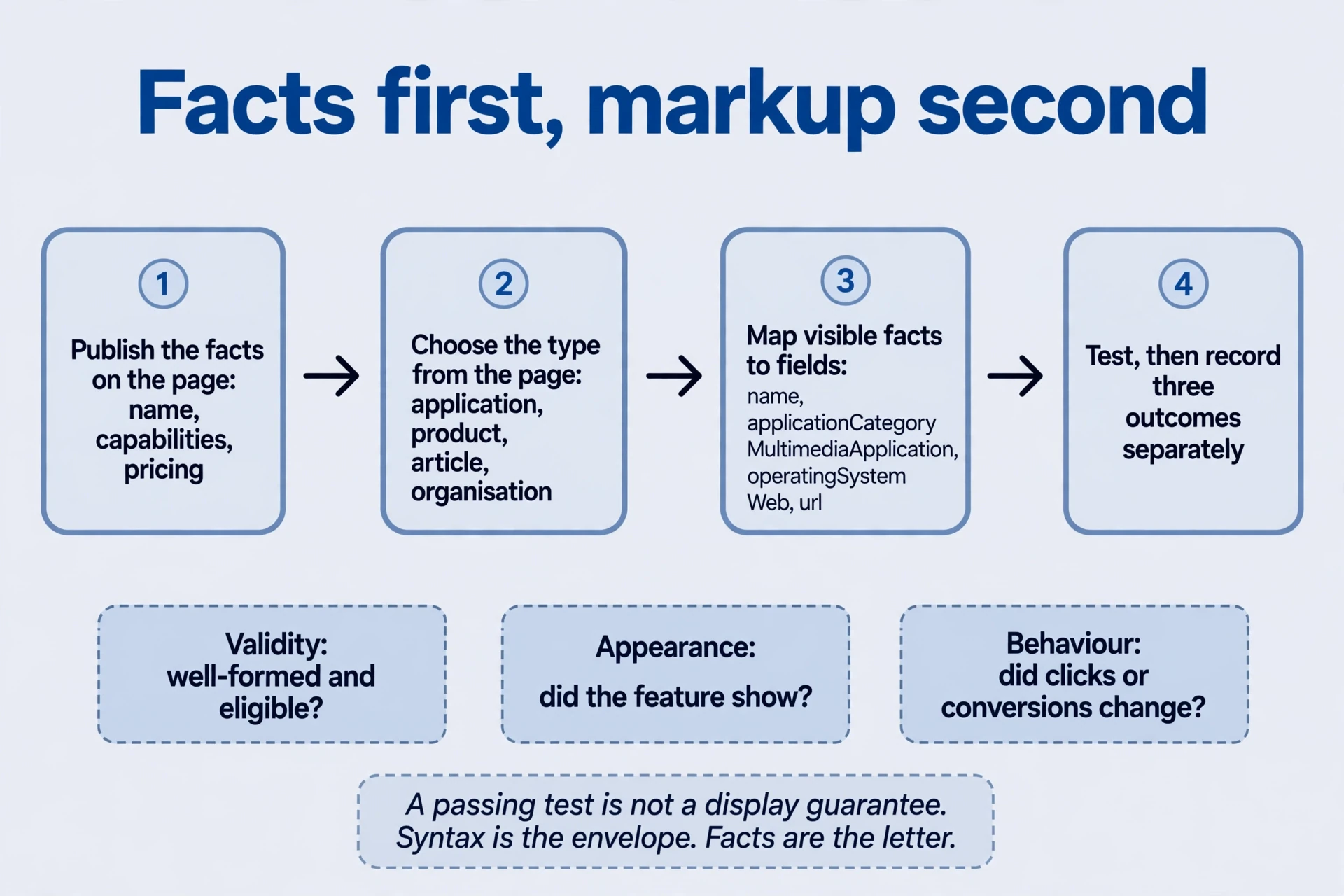
After release, record three outcomes separately, because they answer different questions:
| Outcome | Question it answers | What to record |
|---|---|---|
| Validity | Is the structured data well-formed and eligible? | Test result, flags, date, page |
| Appearance | Did the feature actually show? | Eligible or not, observed display for relevant queries, dates |
| Behaviour | Did clicks or conversions change? | Before-and-after data on comparable periods, other edits noted |
Keep the changed structured data field, the date, and the page with each record. If titles, content, and navigation changed at the same time, later growth can’t all be assigned to the structured data — simultaneous changes share the credit and the blame, inseparably. Either change one thing and watch, or accept that the result is shared and say so. And when a platform retires a feature, identify the scope before treating the appearance change as a site penalty. A retired format looks like a loss in the data. It isn’t one. Nothing about your page got worse. The display went away for everyone.
Structured data: choose work from the actual page
Five questions, answered from the page in front of you — not from a screenshot archive.
-
Where should sitelink structured data work begin? Start with important destinations and navigation: pricing, structured data documentation, and core features need clear crawlable entry points, accurate names, and destinations worth reaching. No schema field guarantees selection. Observe brand-query results after release, and compare them with the navigation you actually shipped. If the wrong destinations appear, the structure taught the engine the wrong priorities. Fix the structure. Sitelink work is navigation work with a longer feedback loop.
-
Can you add five stars without real reviews? Don’t invent ratings. Establish genuine reviews, a qualifying reviewed item, and visible supporting information before structured data implementation. Without those conditions, focus on useful product evidence: real examples, real outputs, real explanations of limits. Stars with nothing behind them describe a reputation the page hasn’t earned. Earn it first, or leave the structured data field empty. An empty field is honest. A fabricated one is a liability that outlives any click gain.
-
Should useful questions disappear with FAQ rich results? Keep questions that explain limits, prices, outputs, and decision criteria. The retirement removed a display, not a need. People still ask whether their file type works, what the free allowance covers, and what happens to their uploads. Decide structured data maintenance separately, according to actual platform needs and cost. The FAQ section serves readers. The structured data served a panel. Only one of those still exists.
-
What if a valid structured data test produces no visible change? Check structured data type eligibility, fetchability, and consistency with visible content, then observe relevant queries over a proper window. Structured data validation is not a display promise. Invented reviews or unsuitable types don’t solve the issue — they add a new one. Most often the answer is patience plus a second look at structured data eligibility: the type may not be supported for this content, the page may not be fetched cleanly, or the structured data fields may describe something the page doesn’t visibly show. Fix the mismatch, not the structured data test.
-
How can a structured data change be evaluated? Record the page, the date, the field, the structured data validation result, and comparable before-and-after data, noting other edits made in the same window. Separate structured data eligibility, actual display, and clicks. Report observations when evidence is insufficient, plainly: “markup valid, no display observed in 28 days, clicks unchanged.” That sentence is more useful than any claim of success without a denominator. Evaluation is bookkeeping before it is judgment.
Before writing any structured data, run this check on the page itself:
| Structured data check | Ask |
|---|---|
| Mechanism | Which source produces this appearance — extraction, structure, or structured data? |
| Support | Is the format still supported, for this type, today? |
| Facts | Is every structured data field visible on the page, in plain words? |
| Type | Does the type describe what the visitor is looking at? |
| Outcome | How will validity, display, and behaviour be recorded separately? |
Five yeses, then write the structured data. Any no is work on the page first — or a decision not to build at all.
Useful information outlasts display formats. Build the page that answers the question, names the task, and delivers the result. Maintain structured data for the formats that exist, check it against visible facts, and retire it when the format retires — without drama, and without rewriting the site for a screenshot. The search appearance is a window onto the page. Keep the page worth looking through.
Comments
Join the conversation. Comments are reviewed before appearing.
Loading comments…