Ten published pages do not automatically become ten discoverable destinations. Without internal links, people don’t know where to go next, and crawlers have no reason to guess every address on your site. A page nobody can reach from anywhere else is a room with no door — furnished, finished, and empty.

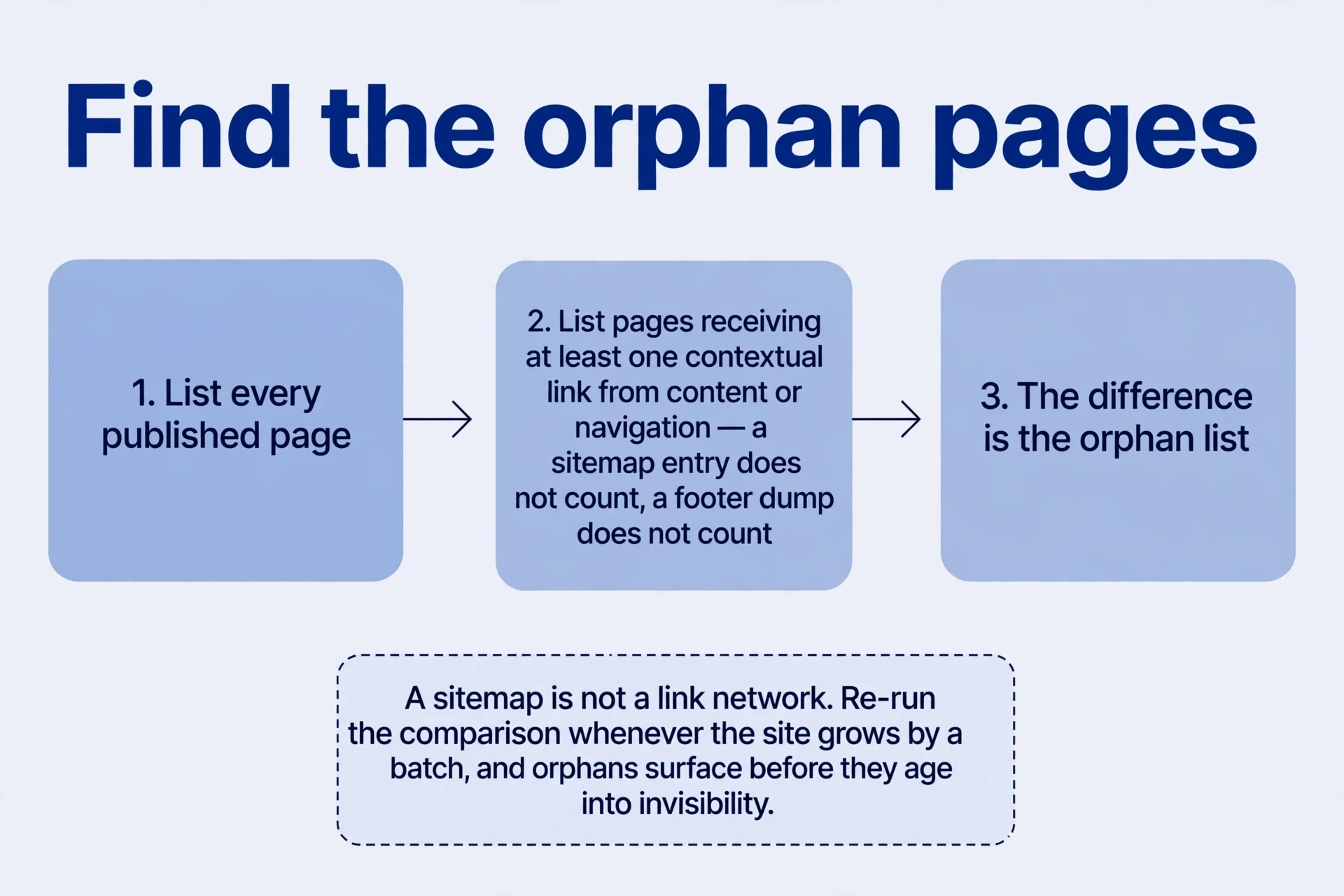
Find the orphans before building anything new. List every published page, then list every page that receives at least one contextual link from another page — not an sitemap entry in an internal link audit, not a footer dump, a real link in content or navigation. The difference is the orphan list. A sitemap tells crawlers addresses exist; it doesn’t tell readers why they’d visit, and it doesn’t tell crawlers which pages matter. A sitemap is not an network of internal links. Run the comparison whenever the site grows by a batch, and the orphans surface before they age into invisibility.
Internal links are doors, and each one should explain why the reader needs its destination. This lesson builds the network of internal links from a single working example — a phone-number generator with one home page and ten country pages — then covers the launch routine, pagination, and the question of outside citations. The thread: plan the next step, connect the pages, check the gaps.
Start with the next useful destination
Every internal link answers one question first: where does the reader go next, and why? From an overview to a country tool. Back to the overview. From an example to its format explanation. Get the next step right and the rest of the network follows, because signals from internal links then have concrete destinations behind them. A link added for its own sake — to raise a count, to fill a quota — points nowhere the reader needs to be.
Get the vocabulary straight before building, because one confusion wastes more time than any missing link. Three directions, three names:
| Link type | Direction | Example |
|---|---|---|
| Internal | One page of your site to another page of your site | Home page to a country tool |
| Outbound | Your page to another site | A tool page citing a format reference |
| Backlink | Another site to your page | A blog recommending your generator |
An on-page check of internal linkslist item labelled “external linking” concerns how you cite other resources — your outbound links. It says nothing about backlinks already earned for your own site. Teams that mix the two up internal link audit the wrong half: polishing citations while their own pages sit unlinked, or chasing backlinks while their navigation hides the destination. Name the direction, then work on the right one.
Outbound links deserve a plain rule of their own: cite what helps the reader, and don’t fear the click leaving. A format explanation that internal links to the numbering authority’s reference is more useful than one that describes the format from memory and cites nothing. Outbound links don’t drain a page. A page that never cites anything reads as isolated — and, for factual claims, unverifiable. Cite what helps the reader, in the passage where the claim appears, and move on.
Internal links do four jobs at once. They reduce navigation effort — the reader reaches the tool in one click instead of three. They provide discovery through internal links and revisit paths — a new page gets found, an old page gets found again. A “related tools” block at the foot of a country page is a revisit path: the visitor who finished one task sees the next one without returning to the home page. They communicate relationships and relative importance — pages linked from the main navigation read as central, pages linked once from a footnote read as peripheral. And they carry readers onward from backlinks: a citation landing on an interior page can lead through relevant routes to the rest of the site, if the routes exist. What they don’t do is pay per link. No fixed ranking increment exists for each added link. Count internal links by the tasks they serve, not by the total.
Relative importance has a practical side beyond signalling. Crawlers revisit frequently-linked pages more often and dig less often for pages buried deep with few entries. A new country page linked from the home page and its category gets fetched quickly. The same page linked only from page nine of a paginated list waits its turn. Link placement decides fetching speed as surely as it decides reader convenience. Put important pages where the traffic already flows.
Internal links: The number generator: give each page a role
The working example is a phone-number generator: a general home page plus ten country pages. The home page links through country navigation and descriptive country sections — short entries that say what each tool does. Each country page provides its own heading, generator, format information, and related destinations. The home page supports selection. The country page delivers the specific format task. Two roles, kept apart. A home page that tries to generate every country’s numbers is a mess. A country page that tries to list every country is a second home page.
The point is distinct navigation contexts, not a rule that every page must have exactly two incoming internal links. Link counts don’t transfer across sites. A page with one strong entry from the main navigation and one from its category can be perfectly discoverable, while a page with twelve footer internal links and no contextual entry stays invisible to readers. Internal Judge entries by who meets them and where, not by arithmetic.
The contexts differ in what surrounds the link. Home-page navigation answers “which country?” — a list of names, scannable in seconds. A country page’s own navigation answers “what next?” — neighbouring countries, the format explanation, the way home. A breadcrumb trail answers “where am I?” — home, category, this tool. Three questions, three link sets, one page. Each context for internal links answers one question. An navigation block that tries to answer all three at once answers none of them well.
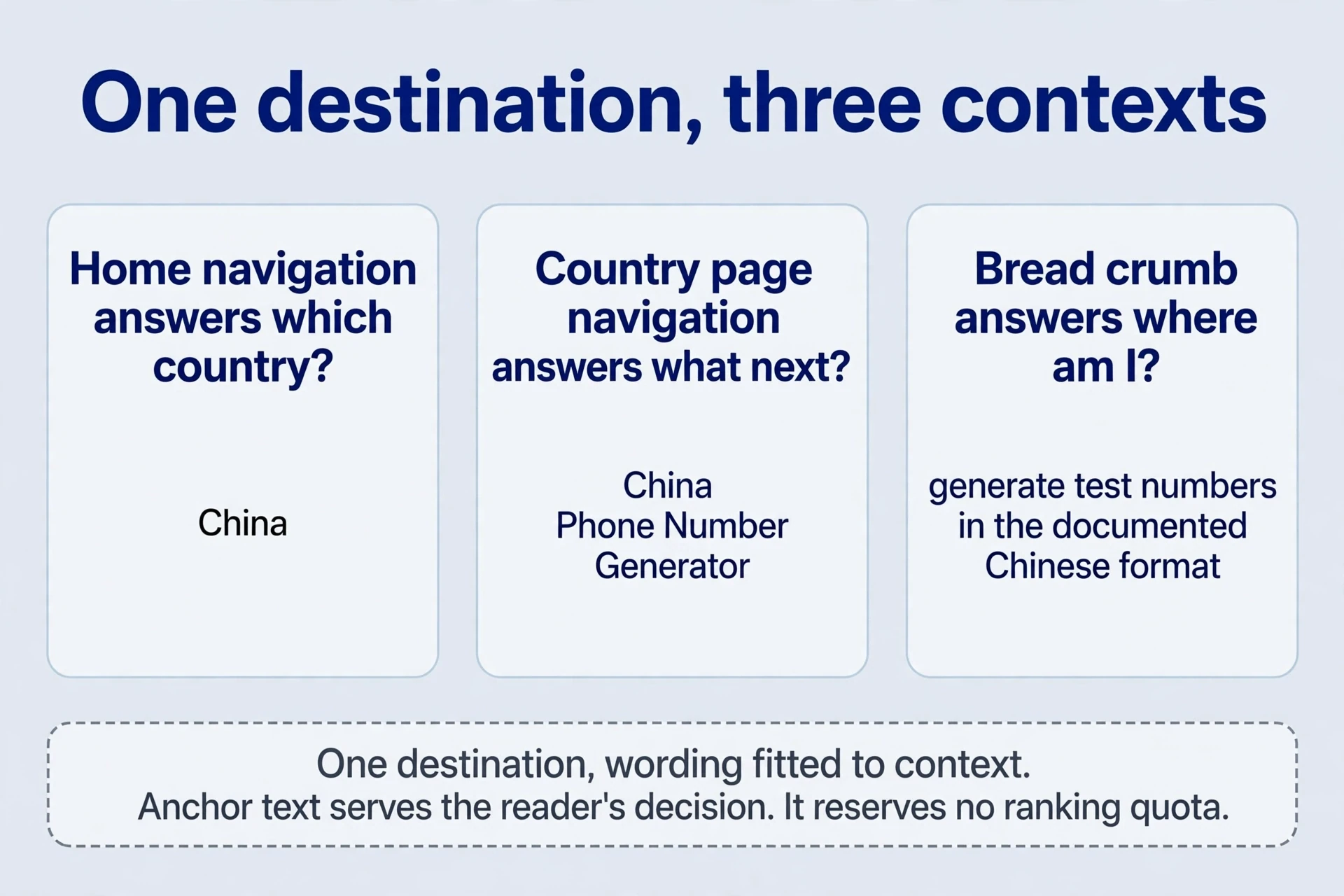
Write anchor text that explains the destination. “China Phone Number Generator” communicates more than repeated “click here” labels, because the reader decides before clicking. Different entry wording can help readers — an navigation label can be short (“China”) while a section heading carries the full task (“China Phone Number Generator”) — and neither wording allocates a separate keyword quota. The same destination wears three wordings across three contexts: the nav label names the country, the section heading names the task, and an in-text link inside a guide names the reason (“generate test numbers in the documented Chinese format”). All three point at the same page. One destination, wording fitted to context. Anchor text serves the reader’s decision. It doesn’t reserve rankings.
<nav aria-label="Country tools">
  <a href="/">All country tools</a>
  <a href="/china-phone-number-generator.html">China</a>
  <a href="/india-phone-number-generator.html">India</a>
</nav>
<section>
  <h2><a href="/china-phone-number-generator.html">China Phone Number Generator</a></h2>
  <p>Generate sample numbers in a documented format for software tests.</p>
</section>
The short label works in navigation because the context — a list of countries under “Country tools” — supplies the rest. The full heading works in a section because it stands alone. A title attribute can add a hint on hover, but it doesn’t replace visible anchor text, and it establishes no authority bonus. Write the visible words as if the title attribute doesn’t exist, because for many readers it effectively doesn’t.

The archive’s process for the country pages is worth copying in order: define the task first, then improve the wording — with an AI writing tool polishing draft metadata, if that helps. Keep the order. Wording first and task second produces polished pages that promise the wrong thing. And keep the promises honest: don’t copy a long country list into the home title, and don’t claim samples are “authentic” or usable for verification. A title describes the page, not the inventory of internal links — “Phone Number Generators by Country” says what the page is, while a ten-country list in the title says only that the author counted. The count belongs in the section below, where readers browse it. Random formatted samples establish neither real usable numbers nor SMS capability. Titles and body copy should state the actual deliverable: sample numbers in a documented format, for software tests. The deliverable is modest. Say so, plainly, and the right visitors arrive. Modest and true beats grand and wrong — the grand version earns clicks that bounce, and bounces teach the engine the page disappoints.
Internal links: Give the linked page a worthwhile task
A link is a promise, and the destination keeps it or breaks it. The country tool appears before its format, prefix, and usage explanations, letting visitors use it first and read as needed. Tool first, explanation second — the reverse order makes every visitor read a manual before touching the thing they came for. The simple demo appends a result per click, shows a failure message when something goes wrong, and suggests batches of ten or fifty. Extending a single operation to useful batches is a valid product idea: testers need many samples, and generating them one at a time wastes the visit. A batch of fifty, listed as fifty lines on the page, turns one click into a usable test set. Batches serve the tester’s real job — filling a form, seeding a database — where single samples only demonstrate the tool.
// Historical simplified format demo; not a current allocation validator.
function sampleNumber() {
  const secondDigit = 3 + Math.floor(Math.random() * 7);
  let rest = "";
  for (let i = 0; i < 9; i++) rest += Math.floor(Math.random() * 10);
  return "1" + secondDigit + rest;
}
const button = document.getElementById("generateButton");
button.addEventListener("click", () => {
  try {
    const row = document.createElement("div");
    row.textContent = sampleNumber();
    document.getElementById("phoneNumberDisplay").append(row);
    document.getElementById("errorDisplay").textContent = "";
  } catch {
    document.getElementById("errorDisplay").textContent = "Please try again.";
  }
});
The demo keeps the archive’s simplified algorithm: a leading 1, a second digit from 3 to 9, and nine random digits. It illustrates the demo. It doesn’t validate current carrier allocations, and each country’s rules require independent verification rather than unreviewed AI-generated variants. A format that changed last year, copied forward by a language model, produces samples that look right and fail in real tests. Verify the format, then ship it.
The failure message carries the same honesty requirement. “Please try again” works when the button to try again sits beside it and the failure was transient. It fails when the problem is permanent — a blocked script, an unsupported setting — and the visitor retries the same dead click five times. Say what happened, say what to do, and distinguish an empty result from an error. A failure message is a next step, not an apology. Give the visitor one action, not a dead end.
Keep page promises consistent with actual behaviour. If samples don’t support communication, explain that near the tool — in plain words, before the first click — and distinguish formatting from a real virtual-number service. The distinction matters because the confusion is the product’s main risk: a visitor who mistakes samples for working numbers blames the tool, the site, and the search result that sent them. One honest sentence near the button prevents that chain. Put it where the click happens, not in a footer nobody reads.
Supporting content follows the same rule: each section earns its place by adding needed information. Export related queries and group them into questions — format, prefixes, testing, and the difference from virtual-number services. Four groups, each with its own reader question: format (“what does a valid number look like?”), prefixes (“which second digits are in use?”), testing (“how do I use samples without real numbers?”), and the virtual-number distinction (“will these receive SMS?”). Verify facts before using an AI tool to organise headings and paragraphs. A section that repeats the tool description with different phrasing adds density, not information. A section assigned to every keyword on a list adds length, not answers. Group by the question the reader asks, answer it once, and move on. One question, one answer, one section.
Internal links: Connect new and existing content purposefully
Consider a reader investigating an unindexed article. Link the passage about crawlable HTML to the rendering inspection guide, and the passage about report statuses to discovery and indexing timelines. These internal links answer different next questions. Then add a return link from a relevant passage in each guide, so the article keeps a useful entry route after leaving the latest-post list.
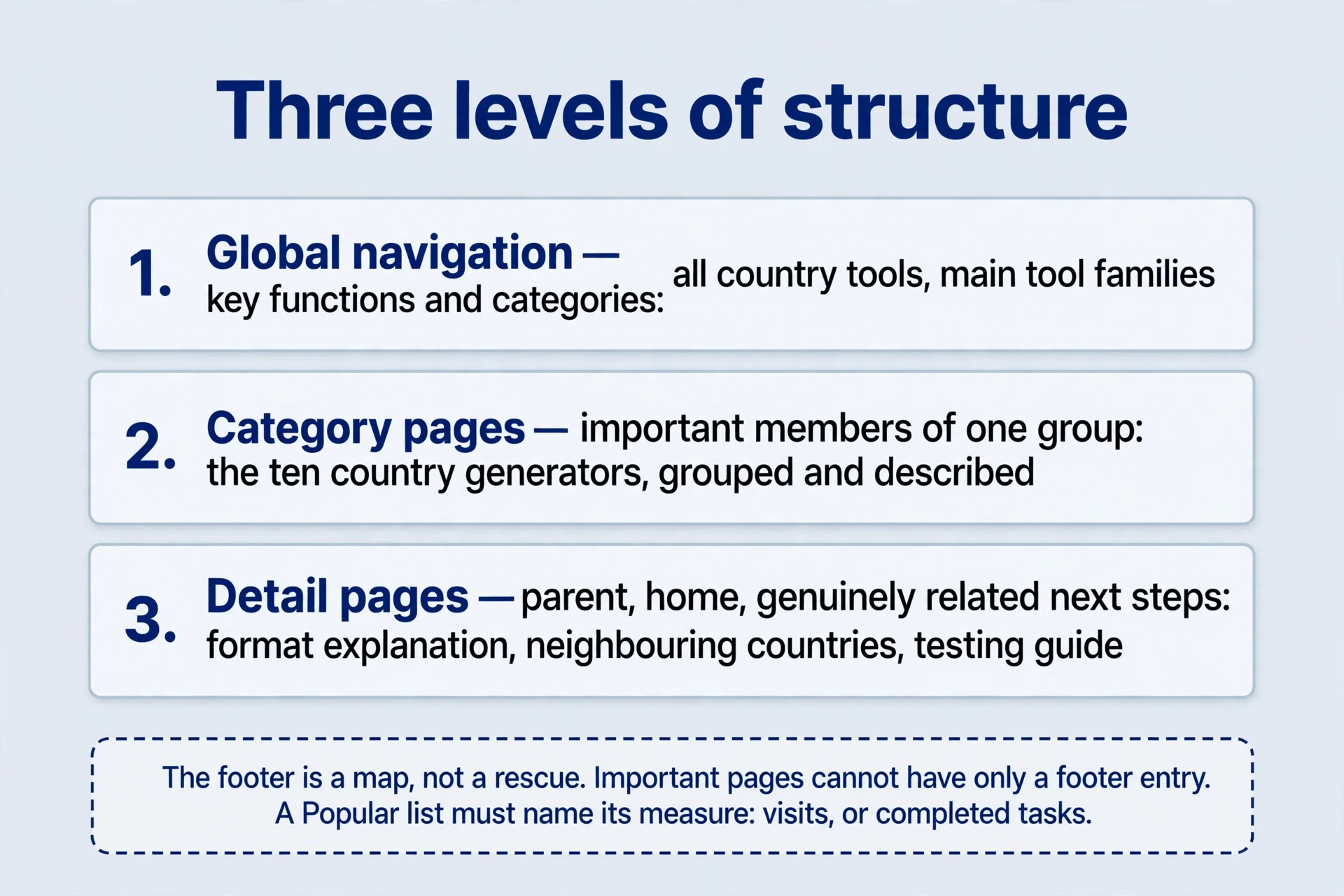
The classification principle works at three levels. Global navigation carries key functions and categories — the destinations every visitor might need. Category pages carry important members — the tools in one family, the guides on one topic. Detail pages carry parent, home, and genuinely related next steps — the internal links a reader of this page would actually follow. Add latest, popular, related, and footer entries according to user needs. Dumping every URL onto every page doesn’t create a better internal link structure. It creates a directory nobody reads, on every page, pushing the content down.

The footer deserves the same discipline. Group footer internal links by category — functions together, help together, company together — so a reader who scrolls to the bottom finds an organised map of internal links, not a spill. Footer internal links carry less context than internal links placed within relevant content, because they sit far from any discussion, so don’t rely on the footer as a page’s only entry. The footer is an map of internal links, not a rescue. Important pages need entries higher up, where readers meet them in context.
“Popular” lists need the same scrutiny. Popular by what measure — raw visits, or completed tasks? A list ranked by visits promotes curiosity clicks: the odd tool everyone opens once. A list ranked by completions promotes tools people actually use. Where completion data exists, rank by it. Where it doesn’t, say what the list measures — “most visited this month” — and let readers discount accordingly. Name the measure or the list misleads by looking objective.
| Level | Carries | Example |
|---|---|---|
| Global navigation | Key functions and categories | All country tools, main tool families |
| Category pages | Important members of one group | The ten country generators, grouped and described |
| Detail pages | Parent, home, genuinely related next steps | Format explanation, neighbouring countries, testing internal links guide |
Publishing a new page is a two-way job. Link the new page to useful existing material — its category, its format explanation, its neighbours. Then add internal links from relevant passages in older pages, where the new page answers an question the old passage raises. A short home-page latest list can provide initial exposure while the lasting routes settle. The archive’s “at least five days” on the latest list is an operating suggestion, not a timer set by the search engine. Five days, five weeks — the list’s job is early discovery through internal links, and the page still needs a lasting category route after leaving it. A page whose only entry is a latest list has an expiry date. Give it a category home before the list turns over.
Pagination is internal linking too, and it fails the same way lists fail: long collections that rely only on browser scrolling strand everything below the first screen. Provide directly accessible next-page URLs and ordinary internal links, so each page of results is an address a person or a crawler can open directly. Keep the URL pattern stable and predictable — page two today should be page two next month — because a shifting pattern breaks every link that points into the list. Use meaningful topic or date categories when scale grows — a hundred tools need grouping before they need a longer scroll. The three- or four-click guideline is a design prompt for important content, not a hard indexing boundary: important pages should be reachable quickly, but a useful page four clicks deep with clear routes beats a useless page one click from home. Clicks measure route clarity, not depth alone.
Internal links: Does a deeper page need backlinks?
The question is about incoming links from other sites to interior pages — not about whether the page should cite external resources. There is no universal answer, and anyone offering one is selling something. Search compares pages while also using site-level signals, and a home page is not a switch guaranteeing every deeper page’s rank. A strong home page helps. It doesn’t confer rank on a country page with no task, no entries, and no visitors. Establish the task, the discovery through internal links paths, and the actual competitors first. The answer depends on all three.
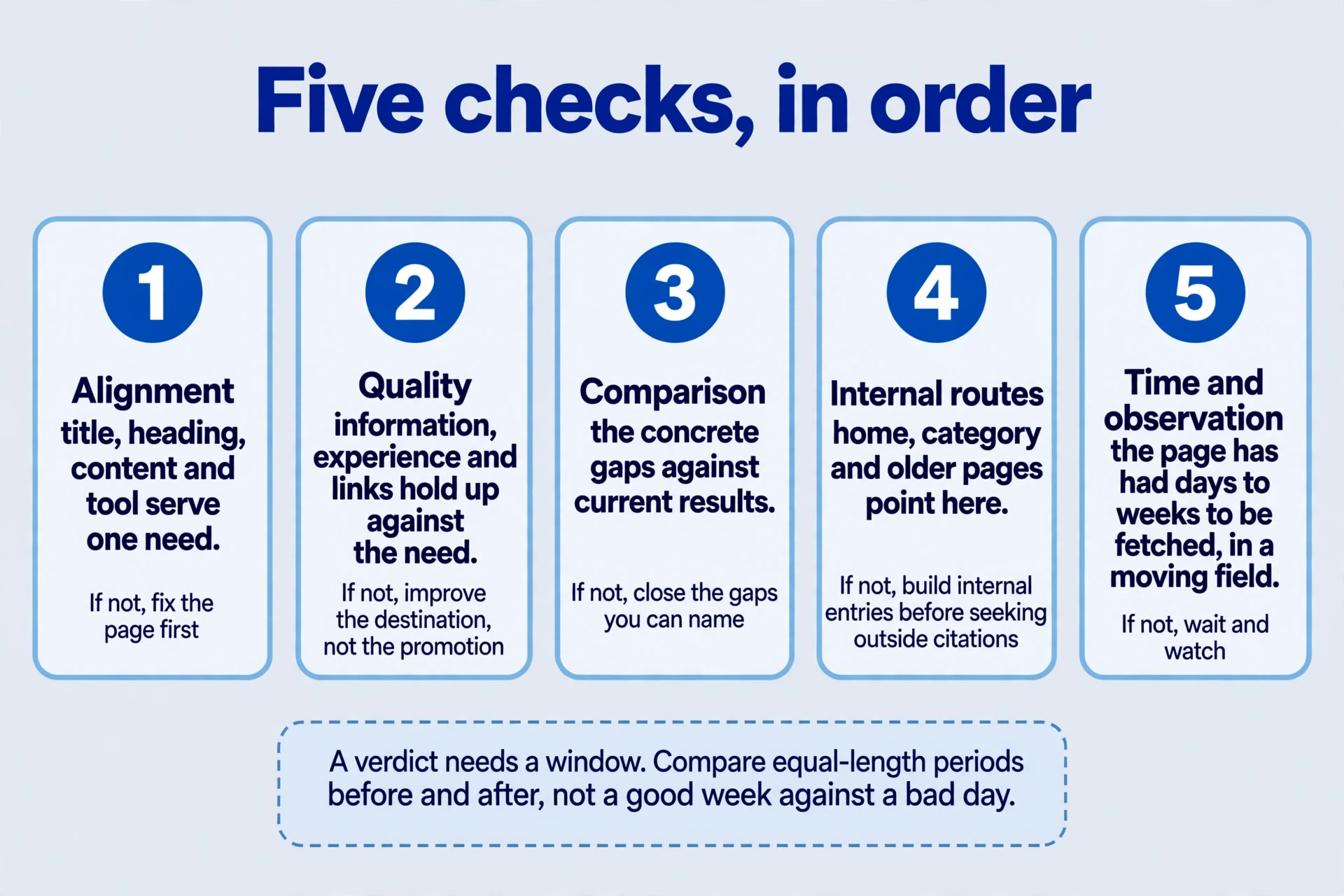
The five checks of internal links form a sequence. Follow the order — each step decides whether the next one is needed. The last check of internal links, time, is the one teams skip most often, because waiting feels like doing nothing. Fetching takes days to weeks, and a competitive field moves while you wait. Give the page a fair window — compare equal-length periods before and after, not a good week against a bad day — and re-run the competitor comparison at the end of it. A verdict needs a window. Judging a page three days after publication judges the fetching queue, not the page.
| Check | Internal question | If it fails |
|---|---|---|
| 1. Alignment | Do title, heading, content, and tool serve one need? | Fix the page before anything else |
| 2. Quality | Do information, experience, and internal links hold up against the need? | Improve the destination, not the promotion |
| 3. Comparison | What concrete gaps separate this page from current results? | Close the gaps you can name |
| 4. Internal routes | Do home, category, and older-page internal links point here? | Build entries before seeking outside citations |
| 5. Time and observation | Has the page had time to be fetched, in a competitive field? | Wait and watch; don’t chase citations for an unfetched page |
Two simplifications from the archive need retiring. “Every link transfers authority” ignores that internal links can be ignored, qualified, or undiscovered — a link nobody follows and no crawler trusts transfers nothing. “Several months of work always produces results” ignores competition, which moves while you work. Competitors add pages, improve tools, and earn their own citations during the months you wait, so a gap analysis done once goes stale. Re-run the comparison before acting on it: the page that trailed the field in spring may face a different field in autumn. More backlinks don’t replace an unfinished task. And the most practical first opportunity is often already yours: a relevant existing page with visitors, one honest link away from the new page. Internal routes first, outside citations where justified, and only after the page earns them.
Build a reasoned internal-link worksheet
Add two review columns to the internal links worksheet: whether the destination answers the promised question, and the date of the latest check. Once the links work, use Search Console measurements to observe the target pages. Keep successful navigation checks separate from later indexing changes so the record shows what was tested and what changed over time.
For each proposed link, record source URL, target URL, placement, visible anchor text, why a reader would click, and the inspection result. Specify pages. “Add ten links to the site” cannot explain which task improved, and a batch nobody can audit is a batch nobody can learn from. The worksheet is the internal link audit: every link has a reason, a place, and an check of internal links. One filled row shows the standard:
| Field | Example |
|---|---|
| Source | Home page, country-tools section |
| Target | China phone-number generator page |
| Placement | Section heading, second entry |
| Anchor text | “China Phone Number Generator” |
| Why a reader clicks | Testing software with Chinese-format samples |
| Inspection | Link live, destination canonical, tool completes a batch of ten |
If a proposed link can’t fill the “why” row honestly, it doesn’t belong in the batch. No reason, no link.
Five questions, worked against the generator site — or any site with pages worth reaching.
-
Should a country page with no traffic get backlinks first? First establish accessibility, a distinct topic, task completion, and home or category entry points. Then inspect indexing and impressions, and compare competitors, before deciding on outside citations. A page with no entries doesn’t have a backlink problem. It has a door problem. Fix the doors, then judge whether citations are still missing.
-
What remains after a page leaves the latest list? Keep lasting entries in a country category, related tools, and relevant guides. A latest list supports early discovery through internal links rather than replacing permanent internal link structure. Check the page a week after publication: if its only remaining entry is a footer dump, give it a category home and a contextual link from the passage that raises its question.
-
How should anchor text and title be written? Visible text should explain the destination, such as “China Phone Number Generator.” Use the title attribute only for useful additional information, without mechanical keyword repetition or expectations of a ranking bonus. Write anchors for the reader deciding whether to click. The reader is the only audience that matters here.
-
How can an older page link naturally to a new one? In an existing passage about test data for different countries, explain the newly supported format and link the tool. Preserve the passage’s task — the link serves the passage, not the other way round — and record the target, anchor, and rewritten text. A forced link in an unrelated paragraph reads as forced, because it is.
-
How will the batch of internal links be reviewed? Open source pages, confirm internal links in context and canonical destinations, and complete the target task. Then observe discovery through internal links, fetching, impressions, and use for the batch. Internal navigation can improve before rankings change — a page that gets visited and used is progressing even while its position holds. Review the batch as a batch, but judge each link by its own reason. A batch with nine good internal links and one forced one teaches nine good reasons and one bad habit.
Published is not discoverable. Doors are the difference: planned next steps, honest destinations, lasting routes that survive the latest list, and checks of internal links that run before outside help is sought. Build the network of internal links one reasoned link at a time, and every page on the site gets closer to the visitor who needs it.
Treat the network of internal links as a living thing. Each publication adds doors; each internal link audit removes dead ones. Links rot — destinations move, tools retire, categories rename — and a link to a missing page is a door to nowhere that costs the reader a click and the site a little trust. Check the network quarterly: open the worksheet, re-walk the entries, fix or remove what broke. Doors need maintenance of internal links. A network built once and never revisited is a network slowly filling with dead ends.
Comments
Join the conversation. Comments are reviewed before appearing.
Loading comments…