After launch, one site owner repeatedly searches their own keyword and worries about every position change. Another installs analytics and rarely looks at it again. Both miss the same step: define a question before choosing the Search Console evidence that can answer it. Search Console dashboards reward whoever arrives with a Search Console question. They punish whoever arrives hoping the Search Console charts will supply one.
This lesson connects the data, explains changes, and Search Console schedules review. The thread: start with reliable definitions, turn Search Console reports into page-level actions, and record every decision with its review date.
Decide what the Search Console data should answer
For the tool site used throughout this course, four questions cover most of Search Console measurement: are key tools discovered and indexed? Which queries produce search appearances? Do those appearances lead to Search Console clicks? Do visitors complete their task? Search Console mainly addresses the first three. Analytics and product events help with the last. Different reporting totals don’t, by themselves, establish a broken installation — the tools measure different things, over different scopes, with different Search Console definitions. Expecting identical totals from two different instruments is the first Search Console measurement error, and the most common.
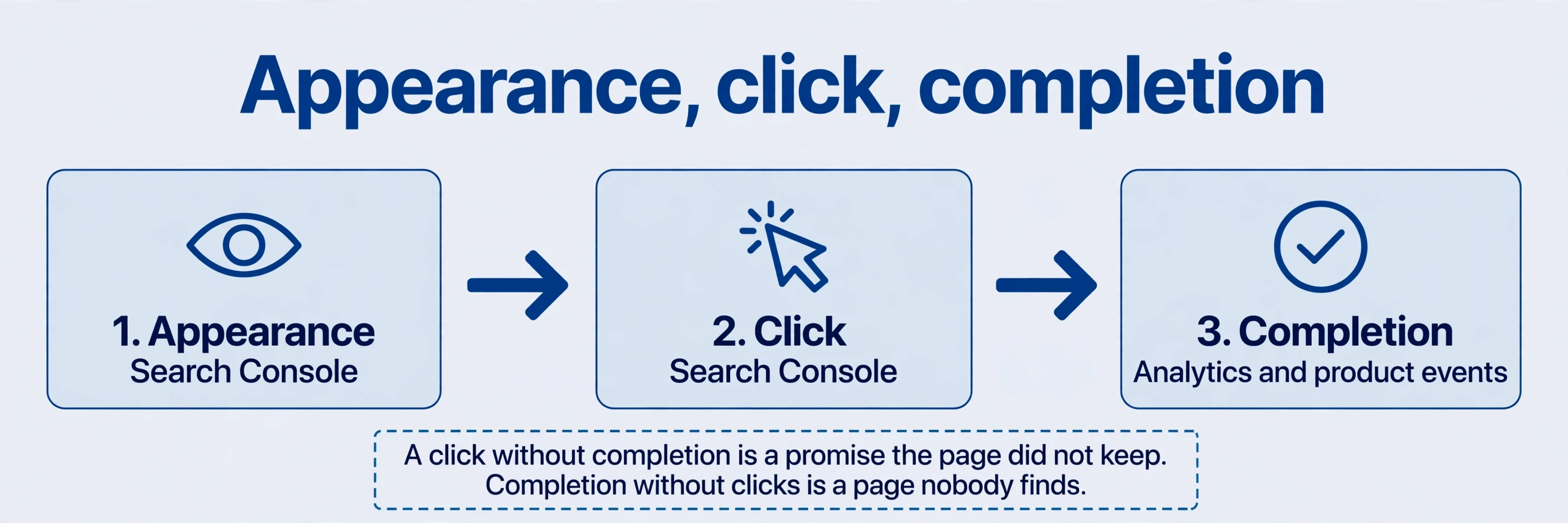
Search Console covers search performance and crawling or indexing information for the site. Analytics measures activity on the site: what visitors do after they arrive. Search Console Search clicks need not equal sessions. Script execution, consent settings, time zones, and reporting scope can all move the analytics number away from the click count. Read the two together to understand appearance, click, and task completion — appearance, click, completion as three separate stages, each with its own Search Console evidence. A click without completion is a promise the page didn’t keep. Completion without Search Console clicks is a page nobody finds. The pair of tools, read together, shows which stage leaks.
Connect the Search Console measurement tools
Search Console review. Choose the reporting scope first, before verifying anything. A Domain property covers protocols and subdomains for that domain — http and https, www and bare, all subdomains in one view. A URL-prefix property is limited to its specified prefix: one protocol, one host, one path root. Search Console Compare reports only after accounting for that difference. A Domain property and a URL-prefix property for the same site will show different totals, correctly, because they watch different scopes. Pick the scope that matches the site, and note the choice where the team can find it.
Search Console review. Open and bookmark Search Console directly rather than relying on a web search to find the Search Console dashboard. Searches for the tool itself can surface lookalikes, and the bookmark habit costs nothing. Domain properties require DNS verification: provider authorisation where supported, or adding the supplied TXT value to DNS and returning to verify. Use the correct domain and preserve existing records — a TXT record added carelessly can disturb mail or other services sharing the zone. If verification is pending, check the record and propagation before creating replacement properties. Duplicate properties don’t speed verification. They create confusion about which one holds the history. URL-prefix verification options differ; use those available in the interface.
Search Console context. Analytics setup follows the same discipline: property name, business details, objectives, a Search Console web data stream, and the correct protocol and domain. Obtain the installation snippet and begin with the configuration the site needs. A shared template should include it on every page to be measured, rather than only on the home page. A tool page without the snippet is a page whose completions never register — and a completion that never registers looks exactly like a page nobody uses.
Search Console review. Placement matters, and old placements mislead. The archive placed code inside a hidden div near the end of the body out of Search Console performance concerns. Don’t copy that historical placement. Current tag instructions place the asynchronous snippet immediately after the opening head tag, without a hidden wrapper. Commit the code, deploy, inspect the live source for the correct identifier, and confirm a test visit in the Search Console realtime report. The acceptance condition is Search Console data arriving from the live site, not code saved locally. A repository retains versions. Hosting publishes them. Keeping code and deployment notes makes migration easier — but it doesn’t replace backups, and it doesn’t guarantee a platform will never fail. Live Search Console data is the acceptance test. Everything before it is preparation.
Separate discovery, crawling, and indexing
Search Console review. After verification, submit a sitemap of valid canonical URLs and inspect a small selection of key pages. A sitemap supports discovery. It doesn’t order the search engine to crawl and index every entry. Submission is an invitation, not an instruction. For a tool page, establish five facts separately: does the engine know the URL? Has it fetched it? Can it access it? Which canonical is selected? Is it indexed? Each fact has its own Search Console check, and a “yes” at one stage says nothing about the next.
Search Console review. The archive’s site search displayed roughly twenty pages. Treat that as a clue rather than an exact index count. The displayed set can change between searches, and absence from one search doesn’t establish removal. Use URL Inspection for a specific address — one URL, full detail — and the indexing report for broader patterns across the site. The site search operator is a torch, not an inventory. It shows you something. It doesn’t count the warehouse.
Search Console planning. Introducing the product in a relevant developer community created discovery opportunities in the Search Console launch case — new routes for crawlers to find the pages, and new people to link them. indexing within hours or a day was a Search Console case outcome, not a platform deadline. Recrawl documentation explains that processing can take days to weeks, and repeated requests don’t accelerate it. Improve the page and its routes instead of repeatedly submitting it. Resubmission is not a queue-jump. It is a repeat of the same invitation, and the engine processes invitations in its own order.
Read the four Search Console performance metrics together
In the Search Console performance report, fix search type, dates, and Search Console filters before interpreting the chart. Totals show how much happened. Dimensions show where. Begin with impressions, then clicks, then the Search Console queries and pages behind changes. A chart without fixed filters is a Rorschach test — everyone sees the trend they feared. Average position misleads the same way: it aggregates across Search Console queries with wildly different volumes, so a page ranking first for a rare Search Console query and ninth for a large one lands on a middling average that describes neither. Read position per Search Console query, with its impressions beside it. An average without its components is a summary that hides the story.

| Metric | What it answers | The next question |
|---|---|---|
| Impressions | Recorded search appearances | Which queries and pages changed? |
| Clicks | Clicks from search results | Existing demand or newly appearing Search Console queries? |
| CTR | Clicks divided by impressions | Did Search Console query mix, device, or positions change? |
| Average position | An aggregated position measure for the selection | Are Search Console queries, pages, and scope comparable? |
Rising impressions with flat clicks need not mean a weaker title. New Search Console lower-position queries can reduce aggregate CTR without any existing query performing worse. Filter to a page and examine its query mix: are established Search Console queries stable, and are new Search Console queries relevant? A CTR decline for comparable Search Console queries and positions warrants reviewing titles, snippets, and the surrounding results. A CTR decline driven by new Search Console queries warrants a different decision — whether the new queries merit better support, or whether they’re irrelevant traffic the page was never meant to serve.
The arithmetic makes the trap visible. Consider a hypothetical: 2,000 impressions and 60 clicks in one Search Console four-week period, then 3,000 impressions and the same 60 clicks. Aggregate CTR falls from 3% to 2%. If established Search Console queries still contribute 2,000 impressions and 60 clicks, while new Search Console queries add 1,000 impressions without clicks, the totals don’t establish weaker performance for the existing Search Console queries. The old queries held. The new ones added exposure without clicks. Split the mix before judging the total. The decision that follows is editorial — support the new Search Console queries, or accept that they browse past — not a title rewrite for Search Console queries that never weakened.
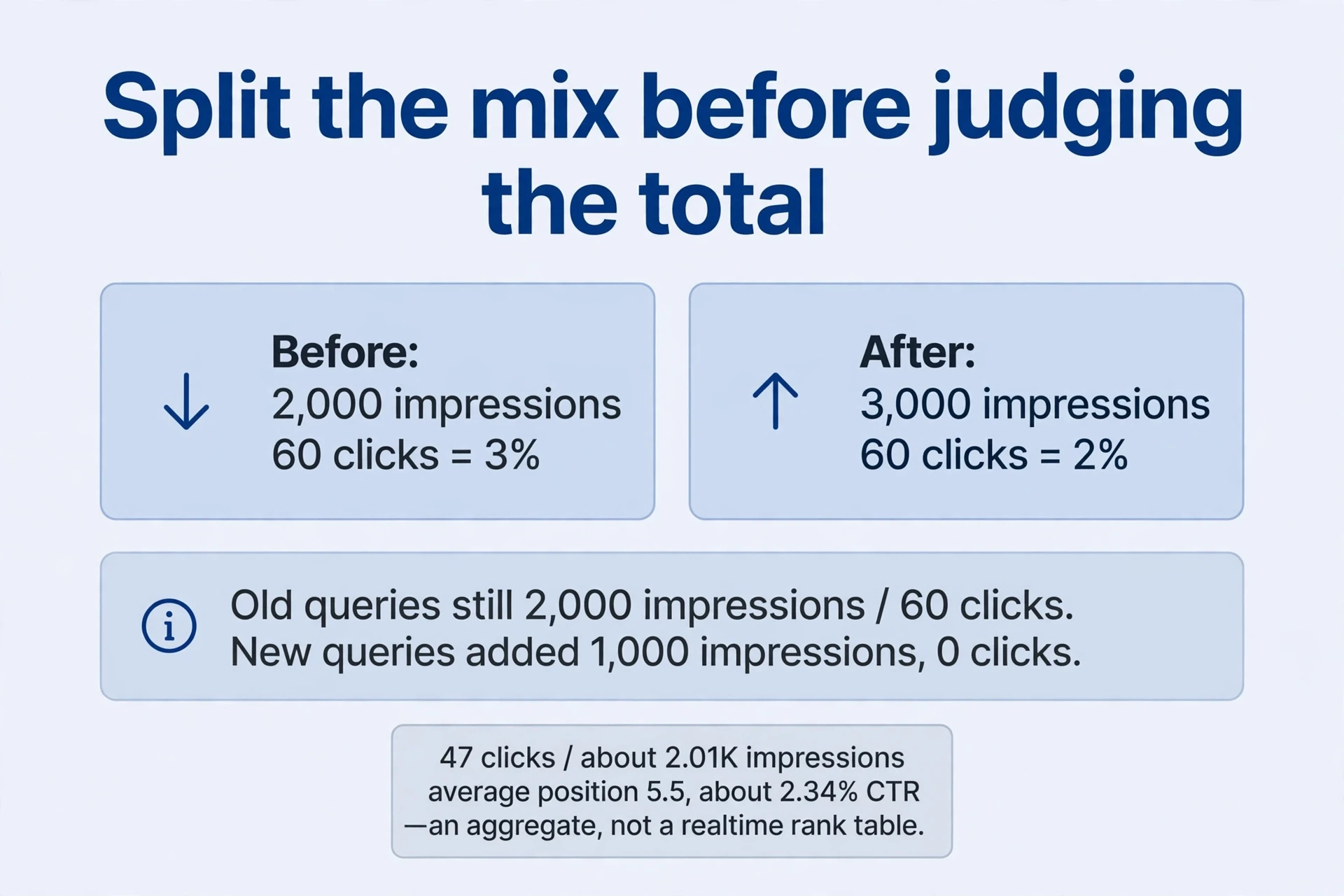
The historical embedded card shows the same Search Console lesson from the other side: 47 clicks, about 2.01Search Console K impressions, and an average position of 5.5, while the author’s manual search showed second place. An aggregate over time and search contexts can differ from one result at one moment. Using the rounded displayed counts gives approximately 47 / 2010 = 2.34% click-through rate. It doesn’t establish an expected click count for second place — Search Console position 5.5 is an average across Search Console queries, devices, locations, and weeks, and second place at one moment on one device is a single Search Console observation. The card is history. The manual search is a snapshot. Neither is a realtime rank meter, and neither replaces the filtered Search Console report.
Change one major dimension at a time: page, Search Console query, then country or device. Record the Search Console filters so the comparison can be repeated — by you next month, or by anyone else reading the record. The archive’s Insights eligibility, embedded search card, and notification placement reflect that account at that time. Missing those exact entry points doesn’t establish a failed setup. Interfaces change. The Search Console data and its definitions persist.
Search Console: Choose a useful time scale
Search Console evidence. Weekly and monthly views arrived in December 2025, with the official announcement on December 10. Hourly detail helps with the recent day. Daily detail helps with a release-related turn. Weekly aggregation smooths weekday noise. Monthly aggregation shows longer direction. These are different views of the Search Console data, not new data — the same appearances, grouped differently. Choose the view that matches the Search Console question: hours for “what happened after the release,” weeks for “is this a trend,” months for “where is the year going.”
Compare complete weeks, equal-length intervals, and year-over-year Search Console periods where seasonality matters. Half of today is not comparable with all of yesterday, and ten days of a month are not a full-month decline. Check freshness and missing Search Console data before drawing conclusions — a Search Console report still collecting today will always look like a drop. The archive’s mention of 72 hours is not a fixed delay for every current Search Console report. Delays vary by report and by processing. Check the Search Console report’s own freshness note rather than memorising a number.

Weekly or monthly views don’t automatically extend rolling history. The standard Search Console performance history is a rolling 16 months. Search Console Arrange exports before older data leaves that window. Save a monthly copy per property with dates, search type, Search Console filters, granularity, and export date in the filename or a companion note. Don’t add overlapping Search Console periods together — the same appearances counted twice — and don’t overwrite older files. Local storage offers control and still needs ordinary backups. A hard drive is not an archive until it has a second copy.

The archive proposes a browser extension for automated Search Console exports and local history. Treat it as a Search Console demand-discovery exercise: the need is retention and convenient comparison, not another attractive Search Console chart. First establish exports and consistent naming by hand. Consider automation only if repeated work creates a real cost. Search Console exports first, automation second. An automated pipeline for a process nobody runs manually automates nothing but the appearance of diligence.
Compare indexing messages with the intended outcome
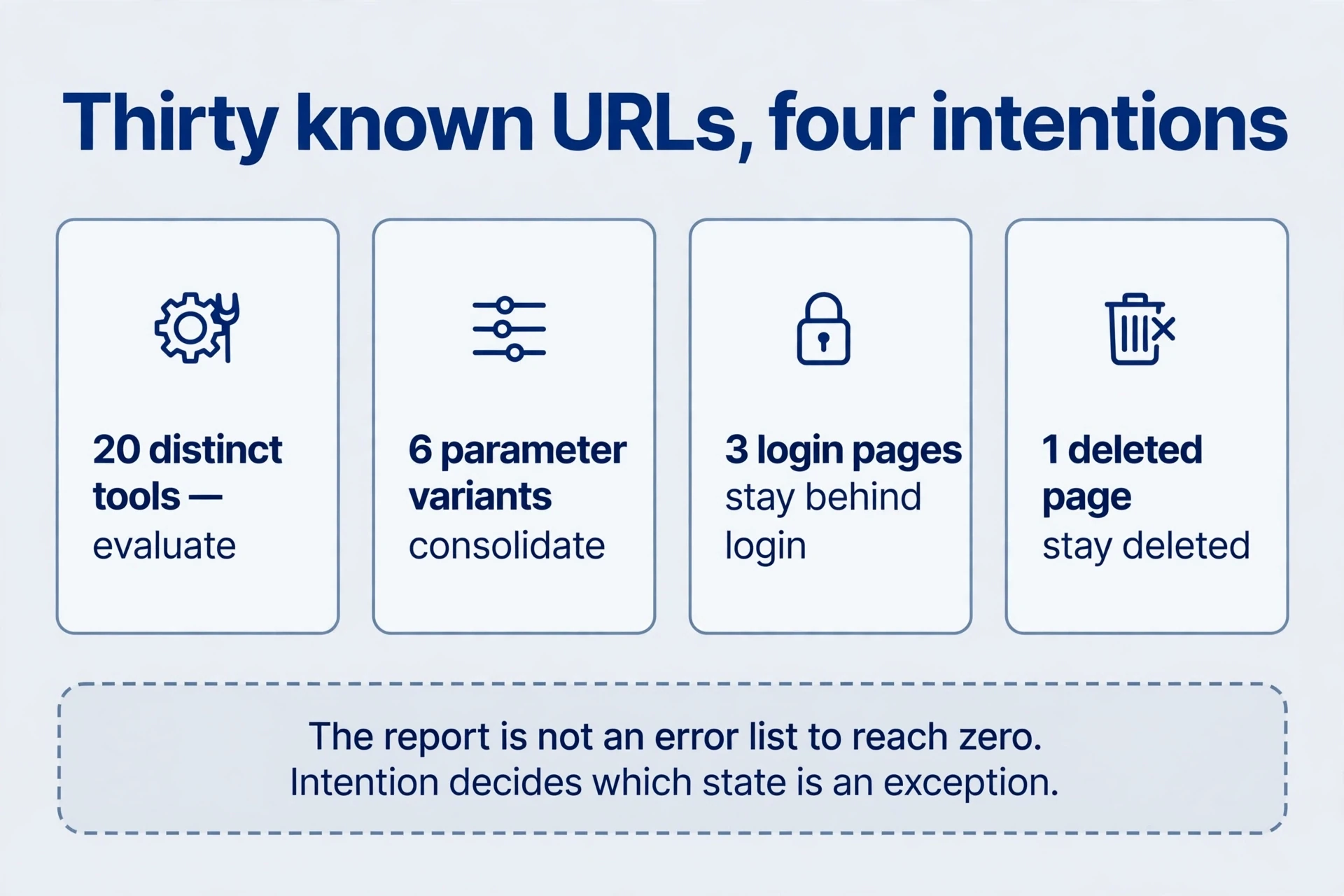
Search Console evidence. Decide the intended outcome before interpreting a Search Console message. Not every exclusion is a fault. For sampled URLs, state whether they should be public and indexed, public but excluded, consolidated elsewhere, deleted, or restricted to signed-in users. Act when actual behaviour differs from that intention. The Search Console report is not an error list that must reach zero. It is a list of states, some intended, some not, and the intention decides which is which. Remember that the indexing report samples URLs: one sampled address represents its group, and extrapolating a single sample to the whole site overstates the Search Console evidence. Sample across templates — a tool page, a category page, a Search Console guide — before concluding a pattern is sitewide. Sample across templates, or one page’s problem becomes a false sitewide alarm.
Search Console context. An example makes the Search Console method concrete. Imagine thirty known URLs: twenty distinct tools, six equivalent parameter variants, three authenticated pages, and one permanently deleted page. The objective is not thirty indexed URLs. It is appropriate evaluation of the twenty tools, with consolidation, authentication, and deletion working as designed elsewhere. The six variants should consolidate. The three authenticated pages should stay behind login. The deleted page should stay deleted. This intention inventory turns apparently similar exclusions into different decisions — and turns a scary-looking Search Console report into a short list of genuine exceptions.
| State | Intended when | Action when unintended |
|---|---|---|
| Blocked by robots.txt | Crawling should be restricted for that path | Unblock; don’t block essential rendering resources; don’t copy blanket framework-directory rules without checking whether the assets render the page |
| Alternate page with proper canonical | Equivalent parameter variants | Distinct tools canonicalising to home: revisit the earlier Search Console lesson on page tags and canonicals, and correct the consolidation |
| 404 | Deleted URL with no equivalent replacement | Restore mistakenly deleted useful pages, or redirect to a genuine equivalent — not every missing URL to the home page |
| Redirect | HTTPS, host or slash normalisation, moved URLs | Check the final destination, loops, and unnecessary chains |
| Excluded by noindex | Administration, login, selected low-value result pages | Excluded core tool: inspect CMS settings, shared templates, and configuration carried over from preview environments |
| 401 | Authenticated private material | Public product page returning 401: review access configuration |
| Crawled, currently not indexed | — (selection decision, may be pending) | Sample duplication, main content, canonical relationships, and usefulness; improve routes or the sitemap; repeated requests can’t compel indexing |
| Indexed despite robots.txt block | — (known from other Search Console signals, content unreadable) | Allow crawling if indexing is wanted; for exclusion, the engine must be able to read noindex; private material needs authentication; a crawl block can hide a newly added noindex |
Search Console evidence. Two rows deserve emphasis because they trap the most people. A URL indexed despite a robots.txt block surprises everyone: the engine knows the URL from other Search Console signals but cannot read its content. If indexing is wanted, allow crawling. For exclusion, the engine must be able to read the noindex directive — and a crawl block can prevent discovery of a newly added noindex, leaving the page indexed with the directive unseen behind the locked door. And “Crawled — currently not indexed” is a selection decision, possibly pending, not a verdict. Sample the affected pages for duplication, thin main content, canonical confusion, and distinct value before concluding anything. Processing can be pending. Repeated requests cannot compel indexing.
Search Console evidence. Notifications and removals need the same intention-first reading. If a bulk replacement breaks valid links, repair those links, restore pages, or provide appropriate replacements. Don’t automatically submit every 404 to Removals. Temporarily hiding a search result is a different task from repairing the site, and it forms no required step for ordinary 404s. A 404 for a page that should be gone is correct behaviour. Hiding it temporarily adds work and teaches nothing.
Use four signals to organise Search Console investigation
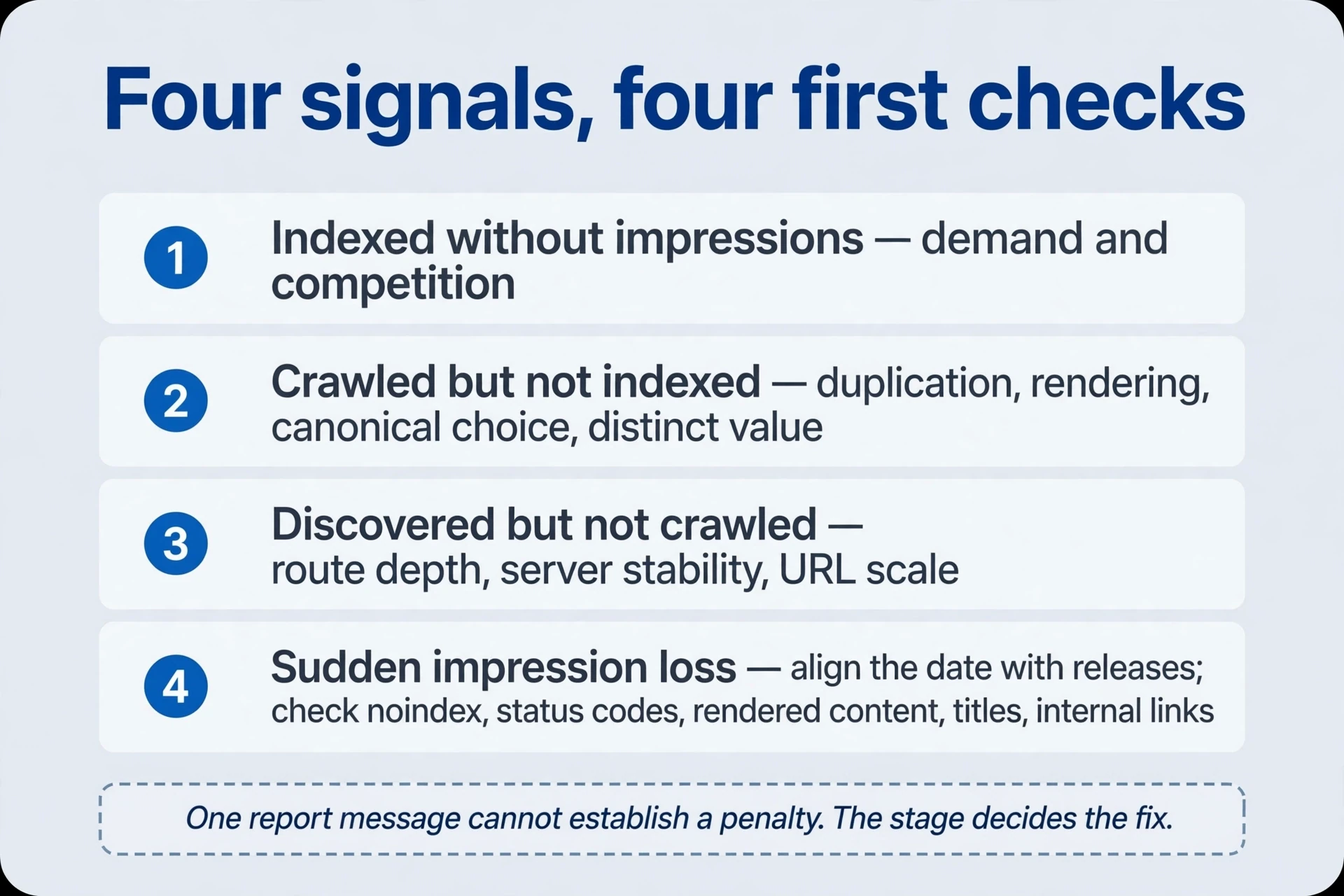
The four signals group common Search Console observations into an investigation framework. They are the author’s framework, not official penalty levels. A single Search Console report message cannot establish a penalty. Confirm scope and page intention first, then identify which stages have occurred and which have not. The Search Console signal tells you where to look. It doesn’t tell you what you’ll find.
| Signal | Pattern | Inspect first |
|---|---|---|
| Indexed without Search Console impressions | Page indexed, no appearances | Demand and competition: a searched task, title/heading/content alignment, usefulness, competing results |
| Crawled but not indexed | Fetched, not selected | Duplication, rendered content, canonical choice, distinct value; bulk useless template pages — pause, improve, consolidate, or remove the truly unnecessary |
| Discovered but not crawled | Known URL, never fetched | Route depth, server stability, URL scale versus useful content, duplicate resources |
| Sudden impression loss | Formerly ranking pages drop | Align the date with releases; check topic changes, irrelevant modules, an emptied server-rendered body, titles, internal links; then demand, competition, broader changes |
Search Console review. A discovered-but-unfetched pattern doesn’t automatically mean a harsher penalty. It usually means routes, capacity, or scale: the URL is known but the crawl hasn’t reached it, or the site offers more URLs than useful content justifies. A fetched-but-unindexed pattern points at the page itself: duplication, rendering, canonicals, value. Different stages, different fixes — and the table keeps them apart when panic wants to merge them. One release fault deserves a named Search Console check: the emptied server-rendered body. A deployment ships the page shell, the content arrives only through client-side scripts, and the fetched page looks empty to a crawler that doesn’t wait. Inspect the rendered HTML, not the source — the source shows the template, the rendered page shows what the crawler received. Check the rendered page, and an empty body explains the drop before any penalty theory gets started.
Search Console context. Seven to fourteen days can help distinguish temporary variation from persistent change. It is not a required wait after an obvious fault. Correct an accidental site-wide noindex immediately — don’t calendar it for next week. Evaluate a single-day click decline over a comparable complete interval instead. Long-term work still means useful relevant pages, clear routes, and worthwhile citations, rather than mechanical keyword or link accumulation. The Search Console investigation ends where the course began: pages worth Search Console finding, routes worth following, citations worth earning.
Turn Search Console observations into the next action
When an observation becomes an algorithm hypothesis, use the algorithm evidence checklist before making broad changes. When Search Console and an external dashboard disagree, use the tool-metric definitions to check the channel, denominator, and date range first.
Leave four short records after each review: question, dates and Search Console filters, evidence, and next action with Search Console review date. For example: “Country-tool impressions rose but clicks did not; four complete weeks versus the preceding four; new lower-position queries explain most growth; improve the relevant explanations before changing titles in bulk.” The next Search Console review can then evaluate an actual decision, not a mood. A record without a Search Console review date is a note. A record with one is a commitment.
Search Console review. Changing titles, content, canonicals, and navigation together makes later gains harder to explain. Address urgent faults promptly. For routine improvements, work on a coherent batch with a shared cause, record the version and objective, and review with the same reporting scope. Search Console measurement should improve the next decision rather than supply a plausible story for every fluctuation. The Search Console dashboard’s job is not to explain the past convincingly. Its job is to make the next action obvious.
-
Do 47 Search Console console clicks and a different session count mean installation failed? Not from the difference alone. Align property, dates, time zone, and traffic scope, then verify the live identifier and realtime events. Search clicks and on-site sessions have different definitions and can differ because of script execution or consent settings. Search Console definitions first, diagnostics second.
-
Should a successful sitemap be resubmitted because only some tools are indexed? Sample unindexed URLs for valid canonical addresses, accessibility, rendering, a useful task, and internal routes. Submission supports discovery. Address concrete issues before requesting Search Console review. Daily repetition is not an accelerator.
-
With two weeks left, how should a lower monthly total be compared? Use equal-length completed intervals or complete weeks with consistent search type and Search Console filters. Add year-over-year context for seasonality and record Search Console data freshness. Don’t compare a partial month directly with the previous full month. Partial Search Console periods flatter or condemn by calendar accident.
-
Should a login page’s 401 and an old URL’s redirect both become 200? Check intention first. Authentication can be correct for private resources, and an equivalent new destination can justify a redirect. Fix public tools wrongly returning 401, redirect loops, or irrelevant destinations. Search Console status codes describe intent. Match the code to the intent, not to a target number.
-
Do fetched-but-unindexed and discovered-but-unfetched URLs need the same next step? No. For fetched URLs, start with main content, duplication, canonical choice, and distinct value. For unfetched URLs, start with routes, server capacity, URL scale, and duplicates. Sample for shared causes without treating either status as a Search Console penalty diagnosis. Stage decides the fix.
-
How should a sudden post-release impression loss be recorded? Record release and decline times, affected pages and Search Console queries, comparison interval, and filters. Search Console check noindex, status codes, rendered content, titles, and internal links first, correcting or rolling back clear faults immediately. If behaviour is expected, investigate demand, competition, and broader changes and schedule another Search Console review. The record’s job is to make the next Search Console review possible — dates, scope, and evidence, not adjectives.
Measurement is a habit, not a Search Console report. Ask the question, fix the scope, read the stages in order, compare complete Search Console periods, and write down what happens next. The Search Console data will not do the deciding. It will do something better: it will show you exactly where the decision lives.
Comments
Join the conversation. Comments are reviewed before appearing.
Loading comments…