One habit runs through this lesson, worth copying. Every number arrives with its definition attached, and every plugin arrives with one job assigned. Record the definition before copying the number. Give every plugin one job before installing it.
The thread: align definitions, find issues, choose tools.
Two vendors, two models, one recording habit
Third-party traffic estimation works like this. Crawlers find pages and links. Result sampling supplies keyword positions. Search volume, click models, and partner data help estimate the traffic nobody directly observes. Given a volume and a position’s click-through rate, one can estimate clicks, then use reliable samples to calibrate the parameters. The model is reasonable. Sampling plus modelling estimates the whole web from partial tool data; coverage stays the open question.

The two vendors compared here build different products from different inputs. Semrush describes its Domain Analytics search estimate as keyword positions, search volume, and average click-through rate, while its Traffic Analytics uses clickstream modelling across channels. Similarweb lists owner-supplied website and app data, a contributor network, public information, and partners, followed by synthesis and modelling. Calling the tool methods “similar” works as a rough analogy. Keyword summation covers search visits. Direct, social, email, and referral visits need other inputs — they never pass through a keyword. Different inputs, different totals — compare the method before comparing the tool number.
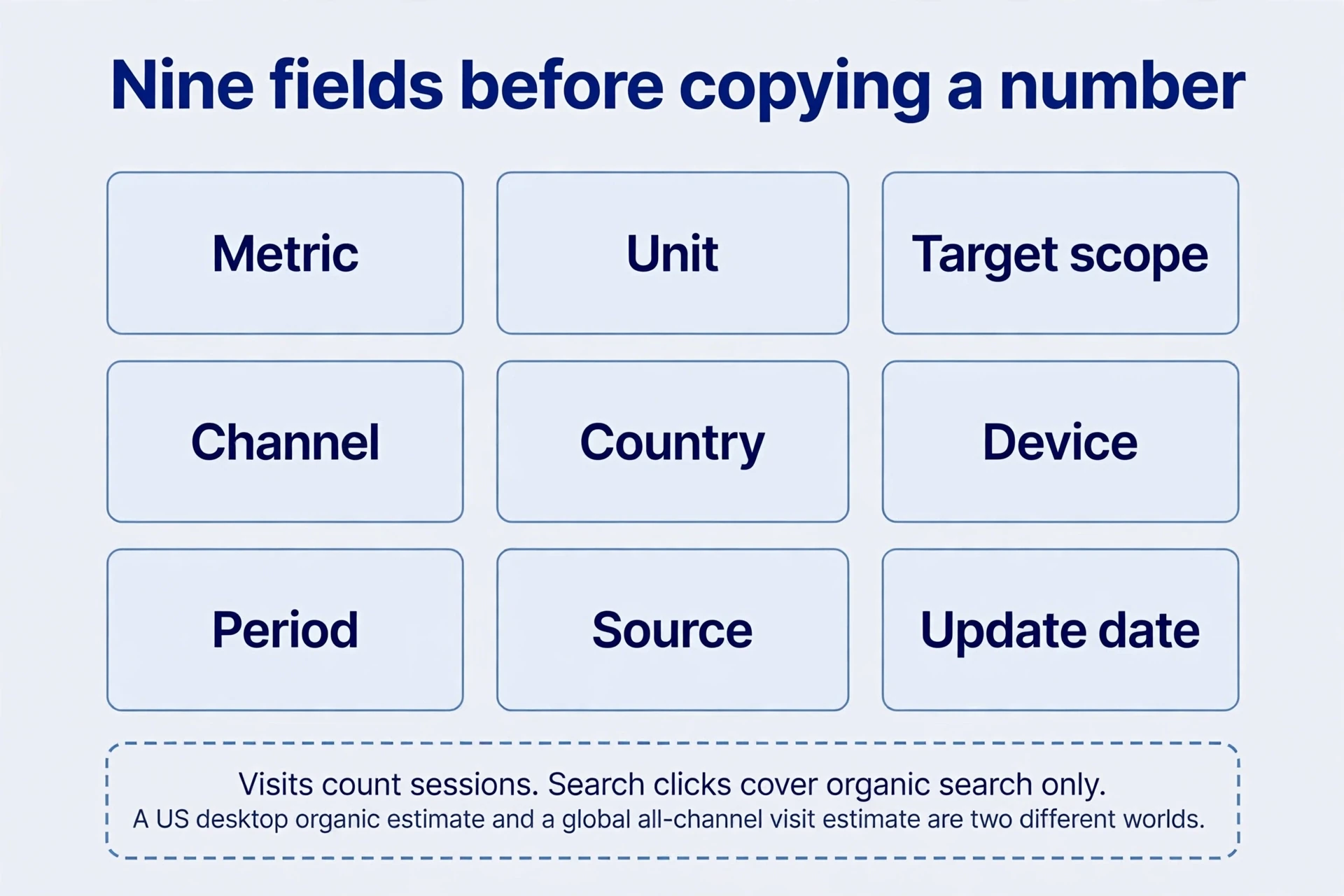
Before copying any number, record nine fields: metric, unit, target scope, channel, country, device, period, source, and update date. Visits count sessions. Pages per visit divides by sessions. Search clicks cover organic search only. A United States desktop organic estimate and a global all-channel visit estimate describe different worlds. Align the nine fields first; comparison comes second. Use first-party analytics, the search console, and relevant logs to understand your own site. Use external tools for opportunities and comparative trends.
The 80.10% that was never a click-through rate
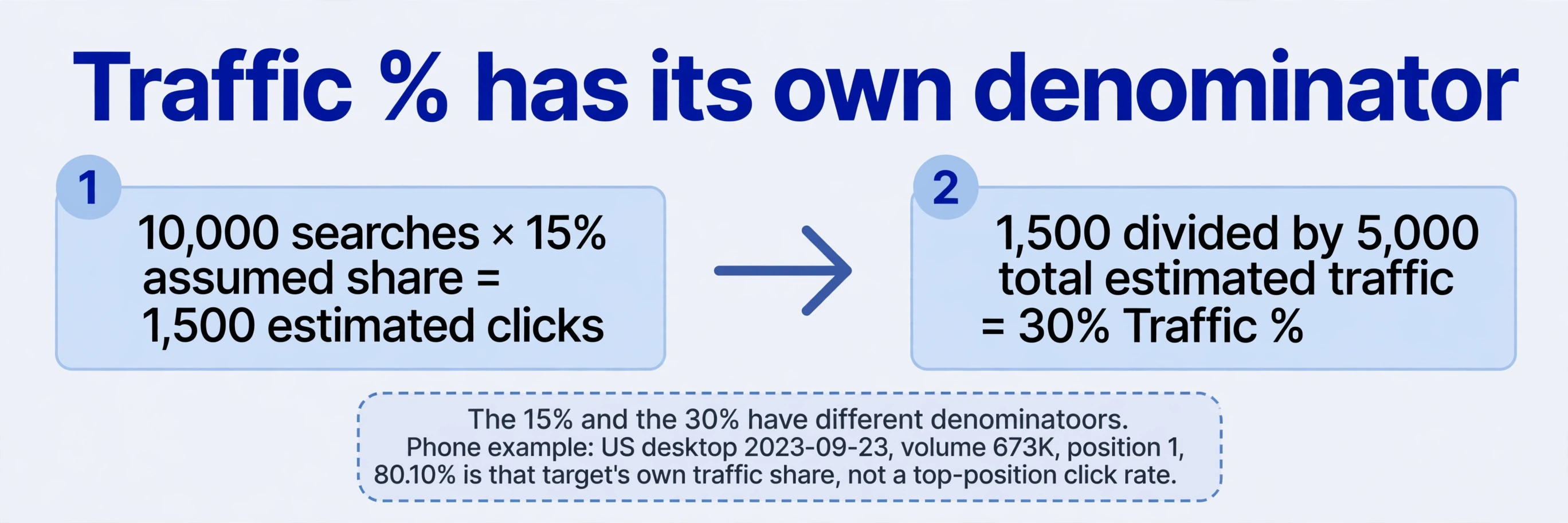
A phone-model overview shows United States desktop data dated 23 September 2023, with a volume of 673K. Organic Research for the phone maker’s product URL shows position 1 and 80.10% in the tool traffic column. The author read it as first place usually receiving 80% of search clicks. The tool column means something else. Traffic % is the keyword’s share of the analysed target’s estimated organic traffic — the portion of that one target’s estimated visits the keyword contributes. The denominator is the target’s traffic, not all clicks for the query. Share of one target.
Two screenshots for a chatbot tool brand query show the same pattern: position 1 with 55.00% and position 2 with 35.52%, rounded to 35.5%. These shares describe different targets’ traffic mixes. Their denominators differ, so keep the two percentages separate — each describes its own target’s mix. Read the tool column first; the “only 55%” question dissolves once the denominator is clear.
A teaching assumption keeps the denominators visible. A query has 10,000 monthly searches and an assumed combined click opportunity and page share of 15%, producing 1,500 estimated clicks. If the page’s total estimated traffic is 5,000, that query’s Traffic % is 30%.
10,000 searches × 15% assumed share = 1,500 estimated clicks
1,500 ÷ 5,000 total estimated traffic = 30% Traffic %
The 15% and the 30% have different denominators: one divides searches, the other divides the target’s traffic. Actual click-through rates vary by brand intent, device, ads, and result modules. Both the assumption and the 80% serve as worked examples with an explicit click model. A forecast for your own pages needs the same: a stated click model for the actual result layout, checked against your own tool data.
The first seven tools: from queries to competition
Fourteen entry points follow. The aim is selecting a tool for a question, not acquiring every tool.
Start with the keyword generator and the AI idea generator to explore phrases and questions. The historical view displayed the difficulty metric for the first ten items. Volume was an estimated monthly average over the previous twelve months, smoothing short spikes. One archived example shows the first 100 of 3,288 ideas, with difficulty visible for the first ten. Volume starts the list. Task judgement selects from it. Task first: group queries by inputs, tool outputs, and scenarios before checking real tool results, rather than building one page per phrase. The tool supplies wordings; judgement supplies the page.
Tools two through four separate platforms. A shopping keyword tool uses headphones for shopping queries. A second search engine’s keyword tool uses a generic term for that engine. A video keyword tool uses music for video queries. Each supplies its own terms and volume estimates. Shopping, watching, and web searching involve different tasks and click behaviour, so adding identical terms across platforms produces no obtainable visitor total. Same words, different rooms, different behaviour.
The fifth tool, a keyword difficulty checker, reports the vendor’s difficulty metric. No threshold is set here. Use difficulty as a filter for tool inspection: inspect leading page types, quality, and your own resources, then decide. A colour on a scale starts the inspection.
The sixth tool, a backlink checker, accepts a domain or URL and reports backlinks and linking websites. The text says roughly 1,100 websites supplied 7,500 links to one tool example site, but the saved image shows 1.1K linking websites, 75K backlinks, and a domain rating of 46. The tenfold discrepancy stays explicit here. Two counts, one conflict: tool record both, with their dates and scopes, and request a dated export when precision matters. Link counts differ from unique referring-site counts in any case. A site with 75,000 links from 1,100 sites and a site with 7,500 links from 1,100 sites tell different stories about concentration. Tool scope and date decide which story the data supports.
The seventh tool, a website authority checker, presents the same family of domain-rating and backlink tool data, so matching output is expected. Its old translation as website “permissions” misleads: the metric means domain authority, not administrator access. The vendor defines domain rating as a domain-level backlink-strength metric on a logarithmic 0–100 scale. The URL-level counterpart concerns a single URL. Two tool metrics, two levels, one vendor’s scale.
The next seven tools: from estimates to inspection
Tool eight, a broken link checker, finds broken links. Direction decides the diagnosis. If page A links to B and B fails, A carries a broken outbound link and B’s site holds a broken inbound destination. If A disappears while B still works, the loss is a referring page. B’s destination stands. Eight outbound failures were found for the tool example site; the image includes unresolved hosts, so failures extend beyond HTTP 404. Direction matters: recheck each target before correcting, replacing, removing, or restoring anything. Repair on the site that owns the failure.
Tool nine, a website traffic checker, estimates organic search traffic and traffic value. A product-launch site’s 2023 image shows 1.1M organic traffic and $495.2K traffic value — 1.1 million and $495,000 rounded — and describes it as higher than the other vendor’s tool estimate. Traffic value states the equivalent monthly pay-per-click cost of the organic traffic. The tool traffic figure counts organic search only. Align target, region, month, device, and channel before comparing estimates.
Tool ten, a keyword rank checker, combines a query with a target site. The example pairing a keyword-research query with the vendor’s own site returned seventh place, with an update four days earlier. Tool eleven, a result-page checker, examines the result set rather than just your site. Its idea-generator example lists ten tool results with domain rating, URL rating, backlinks, referring domains, traffic, and keywords. Identify whether leading results are tools, tutorials, or directories before interpreting scores. Results vary across dates and places. A score needs its result type beside it.
Tool twelve, a WordPress SEO plugin from the same vendor, was positioned as a complement to other SEO plugins, emphasising content audits and recommendations. No installation appears in the demonstration. Tool thirteen, a set of AI writing tools, listed acronym generation, paragraph rewriting, conclusions, paraphrasing, emoji translation, rewording, placeholder text, sentence rewriting, outlines, summaries, and paragraph generation. Testing was deferred, so these stand as listed capabilities. Output quality awaits testing. Generated drafts still require editorial review. Tool fourteen, an SEO toolbar, inspects pages in the browser rather than operating as a WordPress backend plugin. Installation is available; no full toolbar workflow is documented. The next section uses a different extension’s detailed archived interface for a discover–verify–change example, without assuming identical features. Two SEO tools share a topic, not a feature list.

AITDK: turn nine panels into verifiable questions
Version 1.4.0 of an SEO browser extension combines a page-information tool, traffic estimates, and domain-date lookups. The archived interface teaches inspection.
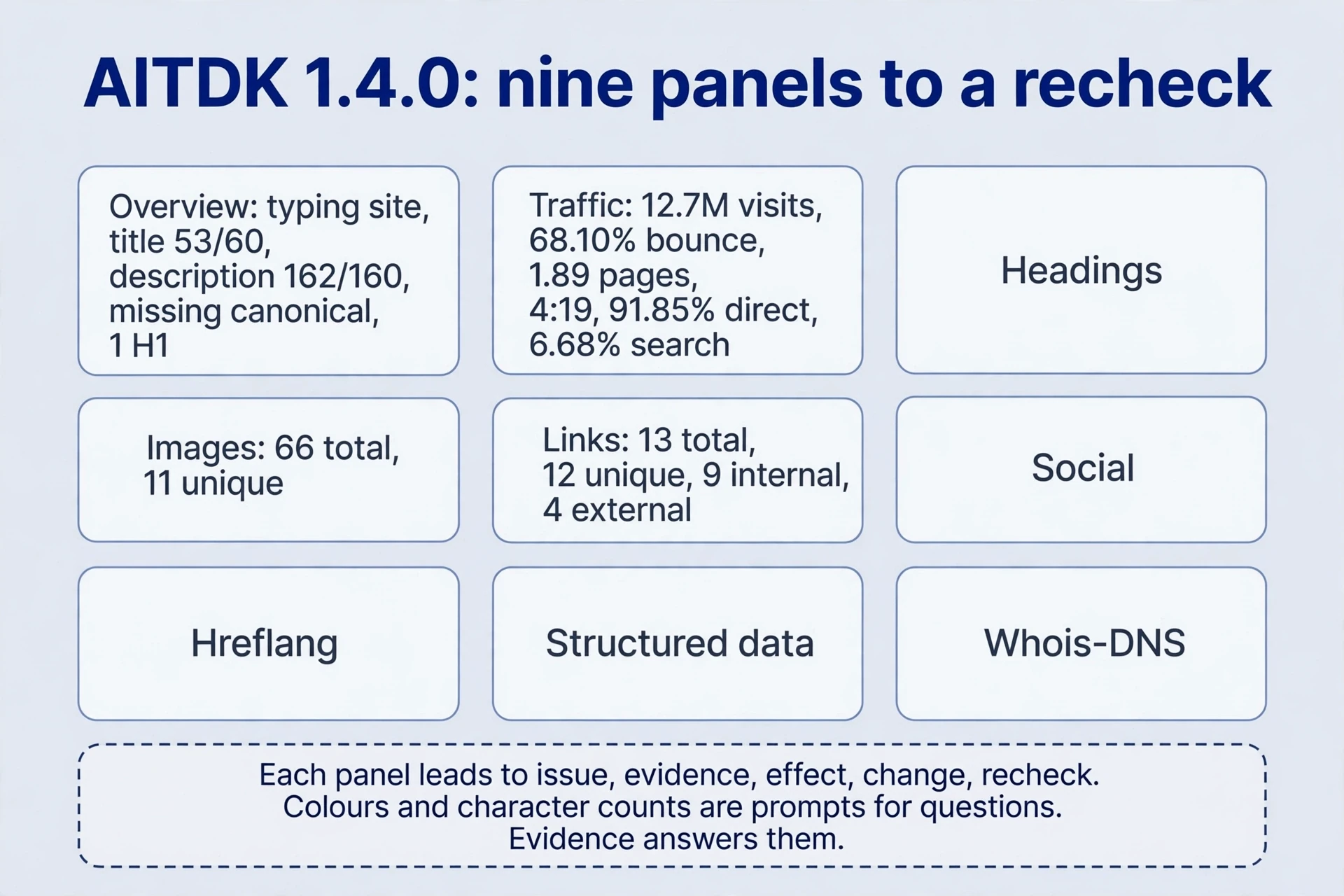
The tool overview panel checks title, description, keywords, current URL, canonical, registration and expiry, robots file, sitemap file, analytics, ad code, heading counts, images and missing alt text, and internal/external follow status. A typing-test site’s image shows title 53/60, description 162/160, a missing canonical, and one H1. Colours and character counts are tool prompts for questions. Length rules vary; the numbers start the tool check. An absent canonical tag calls for checking responses, duplicates, and actual canonical tool selection. Detected analytics or ad code starts two checks: tool measurement coverage and revenue records. Prompts start questions. Evidence answers them.
The tool traffic panel shows monthly visits, bounce, pages per visit, duration, global and country ranks, a three-month trend, channels, and regions. The typing-test image reports 12.7M visits, 68.10% bounce, 1.89 pages per visit, and 4:19 duration, with a November 2023 to January 2024 trend, 91.85% direct and 6.68% search. These historical external tool metrics count visits and behaviour. Users and income need first-party records. No link between country rank and server location appears in the image; address lookups cannot establish one. Consult the underlying metric definition before quoting any panel.
The tool headings panel counts H1–H6 and lists their text. The archived sole H1 names the site’s monkey theme. Ask whether it communicates the task. Read the heading with brand recognition and product experience alongside. The tool image panel switches to a stock-image site and reports 66 images in total, 11 of them unique, alongside missing-alt and title counts. Distinguish informative images from decorative ones: intentionally empty alt text can be correct for decoration, and image title stays optional. The tool links panel counts 13 total links, 12 unique, nine internal and four external, with anchors and URLs. Find wrong targets, unclear anchors, and broken paths; chase those, not a ratio. “Dofollow” is usually a tool label for ordinary links without nofollow. Add no attribute for it. The social tool panel reads Open Graph and social-card tags; verify the actual target-platform preview too. The tool hreflang panel maps languages to URLs on an AI writing site. The tool structured-data panel shows organisation, URL, logo, name, contacts, and same-as entries. Verify real language equivalents and factual markup: code presence starts the tool check. Validity needs its own test, and a rich result needs a supported type. The Whois/DNS panel shows registration, updates, expiry, registrar, nameservers, and resolution. Registration age dates the domain, not the launch. Missing dates for one newer domain suffix reflect the historical lookup’s limits.
Deliver every tool inspection as issue, evidence, effect, change, and recheck: tool evidence, then change. Example: a result page links to an obsolete help URL returning 404. Update the anchor and destination, complete the route on mobile, and verify the response. Treat a green plugin score as a prompt, and a large competitor’s missing tags as a tool question about task fulfilment, assessed separately from technical changes.
The 2024 plugin list: sixteen entries, one job each
Historical prices only: sixteen entries from a 2023–2024 archive — prices, free status, and tool capabilities follow the current product pages, and some tool capabilities may sit in higher tiers. Define responsibilities first, then check current versions, plans, and maintenance with the vendor.

| # | Plugin (2024 list) | Historical price | One job | Watch out |
|---|---|---|---|---|
| 1 | SEO Writing Assistant | Free with vendor login | Score readability, tone, originality, SEO; suggest related keywords | Its score is not the search engine’s; added terms guarantee no ranking |
| 2 | ContentShake AI | Free, 3 tool articles/month, or $60/month | Draft outline with title, intro, subheadings, images, conclusion | Verify facts, image sources, original value; an allowance is not acceptance |
| 3 | Yoast SEO | Free; Premium $99/year | Titles, slugs, descriptions, canonicals, robots meta, schema, redirects, link suggestions, readability | Avoid duplicate canonical/robots directives from themes or other plugins; not every tool capability sits in the free tier |
| 4 | SEOPress | Free; paid from $49/year | Titles/descriptions with length prompts, social previews, sitemaps, 301/302/307, schema, generated metadata | Test one page first; generated titles still require judgement |
| 5 | Rank Math | Free; paid from $5.75/month, billed annually | Metadata previews, robots/sitemap management, setup wizard, analytics integration, 404 monitoring, schema | robots.txt controls crawling; it removes no indexed pages. Verify tool exposure choices after the wizard |
| 6 | All In One SEO | Free; paid from $49.60/year | Metadata, social tags, robots meta, sitemaps, redirects, breadcrumbs, schema, tool console data, link assistant, local SEO | Report integration creates no clicks; local markup guarantees no knowledge-panel or Maps ranking |
| 7 | WP Rocket | Paid only, from $59/year | Caching, lazy loading, minification, cache preloading, CDN support | Compare cold and warm caches; test login, forms, payment, tool interactions. CDN support alone says nothing about CDN costs |
| 8 | NitroPack | Free; paid from $17.50/month, billed annually | Caching, lazy loading, minification, built-in CDN, WebP conversion | Responsibilities overlap WP Rocket; assign caching to one system before enabling duplicate processing |
| 9 | ShortPixel | Free; paid from $3.99/month, billed annually | Lossy, glossy, and lossless modes; JPG/PNG/WebP; tool reports | File-size limits differ from quotas; lossy tool output promises no zero quality change. Retain originals; compare fine text and edges before bulk processing |
| 10 | Smush | Free; paid from $3/month, billed annually | Bulk optimisation, resizing, lossless compression, lazy loading, CDN support | Validate representative images before processing the library; avoid duplicate compression or lazy loading across plugins |
| 11 | Easy Table of Contents | Free; paid from $49/year | Contents lists with layouts, heading tool selection, exclusions | Verify destinations, no empty nodes, usable mobile positioning; a list alone establishes no ranking gain |
| 12 | Redirection | Free | Source/target redirect rules, 404 monitoring, CSV import | Establish an equivalent destination first; check status, target, loops. Redirect no missing URL to the homepage by default; test CSV rules before bulk import |
| 13 | Broken Link Checker | Free | Scan posts, pages, comments for internal/external failures; inline repair, email notices | Distinguish temporary failures from permanent losses; preserve citation context. One timeout removes no reference |
| 14 | Really Simple SSL | Free; paid from $49/year | Certificate checks, certificate assistance, HTTPS redirects, tool mixed-content inspection, hardening | Labels corrected: HTTPS provides transport encryption; mixed content is an HTTPS page requesting HTTP resources. Verify certificates, redirects, resources, internal URLs, canonicals after migration |
| 15 | Schema Pro | $229 lifetime or $69/year | 20+ schema types, friendly tool interface, real-time testing | Verify genuine page facts and supported result types; support for a type guarantees no display and justifies no invented ratings |
| 16 | Internal Link Juicer | Free; paid from $69.99/year | Keyword-driven automatic internal links, anchor variation, frequency limits, exclusions | Start with a small vocabulary; inspect ambiguous terms, density, wrong targets. Link presence ensures no better next step |
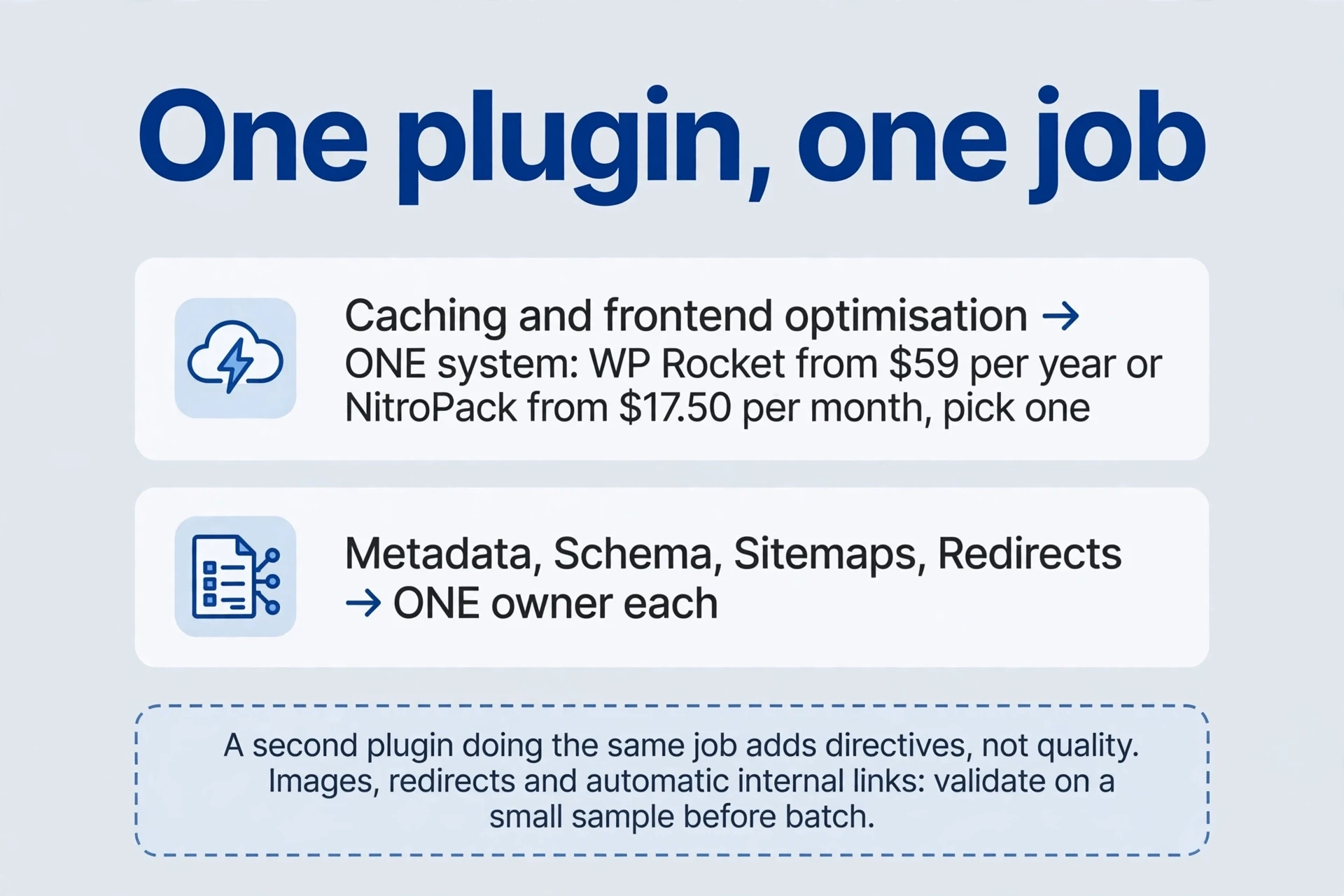
Three overlap rules cover the whole list. Assign caching and frontend optimisation to one system. Assign metadata, schema, sitemaps, and redirects to one owner each, and inspect rendered tool output for duplicates. One job per plugin: a second plugin doing the same job adds directives, not quality. Tool sample before bulk processing — images, redirects, and automatic links all reward a small verified batch and punish a blind library-wide run.
A complete workflow: turn tool output into an improvement
For a site you own, compare tool estimates with your Search Console measurements using the same page, country, device, and period. If the tool flags schema, check the structured data requirements and visible facts before adding a plugin. If it suggests an algorithm explanation, use the algorithm evidence checklist to separate an observation from a causal claim.
Suppose you maintain a WordPress tutorial and tool site and want to understand a large competitor. Spend the first day researching: compare consistent external trends and channels, discover topics with keyword tools, inspect result types, and manually complete tasks on five pages. Treat tool traffic estimates and scores as leads. Connect findings such as missing alt text to the actual content purpose, and test each change on your own pages. Leads open questions; tool evidence closes them.
Next inspect one representative page on your own site. If tool inspection finds an old help link, a large image, and duplicate titles, verify responses, files, and actual tool output. Define three deliverables: correct the help route, compress a backed-up sample image, and provide distinct metadata. Check whether an existing SEO plugin owns metadata and whether hosting or a CDN already caches content. Fill gaps rather than installing four SEO plugins together to stack scores.
Apply changes individually in a test copy or reversible tool scope, preserving prior output and settings. Accept link paths and status, image quality and size, mobile tasks, and nonduplicated title, canonical, robots, and tool schema output. After performance changes, also test login, forms, and payment. Then judge the change by actual search and business outcomes, not by a static external tool estimate. If caching breaks a button, revert that optimisation, identify script dependencies, and retry a narrower scope. If tool traffic estimates still disagree, revisit definitions and sampling. More plugins add output, not agreement. Change one thing, observe, then decide. The tool workflow is the quality control.
Practice: read a column correctly and choose an action
-
Can the phone query’s 80.10% predict your first-position clicks? No. It is that query’s share of the analysed target’s estimated traffic. Record the United States, desktop, date, and URL scope, and drop the “80% for first place” rule. Forecast with sourced volume and explicit click assumptions suited to the result layout, then validate against your own tool data.
-
Does the example site have 7,500 or 75K backlinks, and how should you report it? Record “2023 text: 7,500; saved image: 75K, with 1.1K linking websites and domain rating 46; text and image conflict.” Record both tool figures separately, with dates and scopes. Request a dated export and scope when precision matters; otherwise keep the gap on the tool record.
-
Does the launch site’s $495.2K traffic value imply that monthly revenue? No. It estimates equivalent monthly pay-per-click tool cost using keyword traffic and tool cost per click. Revenue analysis needs actual receipts, refunds, tool costs, and periods. The image suggests only the potential paid-search value of the keyword portfolio.
-
With one SEO plugin already installed, what comes before adding a second SEO plugin, a schema plugin, and another cache plugin? Map owners and actual tool output for metadata, schema, sitemaps, redirects, and caching. If the required type is already covered, the duplicate adds directives, not capability. Test a genuine gap individually and disable overlapping tool output. Accept directives, task flows, and tool rollback records as the acceptance evidence.
-
The destination works and the referring page is gone. What is it? A lost referring page or reference. The destination answers. Request both pages separately and record status, redirects, and time. If the destination fails instead, address external links pointing to its obsolete destination. Repair the failure where it lives: the lost referring page, or the failed destination.
-
How should these prices inform a 2026 budget? Use them as a 2024 tool comparison: record free/paid status, currency, and whether monthly rates required annual billing, then verify current plans, renewals, and required features with the vendor. Budget from the vendor’s current quote.
Definitions first, tools second, plugins last — and every number with its denominator attached. Use a tool estimate with a stated scope. Treat one without a scope as a lead only.
Comments
Join the conversation. Comments are reviewed before appearing.
Loading comments…